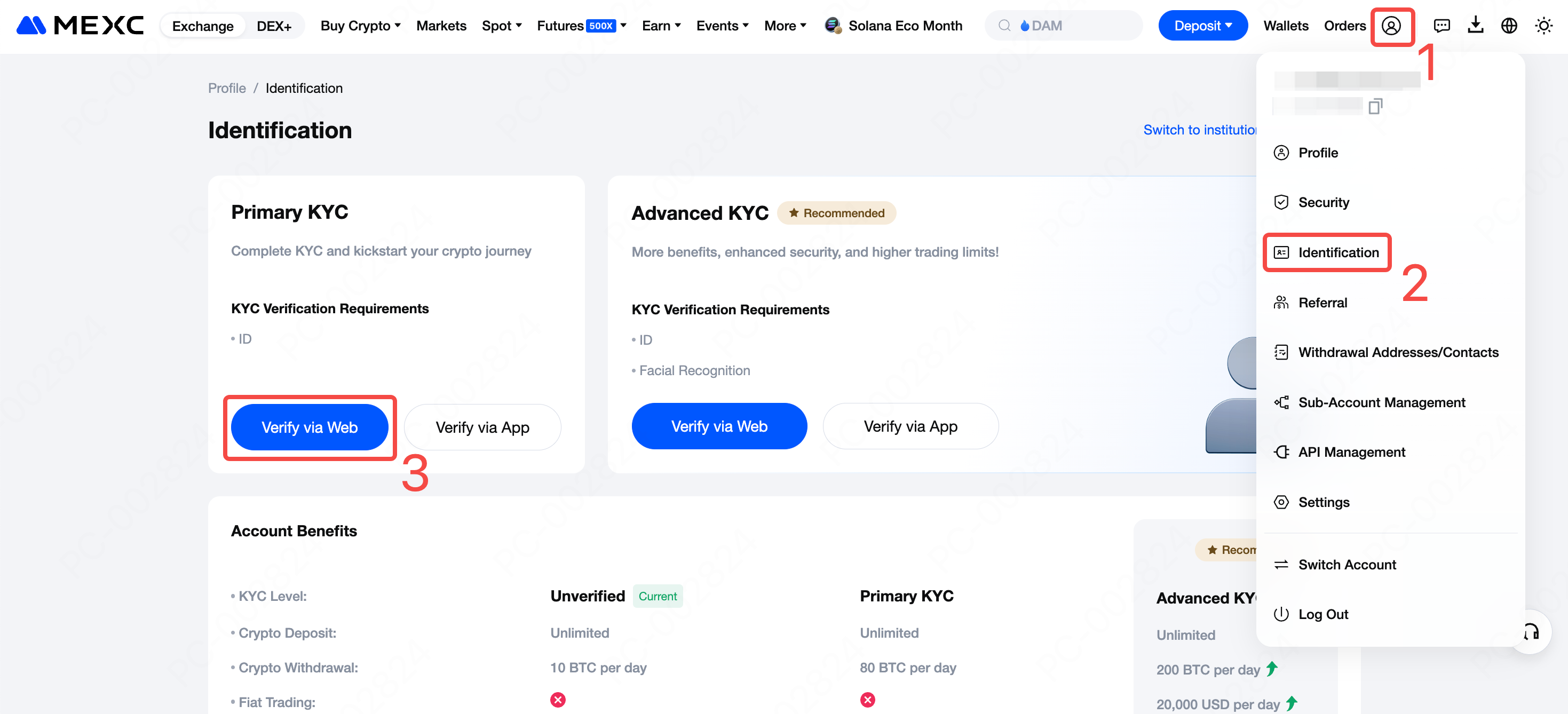
Log in to the official MEXC website. From the navigation bar, click on the user icon and select Identification to open the KYC verification page. Under Primary KYC, click the Verify via Web button.
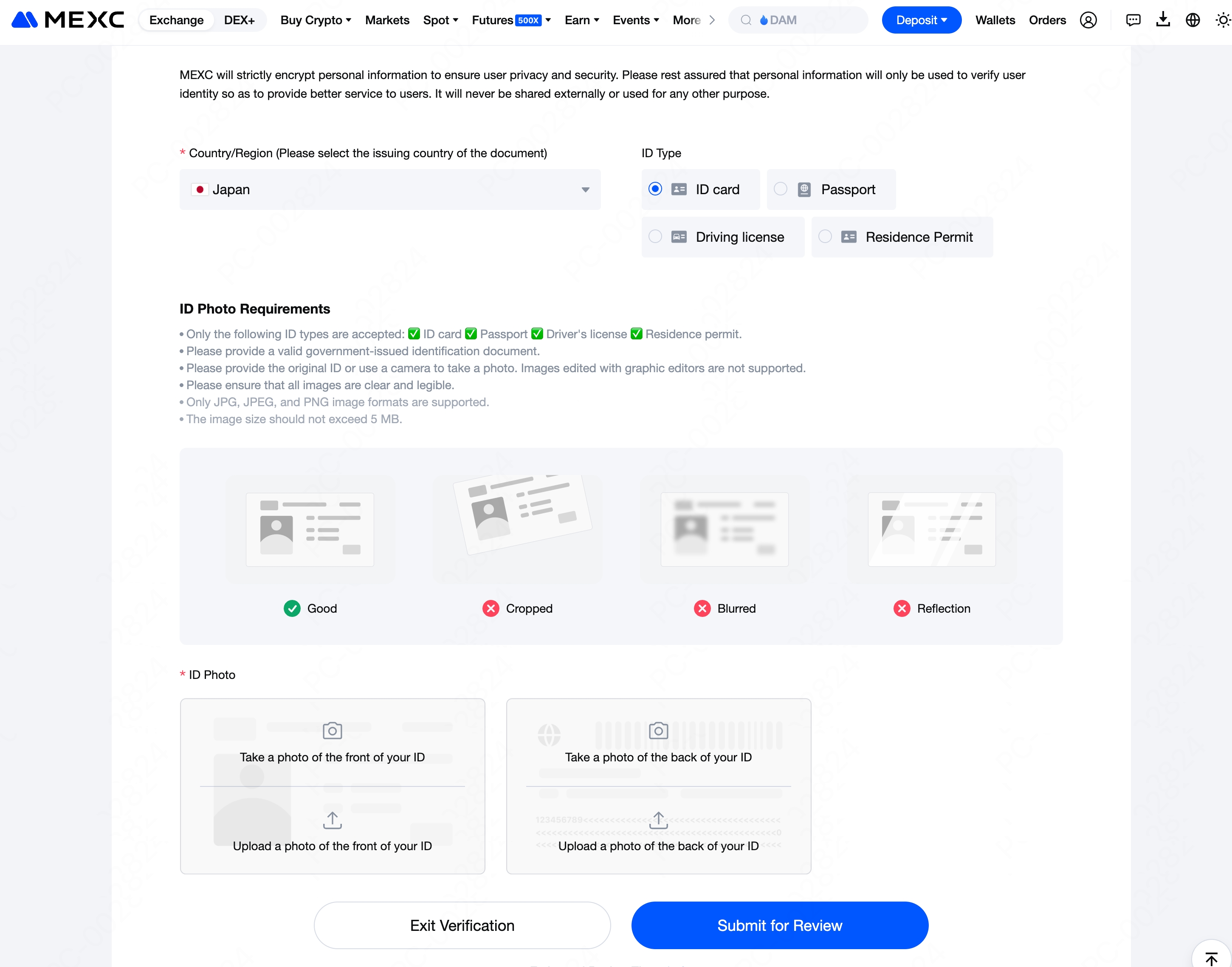
On the Primary KYC page, follow these steps to complete KYC verification:
Select document information: Choose the appropriate Country/Region (the issuing country of the document)and ID Type.
Upload document photos: Take or upload the front and back photos of your ID document. To ensure approval, the photos must be clear and complete, with all four corners visible. You can either take new photos directly or select existing ones from your local album.
Submit for review: After confirming all information is correct, click Submit for Review to complete your application. The system will review your submission within 24 hours and provide the KYC verification result. Please wait patiently in the meantime.
2. How to Complete Primary KYC Verification: App
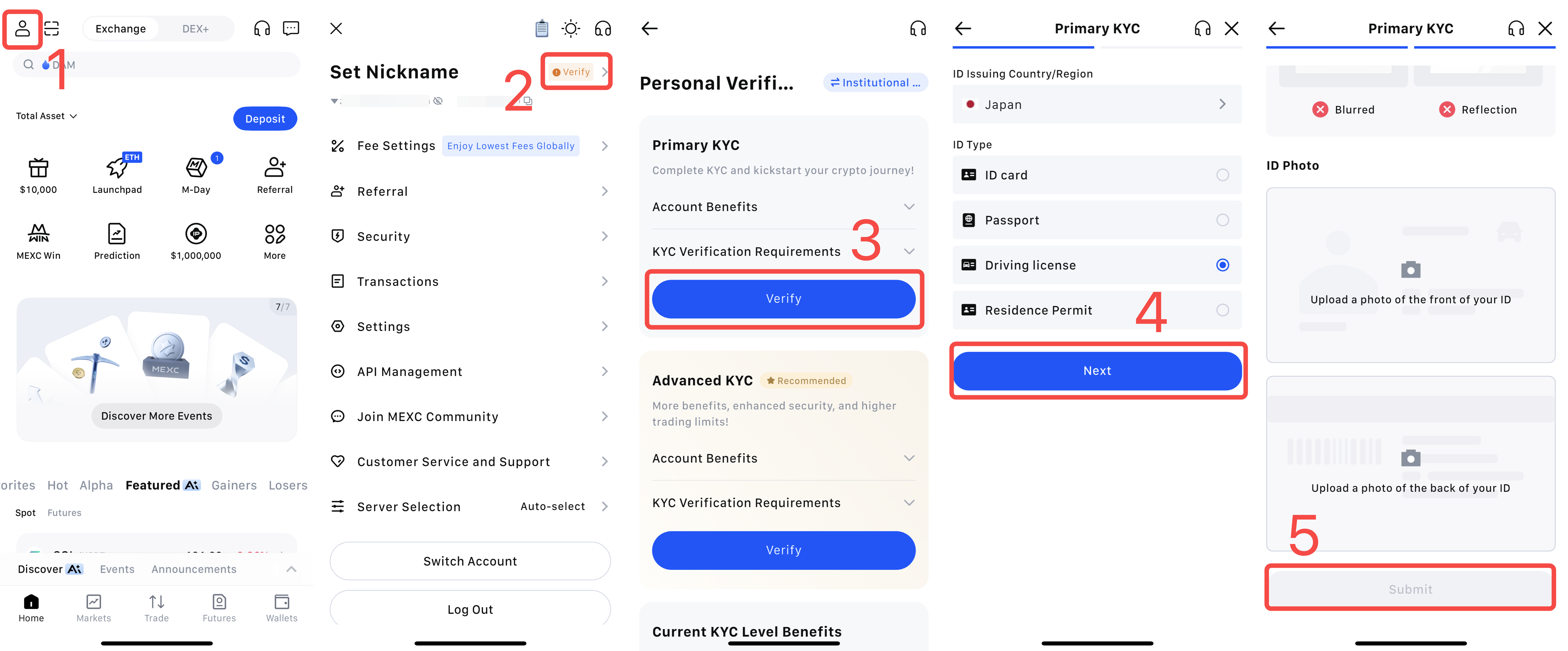
1) Open and log in to the MEXC App, then tap your user icon.
2) Tap the Verify button next to your nickname at the top to enter the KYC page.
3) Under Primary KYC, tap Verify.
4) Select the ID Issuing Country/Region and IDType for your ID, then tap Next.
5) Take a new picture of or upload the front and back photos of your ID document. To ensure approval, the photos must be clear and complete, with all four corners visible. You can either take new photos directly or upload existing ones from your local album.
After confirming all information is correct, tap Submit to complete your application. The system will review your submission within 24 hours and return the KYC verification result. Please wait patiently in the meantime.
Note: You may also skip Primary KYC and proceed directly to Advanced KYC.
Log in to the official MEXC website. From the navigation bar, click on the user icon and select Identification to open the KYC verification page. Under Primary KYC, click the Verify via Web button.
On the Primary KYC page, follow these steps to complete KYC verification:
Select document information: Choose the appropriate Country/Region (the issuing country of the document)and ID Type.
Upload document photos: Take or upload the front and back photos of your ID document. To ensure approval, the photos must be clear and complete, with all four corners visible. You can either take new photos directly or select existing ones from your local album.
Submit for review: After confirming all information is correct, click Submit for Review to complete your application. The system will review your submission within 24 hours and provide the KYC verification result. Please wait patiently in the meantime.
2. How to Complete Primary KYC Verification: App
1) Open and log in to the MEXC App, then tap your user icon.
2) Tap the Verify button next to your nickname at the top to enter the KYC page.
3) Under Primary KYC, tap Verify.
4) Select the ID Issuing Country/Region and IDType for your ID, then tap Next.
5) Take a new picture of or upload the front and back photos of your ID document. To ensure approval, the photos must be clear and complete, with all four corners visible. You can either take new photos directly or upload existing ones from your local album.
After confirming all information is correct, tap Submit to complete your application. The system will review your submission within 24 hours and return the KYC verification result. Please wait patiently in the meantime.
Note: You may also skip Primary KYC and proceed directly to Advanced KYC.
Weekly market moves, listings & insights, straight to your inbox.
Join MEXC on Telegram
Get the latest listings, events, and updates in real time, straight from our official Telegram channel.
Stay up-to-date on the latest MEXC listings, delistings, trading events, and product updates. Discover new tokens, Launchpad projects, Earn opportunities, AI-powered tools, and futures trading enhancements on the MEXC platform.Stay up-to-date on the latest MEXC listings, delistings, trading events, and product updates. Discover new tokens, Launchpad projects, Earn opportunities, AI-powered tools, and futures trading enhancements on the MEXC platform.