

MEXC kriptovalyuta vergi xidmətləri ilə bağlı tez-tez verilən suallar
1. Kripto vergisi nədir?
Kripto vergisi hökumətlər tərəfindən kriptovalyuta investorlarına tətbiq edilən vergilərə istinad edir. Kriptovalyutaların alınması və satılmasından mənfəət əldə etdikdə, bu qazanclar barədə ümumiyyətlə müvafiq vergi orqanlarına məlumat verilməlidir və qüvvədə olan vergilər tətbiq oluna bilər.
Qeyd etmək vacibdir ki, kriptovalyuta vergi qanunları ölkələr və yurisdiksiyalardan asılı olaraq dəyişir, beləcə vergi dərəcələri və hesabat tələbləri də fərqli ola bilər. Buna görə də, vergi bəyannamələrini təqdim etməzdən əvvəl, yerli yurisdiksiyanızdakı konkret vergi qaydaları ilə tanış olmağınız tövsiyə olunur.
2. Kriptovalyuta treydinqi üzrə vergi ödəməliyəm?
Kriptovalyuta treydinqi üzrə vergi ödəməli olub-olmamağınız əsasən ölkənizin və ya bölgənizin vergi siyasətindən asılıdır. Kriptovalyutalar üzrə vergi qaydaları yurisdiksiyalar arasında dəyişir. Bəzi ölkələrdə kriptovalyutalar kapital aktivləri kimi qəbul edilə və kapital mənfəəti vergisinə cəlb edilə bilər, digərlərində isə digər gəlir növləri kimi təsnif edilə bilər.
Dəqiq məlumat üçün ölkənizdə və ya bölgənizdəki ən son vergi təlimatlarına və kriptovalyuta ilə bağlı vergi siyasətlərinə istinad etməyiniz və ya peşəkar vergi məsləhətçisindən konsultasiya almağınız tövsiyə olunur.
3. MEXC hansı kripto vergi alətlərini təqdim edir?
MEXC istifadəçilərə iki əsas vergi xidməti aləti təqdim edir.
Birincisi, istifadəçilərə kriptovalyuta vergi məbləğlərini tez bir zamanda hesablamağa imkan verən onlayn qiymətləndirmə vasitəsi olan vergi kalkulyatorudur.
İkincisi, istifadəçilərə daha ətraflı vergi hesabatları yaratmaq üçün MEXC-dəki treydinq tarixçələrini üçüncü tərəf vergi xidməti platformalarına ötürməyə imkan verən vergi API hesabatı alətidir.
4. MEXC kripto vergi kalkulyatorundan necə istifadə olunur?
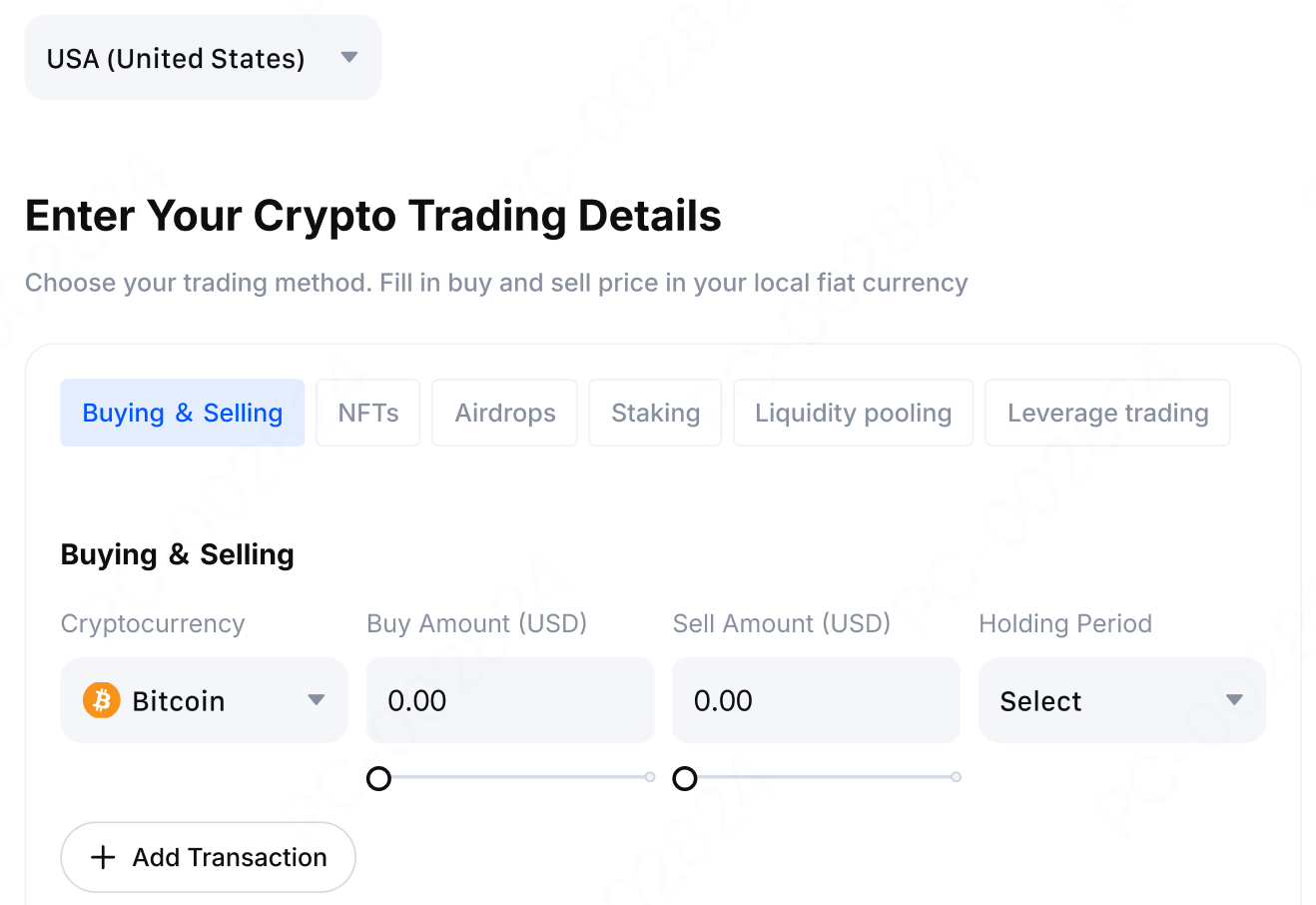
1) MEXC-nin rəsmi veb-saytına daxil olun və vergi hesablama səhifəsinə keçin. Daha sonra vergi bəyannamənizi təqdim etməli olduğunuz ölkəni və ya bölgəni seçin.
2) Kriptovalyutaların alışı və satışı, NFT tranzaksiyaları, airdrop gəliri, steykinq gəliri və daha çoxu daxil olmaqla müvafiq tranzaksiya növünü seçin. Daha sonra səhifədə soruşulduğu kimi alış qiyməti, satış qiyməti və saxlama müddəti kimi müvafiq tranzaksiya məlumatlarını daxil edin.
3) İllik gəlirinizi daxil edin və təxmini vergi məlumatı almaq üçün hesablamaq düyməsinə klikləyin.
Nəzərə alın ki, vergi kalkulyatoru ilə təqdim edilən məlumatlar yalnız istinad üçündür. Ödəniləcək son vergi məbləği yerli vergi orqanınızın qaydalarına uyğun olmalıdır.
5. MEXC kripto vergi kalkulyatorundan istifadə edərkən nələrə diqqət yetirmək lazımdır?
Vergi kalkulyatorundan istifadə edərkən xüsusi diqqət tələb edən bir neçə məqam var:
1) Bütün hesablama nəticələri yalnız istinad üçündür və peşəkar vergi məsləhəti hesab edilmir.
2) Müxtəlif ölkələrdə və bölgələrdə vergi siyasəti istənilən vaxt dəyişə bilər. Vergi bəyannamələrini təqdim etməzdən əvvəl yerli vergi mütəxəssisi ilə məsləhətləşməyiniz tövsiyə olunur.
3) Daha etibarlı hesablama nəticələri əldə etmək üçün daxil edilmiş tranzaksiya məlumatlarının dəqiq və tam olduğundan əmin olun.
4) Mürəkkəb vergi vəziyyətləri üçün daha ətraflı təhlil məqsədilə vergi API xidmətindən peşəkar üçüncü tərəf platforması ilə birlikdə istifadə etməyiniz tövsiyə olunur.
6. MEXC vergi API hesabat aləti nədir?
Vergi API hesabat aləti MEXC tərəfindən təmin edilən inkişaf etmiş bir vergi xidməti xüsusiyyətidir. Bu alət istifadəçilərə yalnız oxuma icazələri olan API açarları yaratmağa və treydinq tarixçəsi, kapital mənfəəti və zərərləri məlumatlarını MEXC hesablarından üçüncü tərəf vergi xidməti platformalarına ötürməyə imkan verir.
API sinxronizasiya funksiyası vasitəsilə üçüncü tərəf platformaları istifadəçilərin birdən çox maliyyə ili ərzində tam treydinq tarixçəsini avtomatik olaraq toplaya bilər və bu da istifadəçilərə vergi öhdəliklərini daha yaxşı başa düşməyə və yerinə yetirməyə kömək edir.
7. MEXC vergi API hesabat alətinin üstünlükləri nələrdir?
MEXC vergi API hesabat aləti bir neçə əhəmiyyətli üstünlük təklif edir:
1) Bu, mürəkkəb treydinq qeydlərini manual şəkildə nizamlamağa ehtiyac olmadan vergi bəyannaməsi prosesini daha asan və daha rahat edir.
2) Alət treydinq tarixçəsi sorğusu təqdim edərkən maliyyə məlumatlarınızın təhlükəsizliyini qorumağa kömək edən yalnız oxuma icazəsi olan giriş modelindən istifadə edir. Üçüncü tərəf platformaları heç bir vəsait əməliyyatı həyata keçirə bilməz.
3) Avtomatik məlumat sinxronizasiyasını və vergi hesabatlarının daha sürətli yaradılmasını təmin etmək üçün MEXC hesabat alətini seçdiyiniz üçüncü tərəf vergi xidməti platforması ilə problemsiz şəkildə inteqrasiya edə bilərsiniz.
8. Bütün MEXC istifadəçiləri vergi API alətindən istifadə edə bilərmi?
Vergi API hesabat aləti əksər MEXC istifadəçiləri üçün əlçatandır, lakin institusional istifadəçilər hazırda bu xüsusiyyətdən istifadə edə bilmirlər. Əgər fərdi istifadəçisinizsə, üçüncü tərəf vergi xidməti platformaları ilə əlaqə qurmaq üçün vergi API-si yarada və ondan normal qaydada istifadə edə bilərsiniz.
Əgər institusional istifadəçilərin vergi bəyannaməsi ilə bağlı ehtiyacları varsa, treydinq qeydlərini digər üsullarla ixrac etmələri və ya kömək üçün peşəkar vergi xidməti təminatçısı ilə əlaqə saxlamaları tövsiyə olunur.
9. MEXC vergi API-si necə yaradılır?
Vergi API-si yaratmaq üçün konkret addımlar aşağıdakılardır:
1) MEXC hesabınıza daxil olun. Səhifənin aşağı hissəsində Xidmətlər bölməsini tapın və səhifəyə daxil olmaq üçün Vergi API-si düyməsinə klikləyin.
2) Vergi API-si yaratmaq düyməsinə klikləyin, API açar adını daxil edin və kimlik doğrulamasını tamamlayın.
Qeydlər:
- API açarı yaratmaq üçün Google ikimərhələli autentifikasiyası tələb olunur. API uğurla yaradıldıqdan sonra sistem API açarınızı və API gizli açarını göstərəcək.
- API gizli açarı yaradılma zamanı yalnız bir dəfə göstərilir və sonradan gizlədiləcək. Onu kopiyalayıb təhlükəsiz bir yerdə saxladığınızdan əmin olun.
- API açarı üç ay müddətində etibarlıdır və müddəti bitdikdən sonra yenidən yaradılmalıdır.
10. Kriptovalyuta vergi hesabatı yaratmaq üçün üçüncü tərəf platformasından necə istifadə olunur?
Koinly nümunəsi kimi yanaşsaq, konkret addımlar aşağıdakılardır:
1) Koinly platformasını açın və qeydiyyatdan keçin və ya daxil olun. Nəzərdə tutduğunuz istifadəni və ya ölkəni/regionu seçin və şəxsi pul kisənizi əlavə edin.
2) Pul kisəsi əlavə etmə səhifəsində MEXC seçiminə klikləyin, sonra Avtomatik sinxronizasiyanı seçin.
3) MEXC-də yaratdığınız API açarını müvafiq giriş sahəsinə yapışdırın, API gizli açarını parol sahəsinə yapışdırın və quraşdırmanı tamamlamaq üçün Təhlükəsiz idxal seçiminə klikləyin.
4) Tamamlandıqdan sonra platforma avtomatik olaraq MEXC treydinq tarixçənizi endirəcək və məlumatları sinxronlaşdıracaq. Vergi hesabatınız qısa müddət sonra yaradılacaq.
11. Üçüncü tərəf vergi platformasından istifadə üçün hansısa komissiya varmı?
Üçüncü tərəf vergi xidməti platforması ilə API bağlantısı vasitəsilə hesabatlar yaradarkən, istifadəçilər üçüncü tərəf vergi proqram təminatı tərəfindən tutulan istifadə komissiyalarını ödəməli ola bilərlər. Komissiya standartları müxtəlif vergi xidməti platformalarında fərqli olur. Konkret detallar üçün seçdiyiniz üçüncü tərəf platforması tərəfindən təqdim edilən qiymətləndirmə məlumatlarına baxın.
MEXC-nin özü tərəfindən təmin edilən vergi API yaratma xüsusiyyəti pulsuzdur.
Tövsiyə olunan oxu materialı:
Məsuliyyətdən imtina: MEXC vergi tərəfdaşları tərəfindən təqdim edilən məhsul və ya xidmətlərin keyfiyyətini və ya dəqiqliyini təmin etmək üçün məsuliyyət daşımır. MEXC vergi tərəfdaşları tərəfindən MEXC istifadəçilərinə təklif edilən məhsul və ya xidmətlərdən yarana biləcək hər hansı bir məsuliyyəti açıq şəkildə rədd edir. MEXC istifadəçiləri vergi tərəfdaşları ilə öz riskləri hesabına əlaqə qurmağa razılıq verirlər. Bu məqalədə verilən bütün məlumatlar yalnız istinad üçündür və vergi, hüquqi və ya maliyyə məsləhəti hesab edilmir.