

MEXC Spot şəbəkə treydinqi ilə bağlı tez-tez verilən suallar
1. Əsas konsepsiya sualları
1.1 Spot şəbəkə treydinqi nədir?
Spot şəbəkə treydinqi istifadəçi tərəfindən müəyyən edilmiş qiymət aralığında sabit intervallarla alış və satış sifarişlərini avtomatik olaraq verən avtomatlaşdırılmış treydinq strategiyası vasitəsidir. Spot şəbəkə treydinqi botu qiymət dalğalanmaları zamanı mənfəət imkanlarını əldə etmək üçün hazırlanmışdır. Davamlı olaraq aşağı qiymətə alıb yüksək qiymətə satmaqla, bu, istifadəçilərə şəbəkə mənfəəti qazanmağa kömək edir və dəyişkən bazarlar üçün çox uyğundur.
1.2 Spot şəbəkə treydinqi üçün hansı bazar şərtləri uyğundur?
Spot şəbəkə treydinqi diapazonla məhdudlaşan bazarlarda və nisbətən məhdud qiymət dalğalanmaları olan bazarlarda ən yaxşı şəkildə işləyir. Qiymətlər müəyyən edilmiş diapazonda dəfələrlə dəyişdikdə şəbəkə strategiyası aşağı alış, yüksək satış ticarətlərini davam etdirə və zamanla mənfəət toplaya bilər. Lakin bazar birtərəfli eniş tendensiyasına girərsə, bu, saxlanılan mövqelər üzrə reallaşmamış itkilərə səbəb ola bilər.
2. Spot şəbəkə parametrlərinin qurulması ilə bağlı suallar
2.1 Spot şəbəkə treydinqi üçün qiymət aralığında hər hansı bir məhdudiyyət var?
Bəli. Qiymət aralığı parametrlərində müəyyən məhdudiyyətlər var. Dəqiq limitlər treydinq cütündən asılı olaraq dəyişə bilər və sistem quraşdırma zamanı icazə verilən aralığı göstərəcək.
2.2 Şəbəkə sayı ilə bağlı hər hansı bir məhdudiyyət var?
Bəli. Şəbəkə sayı ümumiyyətlə 2 ilə 200 arasında məhdudlaşır. Nəzərə alın ki, sistem təyin etdiyiniz qiymət aralığına əsasən şəbəkələrin sayının yuxarı həddini avtomatik olaraq tənzimləyəcək. Qiymət aralığı nisbətən məhduddursa, hər bir şəbəkədən əldə edilən mənfəətin treydinq komissiyalarını qarşılamağını təmin etmək üçün şəbəkələrin maksimum sayı müvafiq olaraq azala bilər.
2.3 Minimum investisiya məbləği var?
Bəli. Minimum investisiya məbləği var və konkret tələb yuxarı qiymət limitinə, aşağı qiymət limitinə və təyin etdiyiniz şəbəkələrin sayına əsasən dinamik olaraq dəyişir. Strategiya yaradan zaman sistem seçdiyiniz parametrlərə əsasən tələb olunan minimum investisiya məbləğini göstərəcək.
2.4 Ədədi şəbəkələr və həndəsi şəbəkələr arasındakı fərq nədir?
Ədədi şəbəkə o deməkdir ki, hər iki qonşu şəbəkə səviyyəsi arasındakı qiymət fərqi eynidir, məsələn, 100, 200, 300 və 400.
Həndəsi şəbəkə o deməkdir ki, hər iki qonşu şəbəkə səviyyəsi arasındakı qiymət nisbəti eynidir, məsələn, 100, 200, 400 və 800.
Ədədi şəbəkələr sıx aralıqlı bazar dalğalanmaları üçün daha uyğundur, həndəsi şəbəkələr isə daha böyük qiymət dalğalanmaları olan bazarlarda daha yaxşı nəticə göstərə bilər.
3. Mənfəət və komissiya ilə bağlı suallar
3.1 Spot şəbəkə treydinqi üçün hansı komissiyalar alınır?
MEXC Spot şəbəkə treydinqi standart Spot treydinq komissiyasını yalnız sifariş uğurla yerinə yetirildikdə alır. Komissiya dərəcəsi adi Spot treydinqi ilə eynidir. Spot şəbəkə strategiyasının özünü yaratmaq üçün əlavə komissiya tələb olunmur.
3.2 Şəbəkə mənfəəti ilə ümumi mənfəət arasındakı fərq nədir?
Şəbəkə mənfəəti hər tamamlanmış alış-satış dövründən əldə edilən kumulyativ mənfəəti ifadə edir və hər şəbəkə üzrə hesablanır.
Ümumi mənfəətə reallaşmış şəbəkə mənfəəti, ödənilmiş treydinq komissiyaları və cari bazar qiyməti əsasında hesablanmış reallaşmamış PnL daxildir. İstifadəçilər ümumi mənfəətə daha çox diqqət yetirməlidirlər, çünki bu, strategiyanın ləğvi zamanı son gəliri əks etdirir.
3.3 Nə üçün şəbəkə mənfəəti müsbətdir, ümumi mənfəət isə zərər olduğunu göstərir?
Bu, adətən bazar qiyməti aşağı düşəndə baş verir. Şəbəkə mənfəəti başa çatmış ticarətlərdən əldə edilən kumulyativ mənfəəti təmsil edir. Bununla belə, ümumi mənfəətə saxlanılan tokenlərin reallaşmamış PnL-i də daxildir. Token qiymətləri düşəndə reallaşmamış zərərlər reallaşmış şəbəkə mənfəətini üstələyə bilər və nəticədə mənfi ümumi mənfəət yarana bilər.
3.4 Treydinq komissiyaları şəbəkə mənfəətini aşa bilər?
Xeyr. MEXC Spot şəbəkə treydinq sistemi ticarətin yalnız şəbəkə mənfəəti treydinq komissiyalarından çox olduqda həyata keçirilməsini təmin edir. Buna görə də, treydinq komissiyaları şəbəkə mənfəətini aşmayacaq.
4. Əməliyyat və idarəetmə ilə bağlı suallar
4.1 Spot şəbəkə treydinqi üçün hansı hesabdan istifadə olunur?
Spot şəbəkə treydinqi Spot hesabınızdakı vəsaitlərdən istifadə edir. Bəzi platformalarda bu, maliyyələşdirmə hesabınız kimi də göstərilə bilər. Şəbəkə strategiyası yaratdığınız zaman sistem avtomatik olaraq tələb olunan vəsaiti həmin hesabdan müstəqil əməliyyat strategiyasına köçürəcək.
4.2 Eyni anda neçə Spot şəbəkə strategiyası tətbiq edə bilərəm?
Eyni anda birdən çox Spot şəbəkə strategiyası tətbiq edə bilərsiniz. Hal-hazırda MEXC istifadəçilərə eyni vaxtda 30-a qədər müxtəlif şəbəkə strategiyası tətbiq etməyə imkan verir.
4.3 Strategiya tətbiq edilən zaman parametrləri dəyişdirə bilərəm?
Strategiya tətbiq edilən zaman mənfəət əldəetmə qiyməti, stop-itki qiyməti və strategiya bitdikdə saxlanılan tokenlərin satılıb-satılmaması kimi bəzi parametrlər dəyişdirilə bilər. Lakin sistemin yeni parametrlərə əsasən investisiya məbləğini avtomatik olaraq tənzimləyə biləcəyini nəzərə alın. Hər hansı bir dəyişiklik etməzdən əvvəl potensial təsiri tam qiymətləndirməyiniz tövsiyə olunur.
4.4 Reallaşmış şəbəkə mənfəətini çıxara bilərəm?
Bəli. Strategiya tətbiq edilərkən istənilən vaxt reallaşmış şəbəkə mənfəətini çıxara bilərsiniz və çıxarılan vəsait Spot hesabınıza köçürüləcək. Lakin nəzərə alın ki, normal fəaliyyəti dəstəkləmək üçün mənfəətin bir hissəsi strategiyada qalmalı ola bilər. İlkin investisiya məbləği strategiyada qalmalı olan və çıxarıla bilməyən minimum məbləğdir.
4.5 Strategiya başa çatdıqdan sonra vəsaitlər hara gedir?
Spot şəbəkə strategiyanız ləğv edildikdən sonra, investisiya məbləği və reallaşmış mənfəət daxil olmaqla, bütün vəsaitlər avtomatik olaraq Spot hesabınıza qaytarılacaq. Həmçinin, ləğvdən sonra saxlanılan tokenləri bazar qiymətinə satmağı və hər şeyi kotirovka tokeninə yönləndirməyi seçə bilərsiniz.
Nəzərə alın ki, bazar likvidliyi zəifdirsə və ya sistemdə istisna hal baş verərsə və saxlanılan tokenlər dərhal bazar qiymətinə tam satıla bilməzsə, qalan tokenlər birbaşa Spot hesabınıza köçürüləcək.
5. Risklərə nəzarət ilə bağlı suallar
5.1 Bazar qiyməti əvvəlcədən müəyyən edilmiş aralıqdan kənara çıxarsa, nə baş verir?
Bazar qiyməti təyin etdiyiniz qiymət aralığından kənara çıxdıqda şəbəkə strategiyası treydinqi dayandıracaq və qiymət əvvəlcədən təyin edilmiş aralığa qayıdana qədər alış və ya satış sifarişlərinin verilməsini dayandıracaq. Qiymətin qısa müddətdə geri qayıtması ehtimalının az olduğunu düşünürsünüzsə, potensial itkiləri azaltmaq üçün strategiyanı manual şəkildə dayandırmağı nəzərdən keçirə bilərsiniz.
5.2 Spot şəbəkə treydinqi likvidasiya olunacaq?
Xeyr. Spot şəbəkə treydinqi Spot bazarında aparılır və kredit çiyni və ya Fyuçers mövqelərini əhatə etmir, buna görə də, likvidasiya riski yoxdur. Saxladığınız aktivlər həmişə real Spot aktivləridir.
5.3 Mənfəət əldə etmə və stop-itki qiymətlərini necə təyin edə bilərəm?
Strategiya yaradan zaman Qabaqcıl parametrlər bölməsində mənfəət əldəetmə qiymətini və stop-itki qiymətini konfiqurasiya edə bilərsiniz. Mənfəət əldəetmə qiyməti qiymət aralığının yuxarı həddindən yüksək olmalıdır. Bazar qiyməti mənfəət əldəetmə qiymətinə çatdıqda, strategiya avtomatik olaraq dayanacaq və siz saxlanılan tokenləri satıb-satmamağı seçə bilərsiniz. Stop-itki qiyməti qiymət aralığının aşağı həddindən aşağı olmalıdır. Bazar qiyməti stop-itki qiymətinə düşdükdə strategiya zərərləri idarə etməyə kömək etmək üçün avtomatik olaraq dayanacaq.
5.4 Strategiya bitdikdən sonra aldığım məbləğ niyə gözləniləndən azdır?
Buna aşağıdakılar səbəb ola bilər:
- Strategiya başa çatdıqda saxlanılan tokenləri satmağı seçsəniz, sistem satışı bazar qiyməti ilə həyata keçirəcək və standart Spot treydinq komissiyaları tətbiq olunacaq.
- Bazar sifarişlərinə bəzi qiymət sürüşmələri daxil ola bilər.
- Strategiya başa çatdıqda reallaşmamış PnL faktiki mənfəət və ya itkiyə çevriləcək.
Nəticədə, aldığınız yekun məbləğ strategiya təfərrüatları səhifəsində göstərilən ümumi mənfəətdən bir qədər fərqlənə bilər.
6. Nasazlıqların aradan qaldırılması ilə bağlı suallar
6.1 Şəbəkə strategiyamın yaradılması niyə uğursuz oldu?
Strategiya yaradılması aşağıdakı səbəblərə görə uğursuz ola bilər:
- Treydinq hesabınızdakı mövcud balans kifayət qədər deyil və strategiya üçün minimum investisiya tələbinə cavab vermir.
- Təyin etdiyiniz parametrlər icazə verilən limitləri aşır.
- Yüksək bazar dəyişkənliyi dövrlərində təxmin edilən icra qiyməti cari bazar qiymətindən çox kənara çıxarsa, sistem qiymət sürüşməsi itkilərinin qarşısını almaq üçün strategiya yaratmağı rədd edə bilər.
Yenidən cəhd etməzdən əvvəl hesab balansınızı və parametrlərinizi yoxlamağınız tövsiyə olunur.
6.2 Strategiyanın başladılması niyə uğursuz oldu?
Strategiyanın başlanğıcında uğursuzluq adətən kəskin bazar dəyişkənliyi dövrlərində baş verir. İlkin bazar alışı sifarişinin icra qiyməti qiymət sürüşməsi səbəbindən gözlənilən qiymətdən çox kənara çıxarsa, bu, arbitraj sahəsinin qeyri-kafi olmasına və ya bütün gözlənilən sifarişləri dəstəkləmək üçün kifayət qədər vəsaitin olmamasına səbəb ola bilər. Bu halda, alınan tokenlər və qalan vəsaitlər treydinq hesabınıza qaytarılacaq və heç bir vəsait itirilməyəcək.
7. Digər tez-tez verilən suallar
7.1 Spot şəbəkə treydinqi üçün KYC doğrulaması tələb olunur?
Bəli. İstifadəçilər Spot şəbəkə treydinqi xüsusiyyətindən istifadə etməzdən əvvəl İlkin KYC doğrulamasını tamamlamalıdırlar.
7.2 Spot şəbəkə treydinqi üçün hansı treydinq cütləri uyğundur?
Əgər treydinqə yeni başlamısınızsa, güclü bazar konsensusu və yaxşı likvidliyə malik olan BTC/USDT və ETH/USDT kimi əsas tokenlər ilə başlamağınız tövsiyə olunur. Bu treydinq cütləri adətən daha yaxşı bazar dərinliyinə və nisbətən sabit qiymət dalğalanmalarına malikdir ki, bu da onları şəbəkə strategiyaları üçün daha uyğun edir. Spot şəbəkə treydinqini daha dərindən başa düşürsünüzsə, potensial olaraq daha yüksək gəlir əldə etmək üçün digər daha dəyişkən treydinq cütlərini də sınaya bilərsiniz.
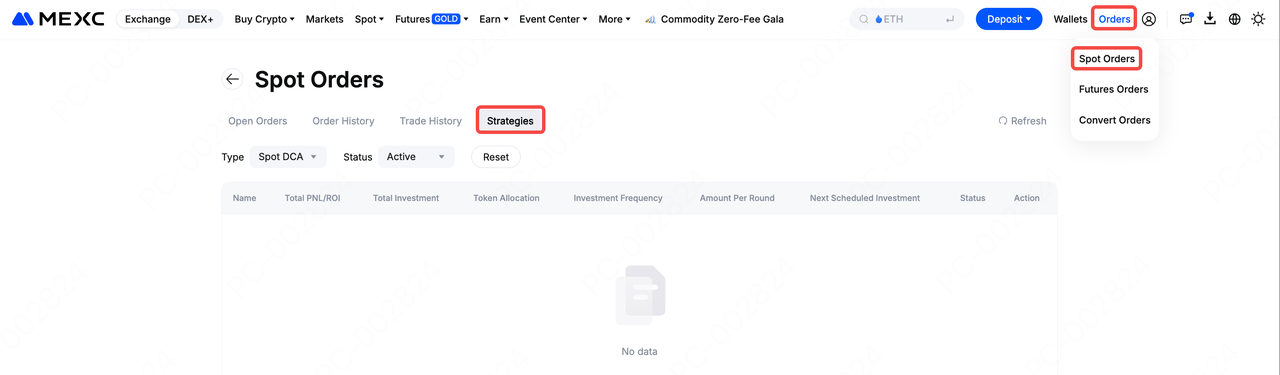
7.3 Strategiyamın sifariş tarixçəsinə harada baxa bilərəm?
MEXC platformasının Spot treydinq səhifəsindəki sifariş vermə sahəsinə keçib Strategiyalar seçiminə klikləyərək əvvəlki sifarişlərə baxa bilərsiniz. Həmçinin, Spot sifarişlər səhifəsinə keçib əvvəlki sifarişlərə baxmaq üçün Strategiyalar seçiminə klikləyə bilərsiniz.
7.4 Strategiya tətbiq edilərkən token dayandırılarsa və ya delistinq edilərsə, nə baş verir?
Əgər müvafiq token dayandırılarsa, delistinq edilərsə və ya şəbəkə strategiyası tətbiq edilərkən başqa bir qeyri-adi vəziyyət baş verərsə, strategiya avtomatik olaraq dayanacaq. Aktivləriniz platformanın müvafiq qaydalarına uyğun olaraq idarə olunacaq. Xüsusi tənzimləmələr üçün MEXC-nin rəsmi elanlarını izləməyiniz tövsiyə olunur.