Common Questions About MEXC AI Strategy Futures TradingCommon Questions About MEXC AI Strategy Futures Trading
Category List
Cancel

Common Questions About MEXC AI Strategy Futures Trading

Key Takeaways

  • Barrier-Free Smart Trading: Simply describe your idea in natural language and the system will generate a strategy, suitable for both beginners and experienced traders.
  • Isolated and Secure Funds: Strategies run via a sub-account, fully segregated from your main account.
  • Five Comprehensive Strategy Types: Covers time, price, candlestick patterns, technical indicators, and social media monitoring.
  • Flexible Combinations and Fine-Tuning: Up to 50x leverage, with a maximum of two strategy types combined per setup.
  • Clear and Transparent Risk Controls: No automatic position scaling. Positions close only via preset TP/SL rules.

1. Getting Started with AI Strategies


1.1 How do I create an AI strategy for Futures trading?


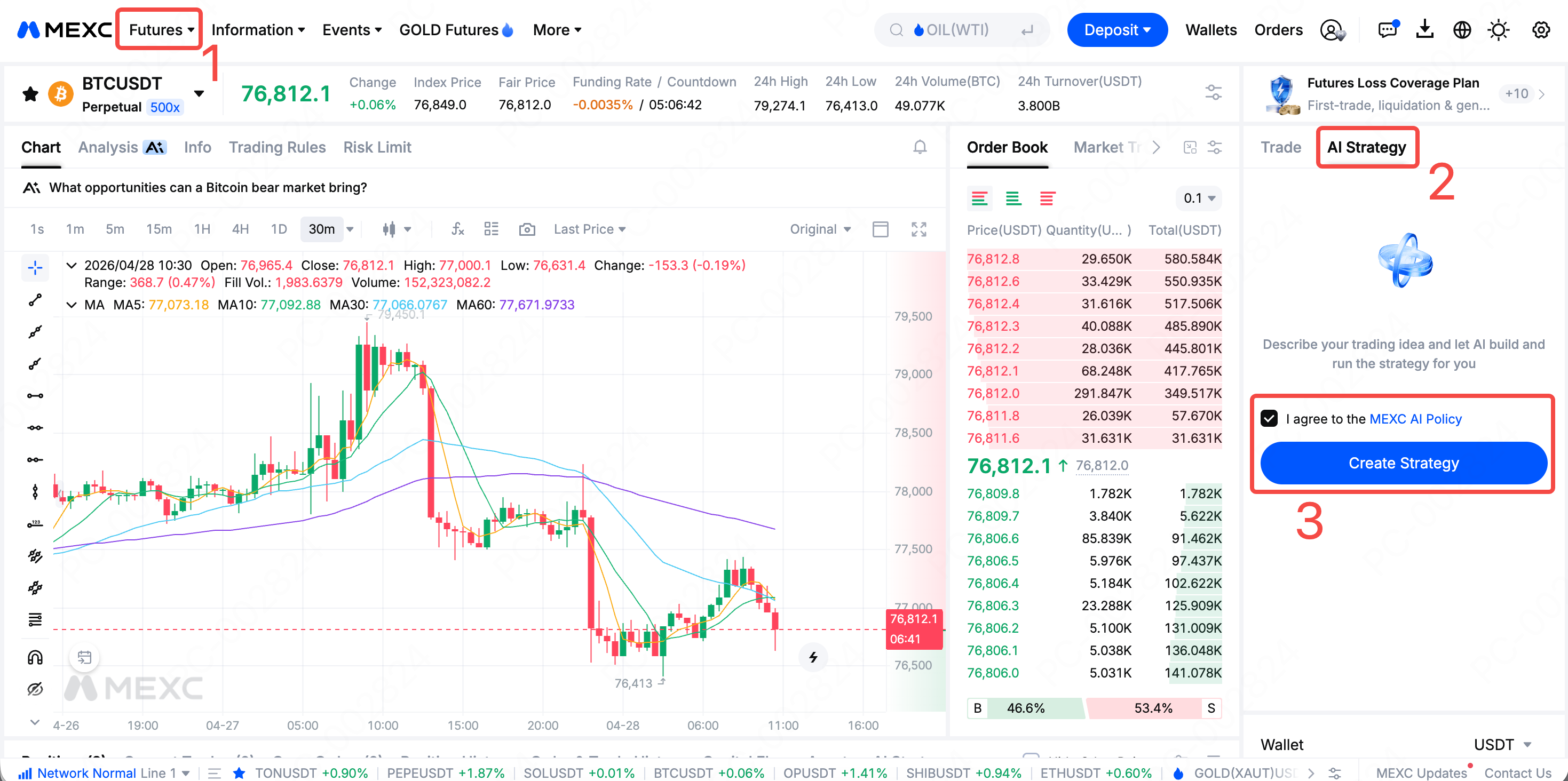
You can launch an AI strategy in just six simple steps:
1. Go to the MEXC homepage and click "Futures."
2. Select the "AI Strategy" feature.
3. Click "Create Strategy."
4. Enter your trading idea in a conversational format.
5. The AI will generate a strategy and display it on the right-hand side.
6. Review and confirm parameters (investment amount, TP/SL, etc.), then launch the strategy for it to run automatically.

1.2 Who can use AI strategies?


AI strategies use a conversational interface, making them beginner-friendly while remaining efficient for experienced traders. Simply describe your trading idea in natural language, and the system will generate a professional Futures trading strategy.

1.3 Are AI strategy funds linked to the main account?


No. AI strategies run independently via sub-accounts, with funds fully isolated from the main account. The structure is similar to grid trading, offering an added layer of fund security.

2. Types of AI Strategies


2.1 What trigger conditions are supported?


AI strategies currently support five main categories of triggers:
Strategy Type
Primary Use Case
Time-based
Triggered at fixed times or intervals
Price-based
Triggered by price levels or percentage changes
Candlestick patterns
Triggered by single or multi-candle formations
Technical indicators
Triggered by indicators (e.g., KDJ, MACD)
Monitoring-based
Tracks platforms like X (Twitter) and Truth Social

2.2 Can AI identify bullish or bearish posts?


Not at this time. AI strategies do not analyze sentiment from news or social posts. Monitoring-based strategies must be combined with price conditions to form a complete and effective trigger logic.

3. AI Strategy Combinations


3.1 Can I combine multiple strategies?


Yes, but with two rules:
  • Monitoring-based strategies cannot be combined with other types.
  • A maximum of two strategy types can be combined in a single setup.

3.2 Can I run multiple strategies simultaneously on one account?


No. Each account can run only one strategy at a time, and each strategy can be applied to only one trading pair.

4. How AI Strategies Work


4.1 How are indicator triggers evaluated?


All indicator-based conditions are based on candle closing prices. For example, a breakout above the upper Bollinger Band on a 4-hour timeframe refers to the closing price of the 4-hour candle exceeding the band, instead of a temporary intraday spike.

4.2 What timeframes are supported?


Eight candlestick intervals are available: 1m, 5m, 15m, 30m, 1h, 4h, 12h, 1D, covering both short-term and longer-term strategies.

4.3 Will the strategy automatically add to positions?


No. If a position in the same direction already exists, the system will ignore repeated trigger signals to avoid duplicate entries and additional risk.

4.4 When will a strategy stop running?


The strategy's operating status under different scenarios is as follows:
Scenario
Status
Trading pair is delisted
❌ Terminated
Leverage no longer supported after change
❌ Terminated
Account restricted by risk measures
❌ Terminated
Risk limit exceeded
✅ Continues
Insufficient available balance
✅ Continues

5. Rules and Limits


5.1 What is the minimum transfer amount?


The minimum transfer amount is determined as the lower value between twice the single investment amount and 10,000 USDT.

5.2 What is the minimum order amount?


The minimum order amount is 10 USDT.

5.3 What is the maximum leverage?


The maximum leverage is determined as the lower value between the maximum leverage supported by the trading pair and 50x.

5.4 What is the minimum precision for price change settings?


The minimum tick size is 0.1%.

5.5 How are fees calculated?


Fees follow the main account's rate. However, benefits such as Futures bonuses or fee vouchers cannot be used to offset AI strategy fees.

6. Adjustments and Position Closing


6.1 Can a strategy be modified after creation?

Only the investment amount and TP/SL settings can be modified. To change other parameters, you must cancel the current strategy and generate a new one via AI.

6.2 Will modifying TP/SL affect existing positions?


No. Changes apply only to new positions opened after the update. Existing positions will continue using their original parameters.

6.3 How are positions closed?

AI strategies close positions exclusively through predefined TP/SL settings. All positions are closed in full, as partial closing is not supported, and users cannot define custom closing conditions.

Common Questions About MEXC AI Strategy Futures Trading

Key Takeaways

  • Barrier-Free Smart Trading: Simply describe your idea in natural language and the system will generate a strategy, suitable for both beginners and experienced traders.
  • Isolated and Secure Funds: Strategies run via a sub-account, fully segregated from your main account.
  • Five Comprehensive Strategy Types: Covers time, price, candlestick patterns, technical indicators, and social media monitoring.
  • Flexible Combinations and Fine-Tuning: Up to 50x leverage, with a maximum of two strategy types combined per setup.
  • Clear and Transparent Risk Controls: No automatic position scaling. Positions close only via preset TP/SL rules.

1. Getting Started with AI Strategies


1.1 How do I create an AI strategy for Futures trading?


You can launch an AI strategy in just six simple steps:
1. Go to the MEXC homepage and click "Futures."
2. Select the "AI Strategy" feature.
3. Click "Create Strategy."
4. Enter your trading idea in a conversational format.
5. The AI will generate a strategy and display it on the right-hand side.
6. Review and confirm parameters (investment amount, TP/SL, etc.), then launch the strategy for it to run automatically.


1.2 Who can use AI strategies?


AI strategies use a conversational interface, making them beginner-friendly while remaining efficient for experienced traders. Simply describe your trading idea in natural language, and the system will generate a professional Futures trading strategy.

1.3 Are AI strategy funds linked to the main account?


No. AI strategies run independently via sub-accounts, with funds fully isolated from the main account. The structure is similar to grid trading, offering an added layer of fund security.

2. Types of AI Strategies


2.1 What trigger conditions are supported?


AI strategies currently support five main categories of triggers:
Strategy Type
Primary Use Case
Time-based
Triggered at fixed times or intervals
Price-based
Triggered by price levels or percentage changes
Candlestick patterns
Triggered by single or multi-candle formations
Technical indicators
Triggered by indicators (e.g., KDJ, MACD)
Monitoring-based
Tracks platforms like X (Twitter) and Truth Social

2.2 Can AI identify bullish or bearish posts?


Not at this time. AI strategies do not analyze sentiment from news or social posts. Monitoring-based strategies must be combined with price conditions to form a complete and effective trigger logic.

3. AI Strategy Combinations


3.1 Can I combine multiple strategies?


Yes, but with two rules:
  • Monitoring-based strategies cannot be combined with other types.
  • A maximum of two strategy types can be combined in a single setup.

3.2 Can I run multiple strategies simultaneously on one account?


No. Each account can run only one strategy at a time, and each strategy can be applied to only one trading pair.

4. How AI Strategies Work


4.1 How are indicator triggers evaluated?


All indicator-based conditions are based on candle closing prices. For example, a breakout above the upper Bollinger Band on a 4-hour timeframe refers to the closing price of the 4-hour candle exceeding the band, instead of a temporary intraday spike.

4.2 What timeframes are supported?


Eight candlestick intervals are available: 1m, 5m, 15m, 30m, 1h, 4h, 12h, 1D, covering both short-term and longer-term strategies.

4.3 Will the strategy automatically add to positions?


No. If a position in the same direction already exists, the system will ignore repeated trigger signals to avoid duplicate entries and additional risk.

4.4 When will a strategy stop running?


The strategy's operating status under different scenarios is as follows:
Scenario
Status
Trading pair is delisted
❌ Terminated
Leverage no longer supported after change
❌ Terminated
Account restricted by risk measures
❌ Terminated
Risk limit exceeded
✅ Continues
Insufficient available balance
✅ Continues

5. Rules and Limits


5.1 What is the minimum transfer amount?


The minimum transfer amount is determined as the lower value between twice the single investment amount and 10,000 USDT.

5.2 What is the minimum order amount?


The minimum order amount is 10 USDT.

5.3 What is the maximum leverage?


The maximum leverage is determined as the lower value between the maximum leverage supported by the trading pair and 50x.

5.4 What is the minimum precision for price change settings?


The minimum tick size is 0.1%.

5.5 How are fees calculated?


Fees follow the main account's rate. However, benefits such as Futures bonuses or fee vouchers cannot be used to offset AI strategy fees.

6. Adjustments and Position Closing


6.1 Can a strategy be modified after creation?

Only the investment amount and TP/SL settings can be modified. To change other parameters, you must cancel the current strategy and generate a new one via AI.

6.2 Will modifying TP/SL affect existing positions?


No. Changes apply only to new positions opened after the update. Existing positions will continue using their original parameters.

6.3 How are positions closed?

AI strategies close positions exclusively through predefined TP/SL settings. All positions are closed in full, as partial closing is not supported, and users cannot define custom closing conditions.