How to Connect Polygon Network to Metamask?
Polygon is a protocol and a framework for building and connecting Ethereum-compatible blockchain networks. Metamask is a crypto wallet available for Android/ iOS and browser extensions. It allows users to interact with the Ethereum blockchain. In this article, we will see how to connect the Polygon network to Metamask.
Summary
- There are two ways to connect the polygon network to Metamask wallet, first using PolygonScan and second manually.
- Polygonscan is a blockchain explorer and allows users to fetch all their data from other platforms.
- Polygon network was also known as Matic Network.
- Chain ID to connect with the Polygon network is 137.
Also read, How to Connect Avalanche with MetaMask?
How to Connect the Polygon network to Metamask?
There are two ways to add Polygon network to Metamask wallet:
- Using Polygonscan,
- Adding polygon network manually.
We will discuss both methods here.
Also read, How to Buy Matic (Polygon) on CoinDCX?
Using Polygonscan
In June 2021, Polygon introduced Polygonscan, a blockchain explorer that allows users to fetch all blockchain data available on any platform. It supports all high transaction activity in Polygon.
To connect the Polygon network to your Metamask manually using Polygonscan, follow the below-mentioned steps.
- To connect using Polyscan go to polygonscan.com and scroll down till the end.
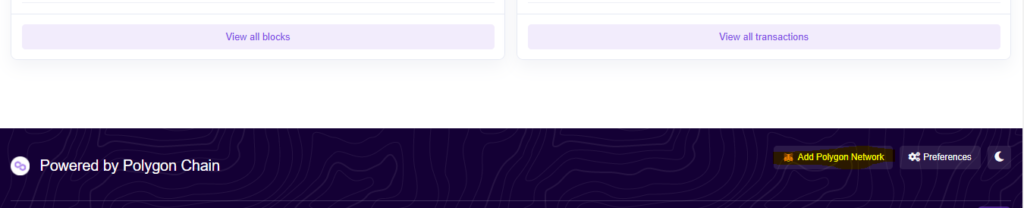 Adding Polygon network
- In the end, click on Add Polygon Network and fill in all necessary details, i.e. network name, URL and chain ID.
- Fill in the details as mentioned below.
Network Name: Matic Mainnet
Network URL: https://rpc-mainnet.maticvigil.com/
Chain ID: 137
Chain Symbol: MATIC
- There will be a popup as shown below, approve it, and you will be directly switched to Polygon’s mainnet and network drop-down list.
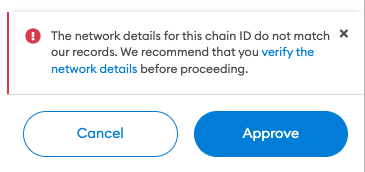 The warning is shown while connecting
Adding the Polygon network Manually
To connect the Polygon network to your Metamask manually, follow the below-mentioned steps.
- Open Settings: Go to your Metamask wallet and open settings.
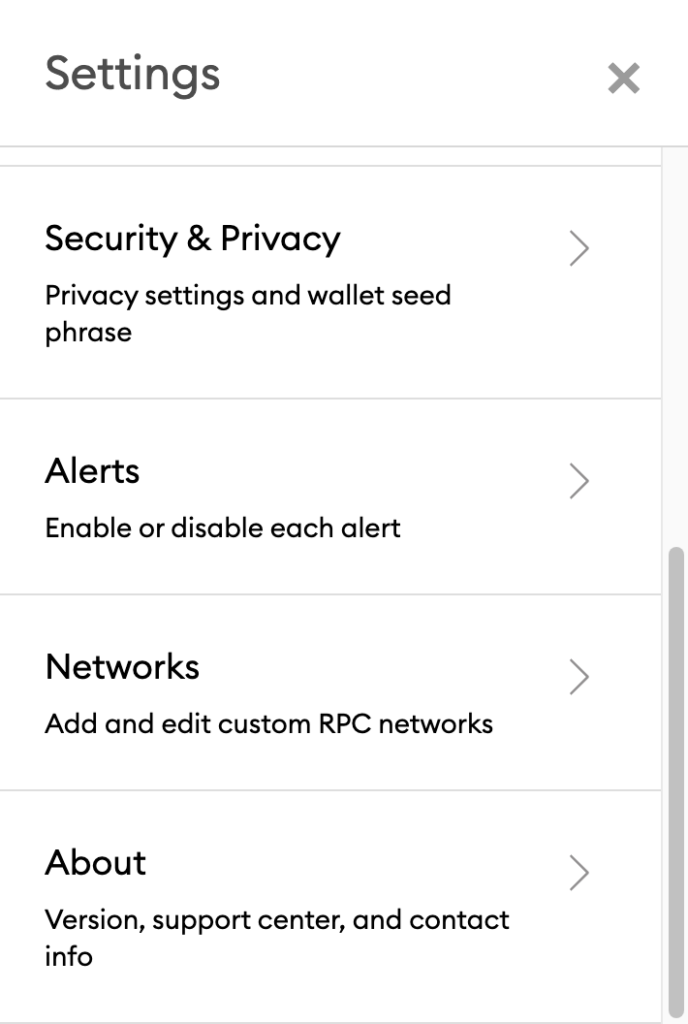 The setting of the Metamask wallet
- On settings, click on the Network option and fill-up the form as detailed below.
- Be careful; all details must be the same as shown and save it. You can choose the network name as Polygon network or Matic Mainnet, and also Currency symbol and block explorer URL can be left as they are optional to mention.
- Now you have connected the Polygon network to your Metamask wallet.
- Also, sometimes while connecting to the Polygon network via any method, you can change the URL to any of the below-mentioned URLs.
- https://rpc-mainnet.matic.network
- https://rpc-mainnet.maticvigil.com
- https://rpc-mainnet.matic.quiknode.pro
- https://matic-mainnet.chainstacklabs.com
- https://matic-mainnet-full-rpc.bwarelabs.com
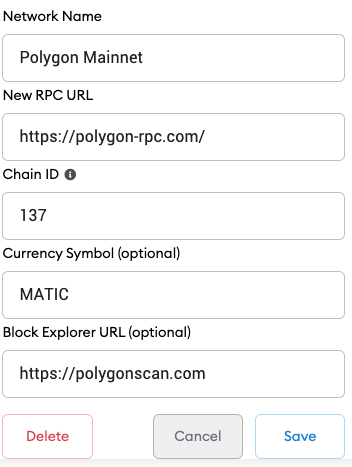 Details while connecting
Conclusion
Polygon is the first well-structured, easy-to-use platform for Ethereum scaling and development. An Ethereum developer is also a Polygon developer and the process for connecting Metamask and Polygon network is a bit easy. Connecting metamask wallets to the Polygon network allows users to benefit from the DeFi ecosystem and low transaction fees. We have mentioned both ways to connect, hopefully, you are connected successfully.
Frequently Asked Questions
- How to connect to Polygon’s Mumbai-Testnet?
To connect Mumbai-Testnet change chain ID to 80001 and URL to https://rpc-mumbai.maticvigil.com .
- What is a Polygon network?
Polygon is a blockchain scalability platform and framework for connecting and building blockchain networks compatible with Ethereum.
- Are Matic network and Polygon the same?
Yes! Polygon was formerly known as the Matic network.
Also read,
- How to Connect Avalanche with MetaMask?
- CoinGate Review: Accept Crypto Payments
- Lido Review: Staking with Highest Interests
- Wildcoins Review – Get UPTO 3.5 BTC for Free
- Red Dog Casino Review – Casino and Crypto


You May Also Like

Pentagon taps GM, Ford for weapons as US-Iran conflict strains munitions

Fireblocks Opens Access to Lending Markets for 2,400 institutions