

Developers Gain Direct Insight Into Data Flows With CocoIndex Update
We are launching a major feature in both CocoIndex and CocoInsight to help users fast iterate with the indexing strategy, and trace back all the way to the data — to make the transformation experience more seamlessly integrated with the end goal. With the new launch, you can define query handlers, so that you can easily run queries in tools like CocoInsight.
Checkout CocoIndex - https://github.com/cocoindex-io/cocoindex
CocoInsight
Does my data transformation creates meaningful index for retrieval?
In CocoInsight, we’ve added a Query mode. You can enable this by adding a CocoIndex Query Handler. You can quickly query index, and view the collected information for any entity.
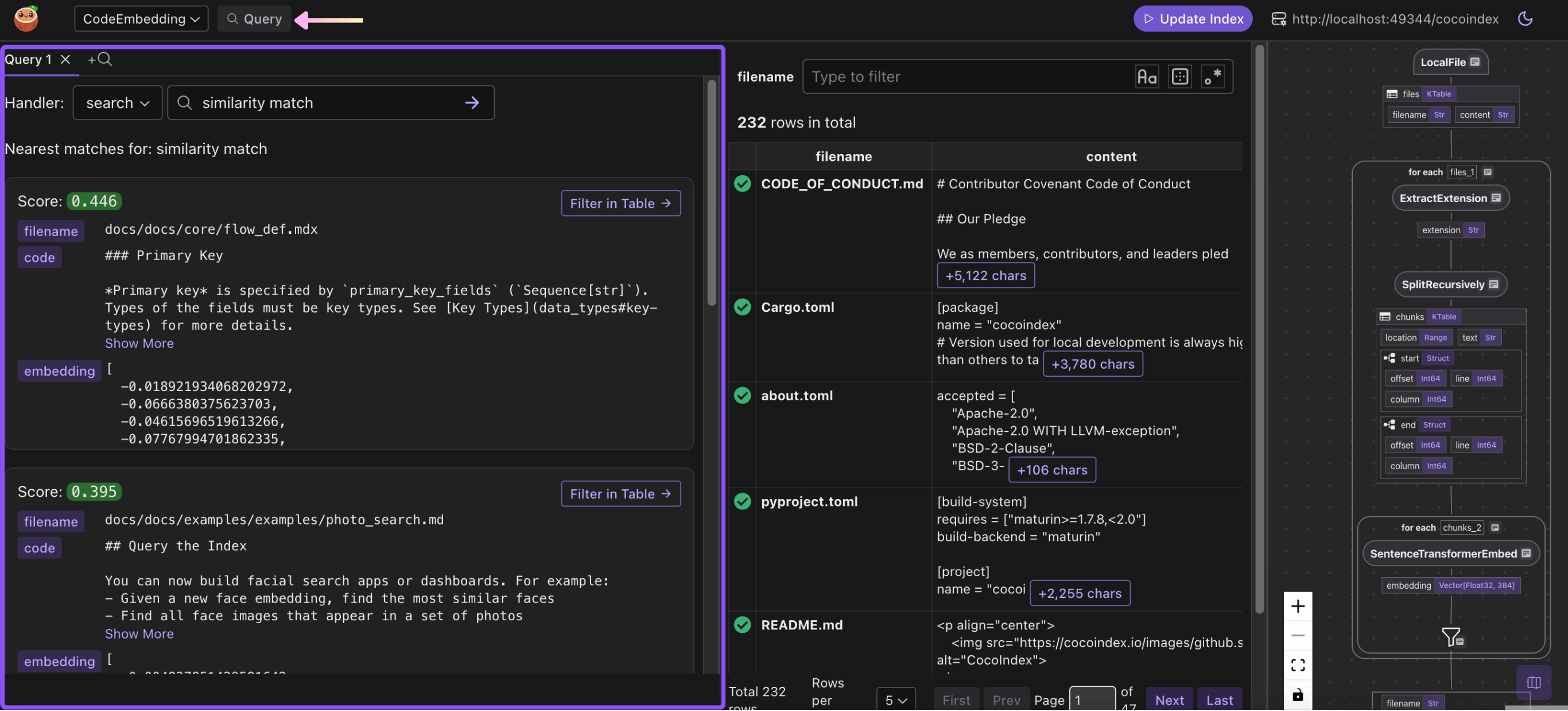
\ The result is directly linked and can be traced back step by step to how data is generated on the indexing path.
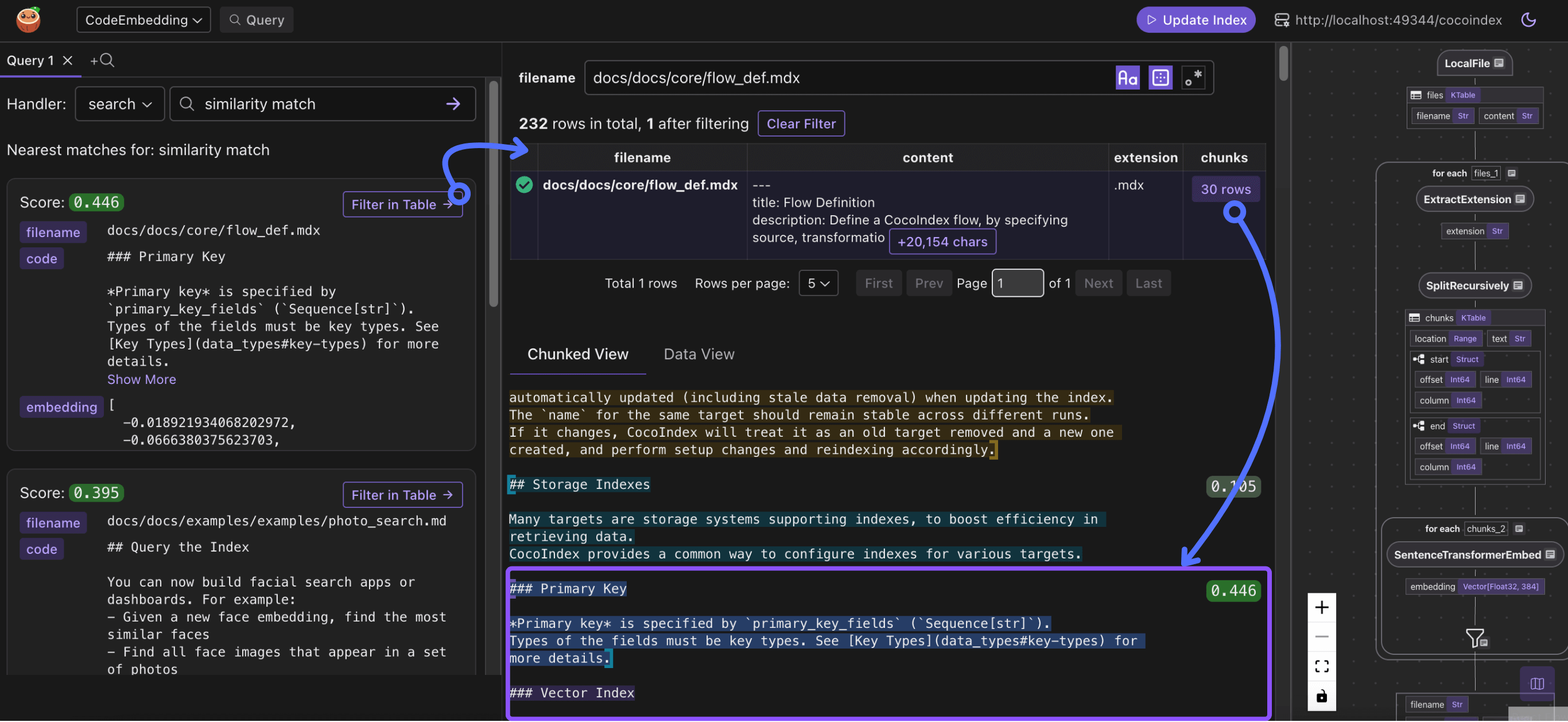
Where are the results coming from?
For example, this snippet comes from the file docs/docs/core/flow_def.mdx . The file was split into 30 chunks after transformation.
Why is my chunk / snippet not showing in the search result?
When you perform a query, on the ranking path, you’d usually have a scoring mechanism. On the CocoInsight, you can quickly find any files you have in your mind, and for any chunks, you can scan the scoring in the same context.
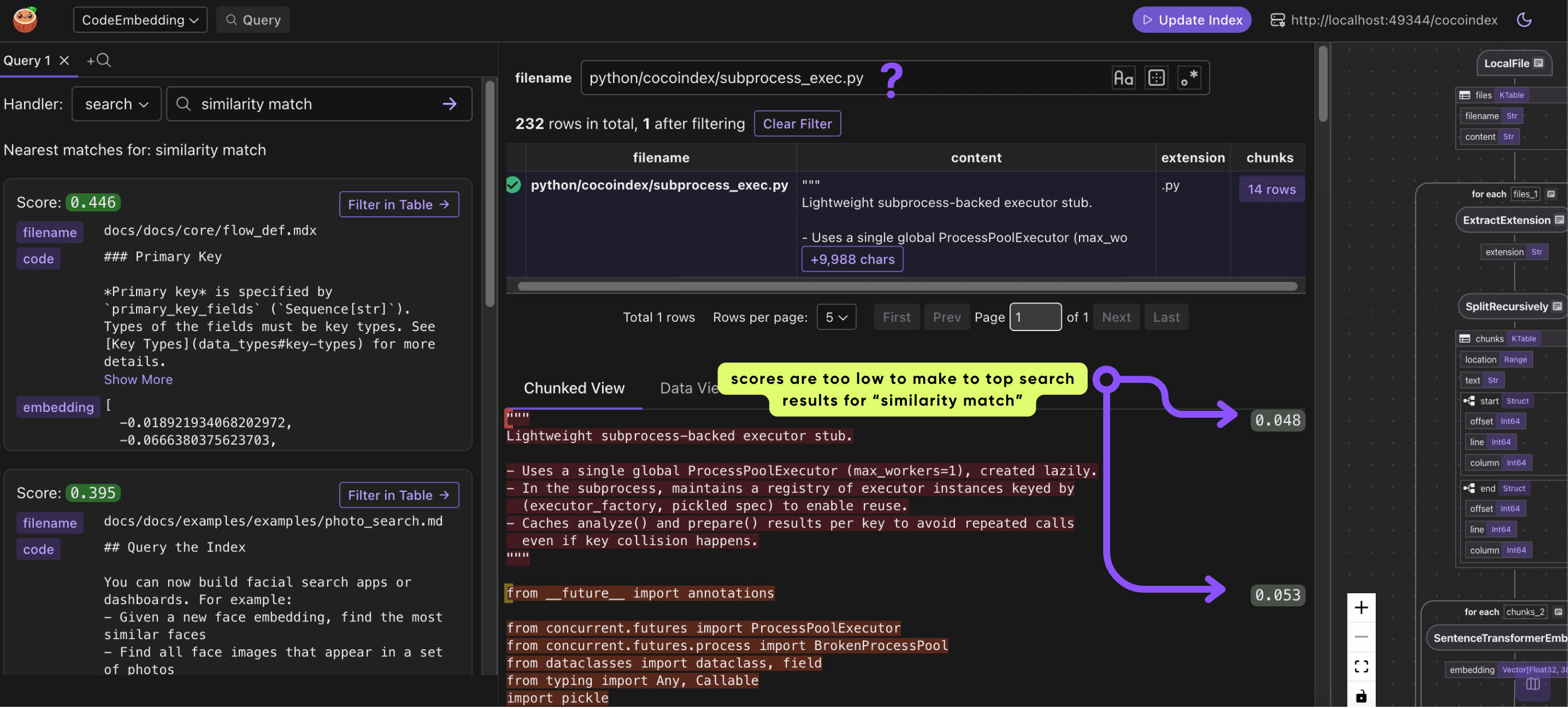
This gives you a powerful toolset with direct insight to end to end data transformation, to quickly iterate data indexing strategy without any headaches of building any additional UI or tools.
Integrate Query Logic with CocoIndex
Query Handler
To run queries in CocoInsight, you need to define query handlers. You can use any libraries or frameworks of your choice to perform queries.
You can read more in the documentation about Query Handler.
Query handlers let you expose a simple function that takes a query string and returns structured results. They are discoverable by tools like CocoInsight so you can query your indexes without building your own UI.
For example:
# Declaring it as a query handler, so that you can easily run queries in CocoInsight. @code_embedding_flow.query_handler( result_fields=cocoindex.QueryHandlerResultFields( embedding=["embedding"], score="score" ) ) def search(query: str) -> cocoindex.QueryOutput: # Get the table name, for the export target in the code_embedding_flow above. table_name = cocoindex.utils.get_target_default_name( code_embedding_flow, "code_embeddings" ) # Evaluate the transform flow defined below with the input query, to get the embedding. query_vector = code_to_embedding. # Run the query and get the results. with connection_pool().connection() as conn: register_vector(conn) with conn.cursor() as cur: cur.execute( f""" SELECT filename, code, embedding, embedding <=> %s AS distance, start, "end" FROM {table_name} ORDER BY distance LIMIT %s """, (query_vector, TOP_K), ) return cocoindex.QueryOutput( query_info=cocoindex.QueryInfo( embedding=query_vector, similarity_metric=cocoindex.VectorSimilarityMetric.COSINE_SIMILARITY, ), results=[ { "filename": row[0], "code": row[1], "embedding": row[2], "score": 1.0 - row[3], "start": row[4], "end": row[5], } for row in cur.fetchall() ], ) This code defines a query handler that:
- Turns the input query into an embedding vector.
code_to_embeddingis a shared transformation flow between Query and Index path, see detailed explanation below. - Searches a database of code embeddings using cosine similarity.
- Returns the top matching code snippets with their filename, code, embedding, score, and positions.
Sharing Logic Between Indexing and Query
Sometimes, transformation logic needs to be shared between indexing and querying, e.g. when we build a vector index and query against it, the embedding computation needs to be consistent between indexing and querying.
You can find the documentation about Transformation Flow.
You can use @cocoindex.transform_flow() to define shared logic. For example
@cocoindex.transform_flow() def text_to_embedding(text: cocoindex.DataSlice[str]) -> cocoindex.DataSlice[NDArray[np.float32]]: return text.transform( cocoindex.functions.SentenceTransformerEmbed( model="sentence-transformers/all-MiniLM-L6-v2")) In your indexing flow, you can directly call it
with doc["chunks"].row() as chunk: chunk["embedding"] = text_to_embedding(chunk["text"]) In your query logic, you can call the method with a specific value
def search(query: str) -> cocoindex.QueryOutput: # Evaluate the transform flow defined below with the input query, to get the embedding. query_vector = code_to_embedding. Examples
- Text Embedding (PostgreSQL)
- Text Embedding (Qdrant)
- Code Embedding
Beyond Vector Index
We use vector index in this blog. CocoIndex is a powerful data transformation framework that is beyond vector index. You can use it to build vector index, knowledge graph, structured extraction and transformation and any custom logic towards your need on efficient retrieval from fresh data.
Support Us
We’re constantly adding more examples and improving our runtime. ⭐ Star CocoIndex on GitHub and share the love ❤️ !
And let us know what are you building with CocoIndex — we’d love to feature them.


You May Also Like

Netflix (NFLX) Stock: Italian Court Orders Refunds Over Illegal Price Hikes

Kentucky Eases Crypto Rules




