In a market obsessed with gold and “digital gold” (read Bitcoin), a new narrative is quietly rising: building the plumbing behind the money. What this means is that smart money investors are looking for projects that will innovate the way people are handling their finances, and Digitap ($TAP) has emerged as the best contender. Bitcoin […] The post Bitcoin vs. Banking Boom: Which Narrative Will Create More Millionaires in 2026? appeared first on Live Bitcoin News.In a market obsessed with gold and “digital gold” (read Bitcoin), a new narrative is quietly rising: building the plumbing behind the money. What this means is that smart money investors are looking for projects that will innovate the way people are handling their finances, and Digitap ($TAP) has emerged as the best contender. Bitcoin […] The post Bitcoin vs. Banking Boom: Which Narrative Will Create More Millionaires in 2026? appeared first on Live Bitcoin News.
Bitcoin vs. Banking Boom: Which Narrative Will Create More Millionaires in 2026?

2025/10/24 02:00
5 min read
For feedback or concerns regarding this content, please contact us at crypto.news@mexc.com

In a market obsessed with gold and “digital gold” (read Bitcoin), a new narrative is quietly rising: building the plumbing behind the money. What this means is that smart money investors are looking for projects that will innovate the way people are handling their finances, and Digitap ($TAP) has emerged as the best contender.

Bitcoin Is Still the King, But Might Face Struggles In the Short Term

Recently, the price of Gold plunged by 6.3% in one single day. This led to some money flowing into Bitcoin almost immediately, a historical pattern the market is seeing play out again.

However, the inflows didn’t last long, as the BTC price fell yet again, currently at $107,762.80. This marks a 3.9% decrease for the BTC price in the last 7 days, while its trading volume is up, indicating sales or the opening of short positions.
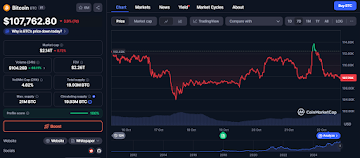
According to analysts, this was expected, as historical patterns show a clear path in conditions like now. Namely, a rush for Gold, a plunge in the Gold price due to a big surge, a shift toward Bitcoin, and, lastly, a shift into altcoins. This seems to be playing out so far, and many are on the lookout for the best altcoins to invest in right now. 

According to Ali Martinez, BTC’s current setup doesn’t look like one that will take the Bitcoin price to $250,000 soon, but the opposite. This statement also signals that he expected the BTC price to decrease more in the coming weeks, which is on par with historical patterns.

This further suggests that the “altcoin season” might finally be here, which is a time when some of the best cryptos to buy other than Bitcoin see explosive growth.

The Banking Infrastructure Narrative: Why It Matters and Why Digitap Is Leading

The traditional “digital gold” thesis for Bitcoin has strength in narratives and store-of-value demand, but, like the entire crypto market, it’s fundamentally speculative. In contrast, the banking infrastructure narrative is one with real-world use cases that can not only be used but also be beneficial for far more people than just crypto users.

That’s where Digitap comes in as the world’s first omnibank. With Digitap, people can store, hold, and spend both fiat and crypto assets from one place, meaning Digitap has finally merged crypto and fiat for good.

This means that the users will get to take advantage of the benefits both fiat and crypto offer, like accessibility and convenience for fiat and speed, privacy, and cost-effectiveness for crypto.

Even though Digitap is still in presale, its beta app is already live, available on the Apple App Store and the Google Play Store. It also offers a crypto card backed by VISA, which people can use to spend both fiat and crypto anywhere VISA is accepted. Thousands of people are already using Digitap’s app, and experts who have tested it out believe that it could bring in a whole new era in finance.

Furthermore, Digitap can also bring changes to the global payments sector, as it cuts fees significantly. Namely, it has developed an AI-powered routing system that slashes the industry average cross-border payment fees of 6.2% to under 1%.

So, Digitap’s reach can potentially be vast, leading experts to believe that it could become a top 5 cryptocurrency in the years to come. And all of the utilities that Digitap offers make it one of the best cryptos to invest in 2025. 

USE THE CODE “LIVEAPP30” FOR 30% OFF FIRST-TIME PURCHASES

$TAP’s Presale: A Potentially Revolutionary Opportunity

The $TAP presale is still quite new, but regardless, it’s already amassing massive traction. So far, the presale has raised over $900K, selling more than 68 million $TAP tokens. Currently, $TAP’s price is at $0.0194, but not for long. 

As demand keeps growing, $TAP will enter its next presale stage, where its price will rise by 38% to $0.0268. These price rises will happen throughout the presale. Also, $TAP’s tokenomics are designed for growth, as 50% of the profit the platform makes is automatically set for buy-backs and burns.

These events will create more scarcity in the $TAP supply, which will further promote price growth apart from the demand that experts expect $TAP to see in the future.

Unlike many crypto presales that only offer a whitepaper and a plan, Digitap already has a live and functioning app with registered users, which separates it from the crowd. Also, it has undergone audits by SolidProof and Coinsult, which have further boosted investor confidence.

Metric Details
Stage Price $0.0194
Next Stage Price $0.0268
Tokens Sold Over 68 million
Capital Raised Over $900K
Fundraising Goal $10 million

The Converging Path to Growth

The question of which narrative will create more millionaires in 2026 may not have a single answer. Bitcoin offers a relatively stable, high-conviction bet on the “digital gold” thesis, with clear institutional backing and support. Digitap, however, provides a different kind of potential rooted in real-world adoption and the potential to revolutionize three major industries.

As such, Digitap may become the next big thing in crypto, as its use cases go way beyond those of many other crypto projects.

Digitap is Live NOW. Learn more about their project here:

Presale https://presale.digitap.app

Website: https://digitap.app

Social: https://linktr.ee/digitap.app

Disclaimer: This is a paid post and should not be treated as news/advice. LiveBitcoinNews is not responsible for any loss or damage resulting from the content, products, or services referenced in this press release.

The post Bitcoin vs. Banking Boom: Which Narrative Will Create More Millionaires in 2026? appeared first on Live Bitcoin News.


Market Opportunity
Boom Logo
Boom Price(BOOM)
$0.0007184
$0.0007184$0.0007184
+0.48%
USD
Boom (BOOM) Live Price Chart
Disclaimer: The articles reposted on this site are sourced from public platforms and are provided for informational purposes only. They do not necessarily reflect the views of MEXC. All rights remain with the original authors. If you believe any content infringes on third-party rights, please contact crypto.news@mexc.com for removal. MEXC makes no guarantees regarding the accuracy, completeness, or timeliness of the content and is not responsible for any actions taken based on the information provided. The content does not constitute financial, legal, or other professional advice, nor should it be considered a recommendation or endorsement by MEXC.

You May Also Like

Tether Backs Ark Labs’ $5.2 Million Bet on Bitcoin’s Stablecoin Revival

Tether Backs Ark Labs’ $5.2 Million Bet on Bitcoin’s Stablecoin Revival

The post Tether Backs Ark Labs’ $5.2 Million Bet on Bitcoin’s Stablecoin Revival appeared on BitcoinEthereumNews.com. In brief Ark Labs secured backing from Tether
Share
BitcoinEthereumNews2026/03/12 21:44
MySQL Single Leader Replication with Node.js and Docker

MySQL Single Leader Replication with Node.js and Docker

Modern applications demand high availability and the ability to scale reads without compromising performance. One of the most common strategies to achieve this is Replication. In this setup, we configured a single database to act as the leader (master) and handle all write operations, while three replicas handle read operations. In this article, we’ll walk through how to set up MySQL single-leader replication on your local machine using Docker. Once the replication is working, we’ll connect it to a Node.js application using Sequelize ORM, so that reads are routed to the replica and writes go to the master. By the end, you’ll have a working environment where you can see replication in real time Prerequisites knowledge of database replication Background knowledge of docker and docker compose Background knowledge of Nodejs and how to run a NodeJS server An Overview of what we are building Setup Setup our database servers on docker compose in the root of our project directory, create a file named docker-compose.yml with the following content to setup our mysql primary and replica databases. \ \ name: "learn-replica" volumes: mysqlMasterDatabase: mysqlSlaveDatabase: mysqlSlaveDatabaseII: mysqlSlaveDatabaseIII: networks: mysql-replication-network: services: mysql-master: image: mysql:latest container_name: mysql-master command: --server-id=1 --log-bin=ON environment: MYSQL_ROOT_PASSWORD: master MYSQL_DATABASE: replicaDb ports: - "3306:3306" volumes: - mysqlMasterDatabase:/var/lib/mysql networks: - mysql-replication-network mysql-slave: image: mysql:latest container_name: mysql-slave command: --server-id=2 --log-bin=ON environment: MYSQL_ROOT_PASSWORD: slave MYSQL_DATABASE: replicaDb MYSQL_ROOT_HOST: "%" ports: - "3307:3306" volumes: - mysqlSlaveDatabase:/var/lib/mysql depends_on: - mysql-master networks: - mysql-replication-network mysql-slaveII: image: mysql:latest container_name: mysql-slaveII command: --server-id=2 --log-bin=ON environment: MYSQL_ROOT_PASSWORD: slave MYSQL_DATABASE: replicaDb MYSQL_ROOT_HOST: "%" ports: - "3308:3306" volumes: - mysqlSlaveDatabaseII:/var/lib/mysql depends_on: - mysql-master networks: - mysql-replication-network mysql-slaveIII: image: mysql:latest container_name: mysql-slaveIII command: --server-id=3 --log-bin=ON environment: MYSQL_ROOT_PASSWORD: slave MYSQL_DATABASE: replicaDb MYSQL_ROOT_HOST: "%" ports: - "3309:3306" volumes: - mysqlSlaveDatabaseIII:/var/lib/mysql depends_on: - mysql-master networks: - mysql-replication-network In this setup, I’m creating a master database container called mysql-master and 3 replica containers called mysql-slave, mysql-slaveII and mysql-slaveIII. I won’t go too deep into the docker-compose.yml file since it’s just a basic setup, but I do want to walk you through the command line instructions used in all four services because that’s where things get interesting.
command: --server-id=1 --log-bin=ON The --server-id option gives each MySQL server in your replication setup its own name tag. Each one has to be unique and without it, replication won’t work at all. Another cool option not included here is binlog_format=ROW. This tells MySQL how to keep track of changes before passing them along to the replicas. By default, MySQL already uses row-based replication, but you can explicitly set it to ROW to be sure or switch it to STATEMENT if you’d rather log the actual SQL statements instead of row-by-row changes. \ Run our containers on docker Now, in the terminal, we can run the following command to spin up our database containers: docker-compose up -d \ Setting Up Our Master (Primary) Server To configure our master server, we would have to first access the running instance on docker using the following command docker exec -it mysql-master bash This command opens an interactive Bash shell inside the running Docker container named mysql-master, allowing us to run commands directly inside that container. \ Now that we’re inside the container, we can access the MySQL server and start running commands. type: mysql -uroot -p This will log you into MySQL as the root user. You’ll be prompted to enter the password you set in your docker-compose.yml file. \ Next, we need to create a special user that our replicas will use to connect to the master server and pull data. Inside the MySQL prompt, run the following commands: \ CREATE USER 'repl_user'@'%' IDENTIFIED BY 'replication_pass'; GRANT REPLICATION SLAVE ON . TO 'repl_user'@'%'; FLUSH PRIVILEGES; Here’s what’s happening: CREATE USER makes a new MySQL user called repl_user with the password replication_pass. GRANT REPLICATION SLAVE gives this user permission to act as a replication client. FLUSH PRIVILEGES tells MySQL to reload the user permissions so they take effect immediately. \ Time to Configure the Replica (Secondary) Servers a. First, let’s access the replica containers the same way we did with the master. Run this command in your terminal for each of the replica containers: \ docker exec -it <replica_container_name> bash mysql -uroot -p <replica_container_name> should be replace with the name of the replica container you are trying to setup b. Now it’s time to tell our replica where to get its data from. While inside the replica’s MySQL shell, run the following command to configure replication using the master’s details: CHANGE REPLICATION SOURCE TO SOURCE_HOST='mysql-master', SOURCE_USER='repl_user', SOURCE_PASSWORD='replication_pass', GET_SOURCE_PUBLIC_KEY=1; With the replication settings in place, let’s fire up the replica and get it syncing with the master. Still inside the MySQL shell on the replica, run: START REPLICA; This starts the replication process. To make sure everything is working, check the replica’s status with:
SHOW REPLICA STATUS\G; Look for Replica_IO_Running and Replica_SQL_Running — if both say Yes, congratulations! 🎉 Your replica is now successfully connected to the master and replicating data in real time.
Testing Our Replication Setup from the Node.js App Now that our replication is successfully set up, we can configure our Node.js server to observe the real-time effect of data being replicated from the master server to the replica server whenever we write to it. We start by installing the following dependencies:
npm i express mysql2 sequelize \ Now create a folder called src in the root directory and add the following files inside that folder connection.js, index.js and model.js. Our current directory should look like this We can now set up our connections to our master and replica server in the connection.js file as shown below
const Sequelize = require("sequelize"); const sequelize = new Sequelize({ dialect: "mysql", replication: { write: { host: "127.0.0.1", username: "root", password: "master", database: "replicaDb", }, read: [ { host: "127.0.0.1", username: "root", password: "slave", database: "replicaDb", port: 3307 }, { host: "127.0.0.1", username: "root", password: "slave", database: "replicaDb", port: 3308 }, { host: "127.0.0.1", username: "root", password: "slave", database: "replicaDb", port: 3309 }, ], }, }); async function connectdb() { try { await sequelize.authenticate(); } catch (error) { console.error("❌ unable to connect to the follower database", error); } } connectdb(); module.exports = { sequelize, }; \ We can now create a User table in the model.js file
const {DataTypes} = require("sequelize"); const { sequelize } = require("./connection"); const User = sequelize.define("User", { name: { type: DataTypes.STRING, allowNull: false, }, email: { type: DataTypes.STRING, unique: true, allowNull: false, }, }); module.exports = User \ and finally in our index.js file we can start our server and listen for connections on port 3000. from the code sample below, all inserts or updates will be routed by sequelize to the master server. while all read queries will be routed to the read replicas.
const express = require("express"); const { sequelize } = require("./connection"); const User = require("./model"); const app = express(); app.use(express.json()); async function main() { await sequelize.sync({ alter: true }); app.get("/", (req, res) => { res.status(200).json({ message: "first step to setting server up", }); }); app.post("/user", async (req, res) => { const { email, name } = req.body; let newUser = await User.build({ name, email, }); // This INSERT will go to the write (master) connection newUser = newUser.save({ returning: false }); res.status(201).json({ message: "User successfully created", }); }); app.get("/user", async (req, res) => { // This SELECT query will go to one of the read replicas const users = await User.findAll(); res.status(200).json(users); }); app.listen(3000, () => { console.log("server has connected"); }); } main(); When you make a POST request to the /users endpoint, take a moment to check both the master and replica servers to observe how data is replicated in real time. Right now, we are relying on Sequelize to automatically route requests, which works for development but isn’t robust enough for a production environment. In particular, if the master node goes down, Sequelize cannot automatically redirect requests to a newly elected leader. In the next part of this series, we’ll explore strategies to handle these challenges
Share
Hackernoon2025/09/18 14:44
Nvidia shares fall 3%

Nvidia shares fall 3%

The post Nvidia shares fall 3% appeared on BitcoinEthereumNews.com. Home » AI » Nvidia shares fall 3% Chipmaker extends decline as investors continue to take profits from recent highs. Photo: Budrul Chukrut/SOPA Images/LightRocket via Getty Images Key Takeaways Nvidia’s stock decreased by 3% today. The decline extends Nvidia’s recent losing streak. Nvidia shares fell 3% today, extending the chipmaker’s recent decline. The stock dropped further during trading as the artificial intelligence chip leader continued its pullback from recent highs. Disclaimer Source: https://cryptobriefing.com/nvidia-shares-fall-2-8/
Share
BitcoinEthereumNews2025/09/18 03:13