Anti-Notion: How to Manage a U.S. Relocation, a Startup, and a Divorce from a Single Google Doc

Last year, I closed a seven-year chapter of my life with my startup (an AI writing assistant): $1.35M in funding, 300,000 users, and an acqui-hire exit to a large company.
But behind the scenes of that deal, I was weathering a two-year "perfect storm": plummeting revenue, the loss of a second business, and a painful divorce. In this article, I’ll share how I managed to navigate this chaos using nothing but a single Google Doc instead of complex productivity systems.
My Approach: A Google Doc for Every Occasion
Disclaimer: I’m not inherently against task managers or calendars. In my professional life, I’ve used Notion, Trello, Confluence, and various calendars. My approach isn't meant to replace them entirely, but to complement and structure them in a way that connects work with real-life tasks.
Why not a calendar or Notion?
- Context over Chronology. In a calendar, it’s hard to list the nitty-gritty details of payments to different contractors or a step-by-step EB-1 visa plan. In a Doc, these are just a few lines that are always at my fingertips.
- The Infinite Scroll. A wall calendar eventually comes down. My file, however, holds the history of all my wins and losses over the years. The psychological effect of this "infinite scroll" has proven to be incredibly powerful.
- Frictionless Editing. A Google Doc is easy to open on any device without needing third-party apps. In my opinion, nothing beats the simplicity of a piece of paper—and this is exactly that, but in a digital format with easy hyperlinking.
My Google Doc is simply titled "Tasks," and it contains everything: yearly, weekly, and daily goals. It looks something like this: \n \n 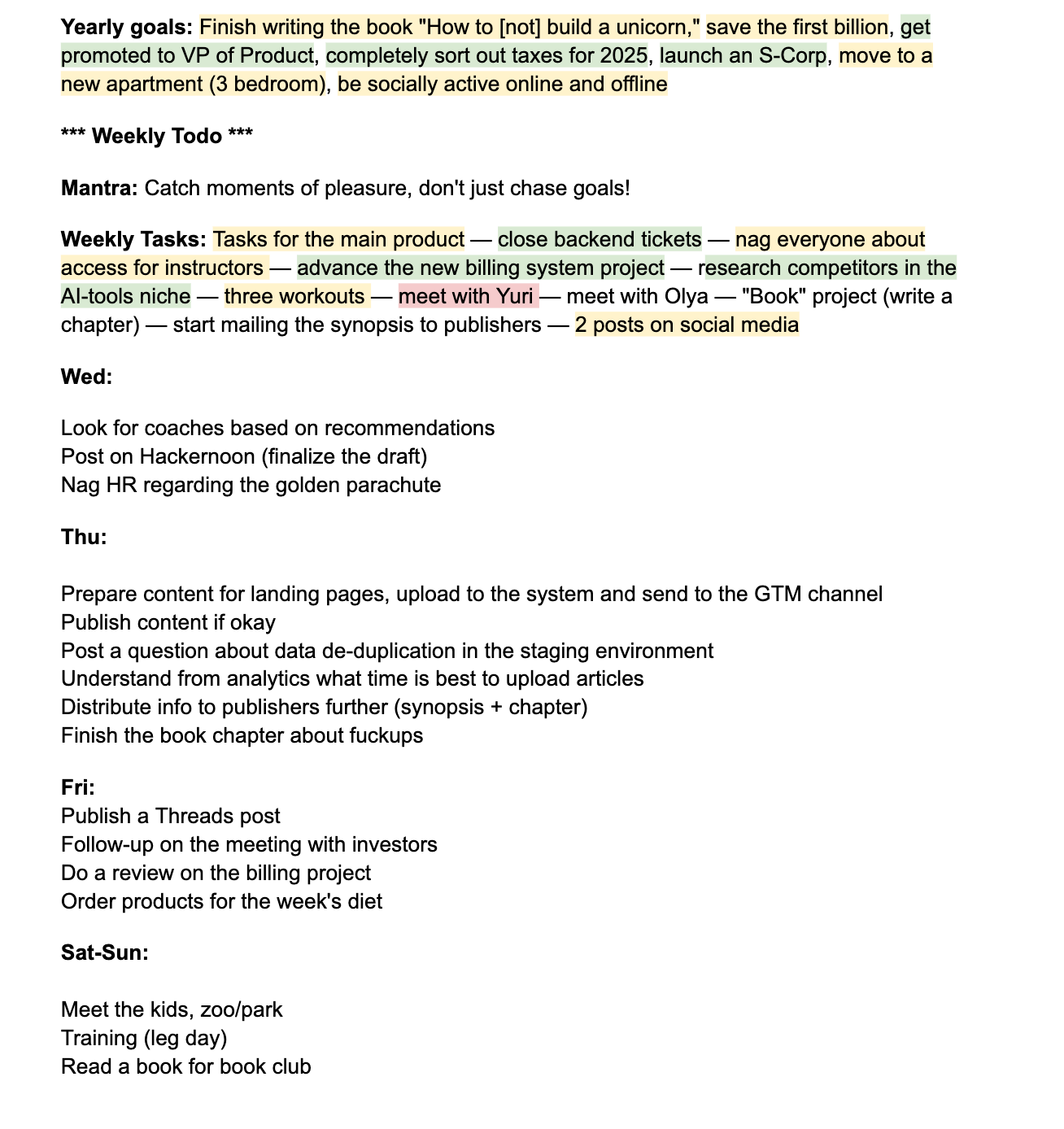
1. Yearly Goals
This is where I list my objectives for the year—both achievements (closing the exit, hitting a savings milestone) and processes (gym 3x a week, being more socially active). As they say, this is top of mind. Every day I see that I wanted to be more socially active; if it’s already Friday and I haven't left the house, it creates that "healthy" discomfort that gets me moving.
2. Weekly Todo
On Sunday evenings, I usually sit down and map out the tasks I expect to tackle. The list evolves as the week progresses, but having a baseline makes it easier to plan my personal life—when to grab coffee with a friend, when to help out family, or when to squeeze in a doctor’s appointment.
3. Mantra
This is either a specific mid-term goal (shorter than a year but longer than a week)—like "save for tax season"—or a simple motto for the current stretch, such as "more sports" or "one book a week."
4. Daily Tasks
I simply list the days (Mon, Tue, Wed, Thu, Fri, Sat-Sun) and add short tasks under each. When a task is done, I cross it out. When the day is over, I delete it. Seeing the list shrink provides a great sense of progress. If a task is lagging, I simply Ctrl+X and Ctrl+V it to another day. It might "travel" for a while, but it only gets deleted once it's done.
Below this, I have a section for Meeting Notes and random ideas. Later, I convert these into tasks and clean up the section to maintain structure.
The Power of Color Coding
For yearly and weekly tasks, I use a simple color-coded system:
- Green: Task completed.
- Yellow: In progress, or waiting on someone else to unblock me.
- Red: Failed to complete within the timeframe.
- No Color: Not started yet.
I don't color-code daily tasks; I delete them. It’s visually cleaner to watch the list melt away.
Why the colors? Every time I finish a week (and later, a year), I Ctrl+X and Ctrl+V the entire block to the end of the document. Over time, I’ve built an archive of "closed" weeks. I’ve currently logged over 200 weeks this way.
When you're in the middle of a startup crisis or a divorce, it’s easy to feel like you're failing at everything. In those moments, I scroll down. I see documented proof of how I cleared debts, passed interviews, and solved hundreds of problems. It’s the tangible evidence that, despite the chaos, I am actually managing. \n
\


You May Also Like

Top Crypto Presales as T. Rowe Price Files ETF, Pepeto Targets 100x

Shiba Inu Price Prediction Faces Limits as Pepeto Races Toward 100x Potential