How to Choose MEXC Copy Trade TradersHow to Choose MEXC Copy Trade Traders
Category List
Cancel

How to Choose MEXC Copy Trade Traders

Key Points

  • Copy Trade is an investment method that allows users to replicate the trades of experienced traders, making it suitable for beginners with little or no trading experience.
  • When selecting a trader, focus on long-term stable performance rather than short-term high returns.
  • Key evaluation metrics include Return on Investment (ROI), PNL, win rate, trading frequency, and number of Followers.
  • MEXC offers two selection methods: AI recommendations and manual filtering, helping you find the most suitable traders.
  • Please note that past performance does not guarantee future results. It is recommended to allocate funds prudently and set take-profit and stop-loss levels.

Copy Trade allows users to follow and replicate the trades of experienced Traders, copying each of their trading actions. Choosing the right Trader is critical to achieving long-term success.

1. How to Evaluate Whether a Trader Is Right for You


1.1 Long-Term vs Short-Term Performance


Many beginners are drawn to high returns, short-term gains are often driven by luck or unusual market conditions and do not reflect a trader’s true ability.
When evaluating a Trader, review both short-term and long-term performance. A Trader whose 7-day results are good and whose 180-day performance remains stable is generally more reliable.
MEXC provides the following metrics for reference:
  • PNL: The Trader's actual profit
  • ROI: Percentage return on invested funds
  • Win Rate: Percentage of profitable trades

1.2 Trading Style and Risk Preference


Each Trader has a different trading style. You should choose a Trader whose approach matches your own preferences. On the Trader Details page, focus on the following indicators.

Trading frequency shows how often a Trader places orders each week.
  • High-frequency Traders trade more often and focus on short-term strategies.
  • Low-frequency Traders trade less often and usually hold positions for a longer period.

If you prefer fewer changes in your account, a low-frequency Trader may be more suitable. If you prefer faster capital turnover, a high-frequency Trader may be a better choice.

PNL performance should also be considered. Do not rely on the win rate alone. Pay attention to how much a Trader earns on profitable trades and how much they lose on losing trades. Over time, a Trader with lower losses and higher average profits may perform better even if their win rate is lower.
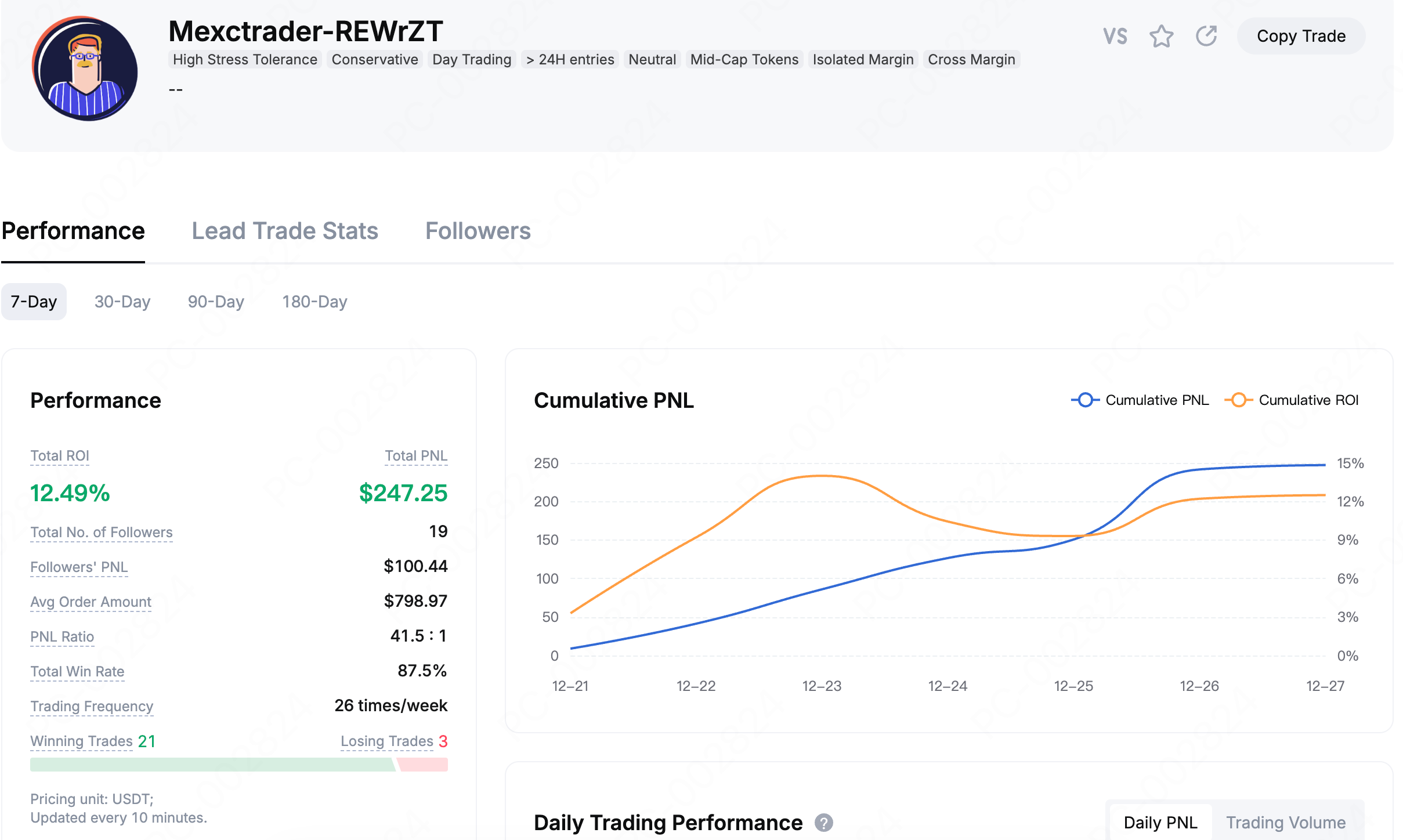

Trading frequency: Refers to the average number of trades a Copy Trade Trader executes per week within a given period. Some Traders prefer short-term, high-frequency trading, while others focus on medium- to long-term strategies. You should choose a trading style and investment approach that matches your own risk tolerance.

Profit-loss ratio: Refers to the ratio of total profits to total losses. It is important to note that a high win rate does not necessarily indicate stronger profitability. If a Copy Trade Trader earns small profits per trade but incurs large losses, that Trader may not be suitable for your needs.

Note: Total win rate = number of profitable closed trades / total number of closed trades × 100%

1.3 Rankings and Number of Followers


MEXC ranks Traders based on multiple factors, including ROI, win rate, PNL, and number of Followers. In general, Traders with more Followers are considered more reliable, as their performance has been validated by more users through actual Copy Trade activity.


However, past performance does not guarantee future results. Even when choosing a high-performing Trader, it is recommended to allocate funds reasonably and set take-profit and stop-loss levels to manage risk effectively.

2. How to Choose a Trader


Open the MEXC website and log in to your account. In the top navigation bar, click Futures, then select Copy Trade to enter the Copy Trade page.


2.1 AI Recommendations (Suitable for Beginners)


If you are unsure how to choose a Trader, you can let the system assist you. On the Copy Trade page, enable AI Recommendations. The system will automatically match suitable Traders based on your trading preferences. If you are not satisfied with the results, click Refresh to generate a new set of recommendations.


You can also turn off AI Recommendations and use preference filters instead. Select your desired criteria and click Match Again. The system will recommend Traders that meet your conditions. If the results are still not satisfactory, you can click Refresh to rematch.


2.2 Manual Filtering: For Users With Clear Preferences


If you have specific requirements for a Trader, you can use manual filtering to make your selection.

Scroll down on the Copy Trade page and choose either Top Traders or All Traders. You can filter and sort Traders by criteria such as higher ROI, higher PNL, or number of Followers.


On each Copy Trade Trader card, you can view key information, including ROI, PNL, win rate, supported Copy Trade pairs, trading frequency, profit-sharing ratio, and number of Followers.

Tip: Click the icon on a Trader card to add the Trader to your watchlist for easier review and comparison later.


Click a Trader card to enter the Trader Details page, where you can view more comprehensive information, including copy performance, cumulative PNL, daily trading performance, follower PNL, Futures preferences, trading pairs, and average holding duration.

You can also review detailed copy data, including records of active and historical copy trades, to better understand the Trader's trading behavior.


If you are undecided between multiple Traders, you can use the comparison feature. On the Trader Details page, click the VS button to enter the Trader comparison page. After adding multiple Traders, the system will compare them based on basic information and trading data.

After selecting Highlight Best Performances, the comparison table will highlight the best-performing data, allowing you to identify differences more easily.


Click the Copy Trade button on the Trader card you have selected and set your copy trading parameters to start Copy Trade. Enter the copy trading amount and account stop-loss. For advanced settings, click More Settings.

If the Trader you selected has reached the maximum number of Followers, you can click Copy Trade and enable slot reminders. Once enabled, you will receive push notifications and in-app messages when a follower slot becomes available.


How to Choose MEXC Copy Trade Traders

Key Points

  • Copy Trade is an investment method that allows users to replicate the trades of experienced traders, making it suitable for beginners with little or no trading experience.
  • When selecting a trader, focus on long-term stable performance rather than short-term high returns.
  • Key evaluation metrics include Return on Investment (ROI), PNL, win rate, trading frequency, and number of Followers.
  • MEXC offers two selection methods: AI recommendations and manual filtering, helping you find the most suitable traders.
  • Please note that past performance does not guarantee future results. It is recommended to allocate funds prudently and set take-profit and stop-loss levels.

Copy Trade allows users to follow and replicate the trades of experienced Traders, copying each of their trading actions. Choosing the right Trader is critical to achieving long-term success.

1. How to Evaluate Whether a Trader Is Right for You


1.1 Long-Term vs Short-Term Performance


Many beginners are drawn to high returns, short-term gains are often driven by luck or unusual market conditions and do not reflect a trader’s true ability.
When evaluating a Trader, review both short-term and long-term performance. A Trader whose 7-day results are good and whose 180-day performance remains stable is generally more reliable.
MEXC provides the following metrics for reference:
  • PNL: The Trader's actual profit
  • ROI: Percentage return on invested funds
  • Win Rate: Percentage of profitable trades

1.2 Trading Style and Risk Preference


Each Trader has a different trading style. You should choose a Trader whose approach matches your own preferences. On the Trader Details page, focus on the following indicators.

Trading frequency shows how often a Trader places orders each week.
  • High-frequency Traders trade more often and focus on short-term strategies.
  • Low-frequency Traders trade less often and usually hold positions for a longer period.

If you prefer fewer changes in your account, a low-frequency Trader may be more suitable. If you prefer faster capital turnover, a high-frequency Trader may be a better choice.

PNL performance should also be considered. Do not rely on the win rate alone. Pay attention to how much a Trader earns on profitable trades and how much they lose on losing trades. Over time, a Trader with lower losses and higher average profits may perform better even if their win rate is lower.


Trading frequency: Refers to the average number of trades a Copy Trade Trader executes per week within a given period. Some Traders prefer short-term, high-frequency trading, while others focus on medium- to long-term strategies. You should choose a trading style and investment approach that matches your own risk tolerance.

Profit-loss ratio: Refers to the ratio of total profits to total losses. It is important to note that a high win rate does not necessarily indicate stronger profitability. If a Copy Trade Trader earns small profits per trade but incurs large losses, that Trader may not be suitable for your needs.

Note: Total win rate = number of profitable closed trades / total number of closed trades × 100%

1.3 Rankings and Number of Followers


MEXC ranks Traders based on multiple factors, including ROI, win rate, PNL, and number of Followers. In general, Traders with more Followers are considered more reliable, as their performance has been validated by more users through actual Copy Trade activity.


However, past performance does not guarantee future results. Even when choosing a high-performing Trader, it is recommended to allocate funds reasonably and set take-profit and stop-loss levels to manage risk effectively.

2. How to Choose a Trader


Open the MEXC website and log in to your account. In the top navigation bar, click Futures, then select Copy Trade to enter the Copy Trade page.


2.1 AI Recommendations (Suitable for Beginners)


If you are unsure how to choose a Trader, you can let the system assist you. On the Copy Trade page, enable AI Recommendations. The system will automatically match suitable Traders based on your trading preferences. If you are not satisfied with the results, click Refresh to generate a new set of recommendations.


You can also turn off AI Recommendations and use preference filters instead. Select your desired criteria and click Match Again. The system will recommend Traders that meet your conditions. If the results are still not satisfactory, you can click Refresh to rematch.


2.2 Manual Filtering: For Users With Clear Preferences


If you have specific requirements for a Trader, you can use manual filtering to make your selection.

Scroll down on the Copy Trade page and choose either Top Traders or All Traders. You can filter and sort Traders by criteria such as higher ROI, higher PNL, or number of Followers.


On each Copy Trade Trader card, you can view key information, including ROI, PNL, win rate, supported Copy Trade pairs, trading frequency, profit-sharing ratio, and number of Followers.

Tip: Click the icon on a Trader card to add the Trader to your watchlist for easier review and comparison later.


Click a Trader card to enter the Trader Details page, where you can view more comprehensive information, including copy performance, cumulative PNL, daily trading performance, follower PNL, Futures preferences, trading pairs, and average holding duration.

You can also review detailed copy data, including records of active and historical copy trades, to better understand the Trader's trading behavior.


If you are undecided between multiple Traders, you can use the comparison feature. On the Trader Details page, click the VS button to enter the Trader comparison page. After adding multiple Traders, the system will compare them based on basic information and trading data.

After selecting Highlight Best Performances, the comparison table will highlight the best-performing data, allowing you to identify differences more easily.


Click the Copy Trade button on the Trader card you have selected and set your copy trading parameters to start Copy Trade. Enter the copy trading amount and account stop-loss. For advanced settings, click More Settings.

If the Trader you selected has reached the maximum number of Followers, you can click Copy Trade and enable slot reminders. Once enabled, you will receive push notifications and in-app messages when a follower slot becomes available.