

MEXC Futures Funding Rate: Calculation Methods and How to View Funding Rates
1. What Is the Funding Rate?
The funding rate is a key mechanism in the perpetual futures market that helps keep futures prices aligned with spot prices. Through this mechanism, long and short position holders periodically pay fees to each other at a fixed rate. MEXC does not charge any fees for funding payments.
- Positive funding rate: Long position holders pay funding fees to short position holders
- Negative funding rate: Short position holders pay funding fees to long position holders
The funding fee is calculated as follows: Funding Fee = Position Value × Funding Rate
Note that funding fee deductions may affect your liquidation price and final PNL. Funding settlement times vary by trading pair. Please refer to the information displayed on the official MEXC website for the exact schedule.
2. Why Do Perpetual Futures Require a Funding Rate Mechanism?
The funding rate exists due to dynamic changes in market supply and demand. When a large number of traders hold positions in the same direction, futures prices may deviate from the underlying spot index price, potentially causing abnormal market fluctuations.
The funding rate mechanism uses economic incentives to guide trader behavior, encouraging futures prices to realign with the underlying asset price. This mechanism effectively prevents excessive price deviations and reduces the risk of market manipulation. For experienced traders, funding rates can also present additional profit opportunities.
3. How to Check the Current Funding Rate on MEXC?
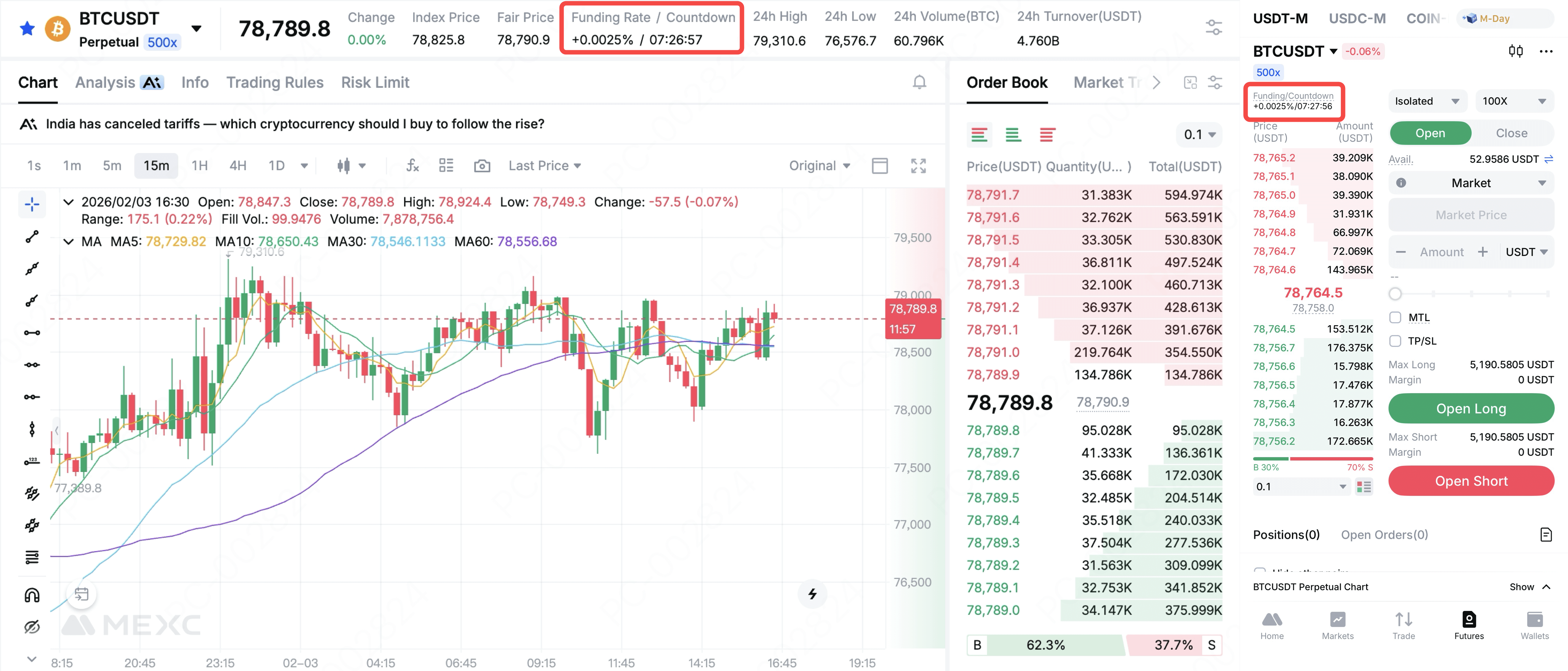
On the MEXC Futures trading page, you can directly view the current funding rate and the funding countdown for each Futures trading pair. As funding rates differ across trading pairs, simply switch between pairs to check the relevant information.
4. Detailed Funding Fee Calculation Methods
MEXC supports two Futures modes, each with a slightly different funding fee calculation method.
4.1 Funding Fee Calculation for Stablecoin-Margined Futures
Funding Fee = Position Value × Funding Rate
Position Value = Position Size (crypto quantity) × Fair Price
Example: Assume Trader A holds a long position of 10 BTC in BTCUSDT Perpetual Futures. The current fair price is 10,000 USDT, and the funding rate is 0.01%.
- Position value = 10 × 10,000 = 100,000 USDT
- Funding fee = 100,000 × 0.01% = 10 USDT
Since the funding rate is positive, Trader A (the long position holder) must pay 10 USDT, while short position holders with the same position size will receive 10 USDT.
4.2 Coin-Margined Futures Funding Fee Calculation
Funding Fee = Position Value × Funding Rate
Position Value = Position Size (Cont) × Contract Value / Fair Price
Example: Assume Trader A holds 100 cont. of BTCUSD long position, with each cont. having a value of $100. The current fair price is 10,000 USDT, and the funding rate is 0.01%.
- Position value = 100 × 100 / 10,000 = 1 BTC
- Funding fee = 1 BTC × 0.01% = 0.0001 BTC
Since the funding rate is positive, Trader A must pay 0.0001 BTC, while the corresponding short position holders will receive 0.0001 BTC.
5. Funding Settlement Time and Fee Rules
Funding fees are generally settled every 8 hours, at 00:00, 08:00, and 16:00 (UTC). Only users who hold open positions at the settlement time are required to pay or receive funding fees. Positions closed before the settlement time will not incur any funding fees. The entire process is fully automated, with funding fees directly exchanged between Futures position holders.
Please note:
1. Funding fee settlement may be delayed by up to 15 seconds due to batch processing. Positions opened shortly after the settlement time, such as 08:00:05 (UTC), may still be included in the current settlement, whether the trader pays or receives the fee.
2. Funding fee settlement times may vary by Futures trading pair. Please refer to the product page for details.
6. How to Check Paid or Received Funding Fee Records?
Web: Go to theOrders page and select Funding Fees to view detailed records.
App: Tap Profile Icon → Transactions → Futures Orders → Capital Flow, then use Filter to select Funding Feeand tap Confirm to view the records.
7. How to View Historical Funding Rate Data?
Web: Visit the MEXCFunding Rate History page to view complete historical data.
App: From the app homepage, enter Futures, tap the Funding/Countdown section, then select View funding rate history to access historical funding data.