

How to Use OCO Orders in Spot Trading
1. What is an OCO order?
An OCO order is a trading strategy that combines a TP/SL order with a limit order into one order setup. Its core mechanism is simple: when one of the two orders is triggered and executed, or partially executed, the other order is automatically canceled. If you manually cancel either order, the other one will also be canceled at the same time.
This automated one-cancels-the-other strategy is suitable for scenarios like this: you are bullish on a token but want to manage the risk of a wrong market call. You may want to take profit if the price rises, while also setting a stop-loss to protect your principal if the price falls. With an OCO order, you do not need to monitor the market at all times, as the system will execute the trade automatically based on your preset conditions.
2. How to use OCO orders in MEXC Spot trading
The following uses the MX/USDT trading pair as an example to show the specific steps for placing an OCO order.
2.1 Web
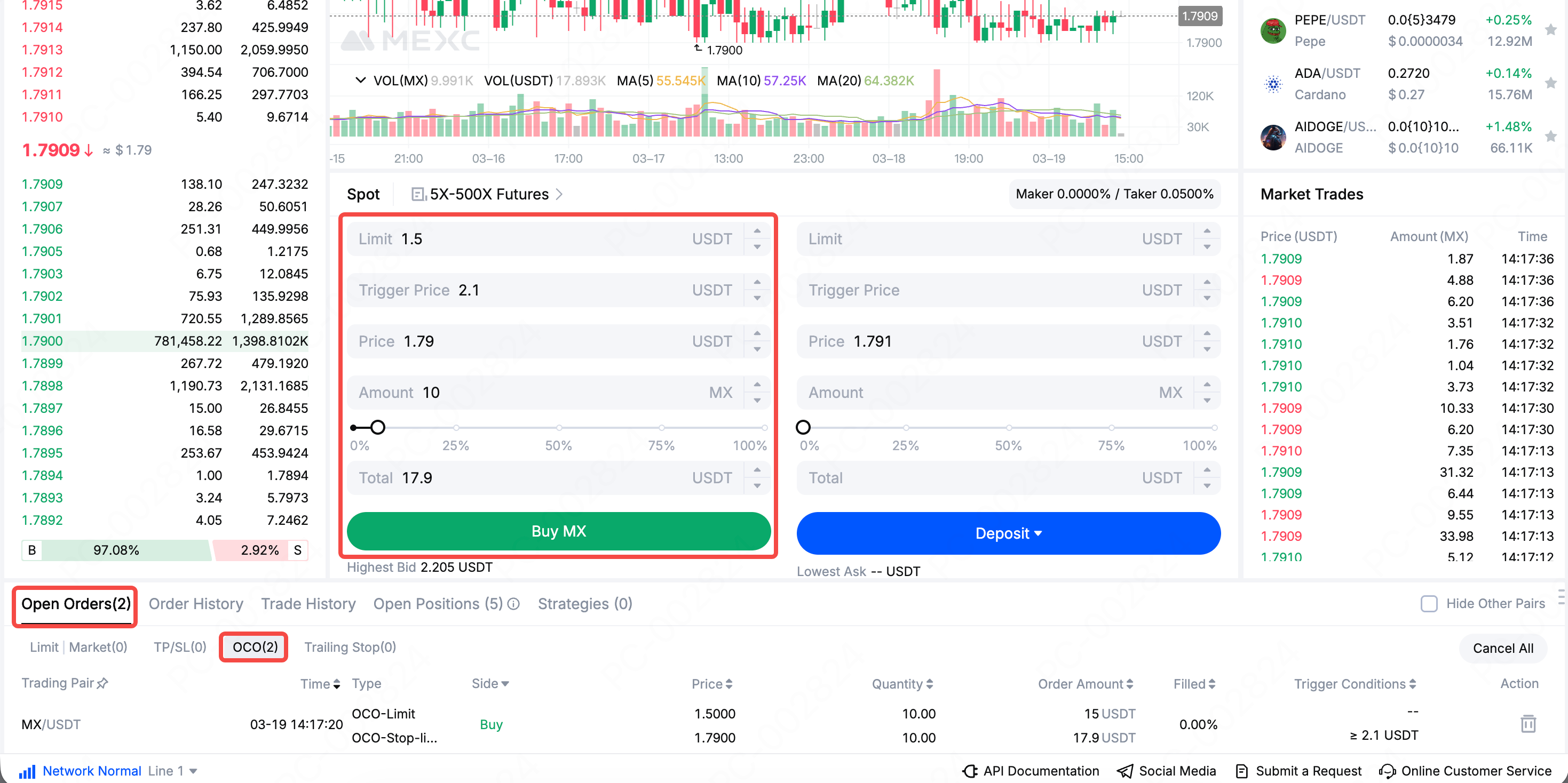
Open and log in to the MEXC official website → Spot → select the MX/USDT trading pair → OCO → enter Limit, Trigger Price, Price, and Amount → Buy MX
After the order is placed successfully, you can check its status in the OCO list under Open Orders.
2.2 App
Open and log in to the MEXC App → Trade → select the MX/USDT trading pair → OCO → enter Limit, Trigger Price, Price, and Quantity → Buy MX
After the order is placed successfully, you can check its status in the OCO list under Open Orders.
2.3 OCO order logic
Trade Direction | Use Case | Limit Order Setting | Stop Order Setting | Price Rule |
Buy | You want to buy at a lower cost if the price pulls back, but also want to avoid missing the upside if the price continues to rise | Set a price below the current market price as your ideal entry point | Set a trigger price above the current market price so the system buys automatically if the price rises to that level | Limit order price < current market price < stop trigger price |
Sell | You believe the price may continue rising and want to take profit at a higher level, but also want to prevent profit retracement if the price drops sharply | Set a price above the current market price as your take-profit target | Set a trigger price below the current market price so the system sells automatically if the price falls below that level | Stop trigger price < current market price < limit order price |
2.4 OCO order example
Assume you are holding MX, and the current market price is 1.8 USDT. Based on your analysis, MX still has upside potential, with a target price of 2.2 USDT. However, if the price falls below 1.5 USDT, that would suggest your market outlook was wrong and a stop-loss is needed.
In this case, you can place a sell OCO order: set the limit sell price at 2.2 USDT as your take-profit target, and set the stop trigger price at 1.5 USDT as your risk threshold.
If the price of MX rises to 2.2 USDT, the limit order will be executed to lock in profits, and the stop order will be canceled automatically. If the price of MX falls to 1.5 USDT, the stop order will be triggered to protect your principal, and the limit order will be canceled automatically. In either case, you do not need to monitor the market in real time.
3. OCO order FAQ
3.1 Must both components of an OCO order involve the same trading pair?
Yes. The take-profit order and stop-loss order in an OCO order must be placed for the same trading pair. For example, if you place an OCO order for BTC/USDT, both orders must be for BTC/USDT and cannot involve different trading pairs.
3.2 Will a stop order always be executed once triggered?
Not necessarily. When a stop order is triggered, the system only submits the corresponding order automatically. If the market is highly volatile or liquidity is insufficient, especially for stop-limit orders, the order may not be filled immediately at the expected price. Under extreme market conditions, it is recommended to leave a reasonable gap between the stop-limit price and the trigger price.
3.3 Will an OCO order freeze my assets?
Yes. When you place an OCO order, the system will freeze the required assets or positions for that order. If your account balance is insufficient, the order cannot be submitted successfully. Frozen assets cannot be used for other trades until the order is executed or canceled.
3.4 What happens if I manually cancel one of the orders in an OCO order?
On the MEXC platform, if you manually cancel either order in an OCO order, the other linked order will also be canceled at the same time. This is the built-in linkage mechanism of OCO orders, ensuring that both orders always function as one complete order setup.
3.5 Do OCO orders support partial fills?
Yes. If the limit order in an OCO order is partially filled, the system will handle the remaining order based on the actual execution. The specific rules are subject to the actual execution logic of the MEXC platform. It is recommended that you review the relevant rules before placing an order.
3.6 Can OCO orders fail under extreme market conditions?
Under fast and highly volatile market conditions, there may be extreme cases where neither the take-profit order nor the stop-loss order is executed as expected. In addition, if there is a network interruption or system abnormality, the order may fail to be sent to the orderbook and executed properly. It is recommended that you review and adjust your OCO settings in advance when major data releases or sharp market swings are expected.
3.7 Are OCO orders suitable for beginners?
OCO orders are an advanced trading tool. It is recommended that you first understand the basic usage of limit orders and TP/SL orders before using them. New users can start with simple limit and market orders, gradually learn how different order types work, and then use OCO orders to build more advanced trading strategies.
3.8 Where can I check the execution status of my OCO orders?
You can view unfilled OCO orders under Open Orders at the bottom of the trading page, check execution or canceled records under Order History, and view detailed filled under Trade History.
Although OCO orders can help investors manage risk and automate trading, orders may still fail to be executed as expected during periods of sharp market volatility. When using an OCO strategy, please monitor market conditions closely and make sure your trading strategy matches your own investment goals and risk tolerance.