

MEXC Futures Trigger Order FAQs
1. What is a trigger order on MEXC Futures?
A trigger order is a strategic order type provided by MEXC. Users can pre-set a trigger price, order price, and quantity. When the market price reaches the trigger price, the system automatically places an order at the pre-set order price. This order type helps traders achieve goals such as taking profit, stopping loss, closing positions, or opening positions based on trends.
Compared to other order types, a key feature of trigger orders is that no positions or margin are frozen before the order is successfully triggered. This means your funds remain available for other trading operations until the trigger occurs, improving capital efficiency.
2. What types of trigger prices are available for trigger orders?
In MEXC Futures trading, trigger orders support three types of trigger prices: last price, fair price, and index price.
Last price refers to the immediate transaction price in the MEXC Futures order book, reflecting real-time market trading conditions. The fair price is calculated using weighted price data from major exchanges. It reflects the true market price more fairly and effectively prevents user losses caused by abnormal fluctuations on a single platform. Index price is derived by selecting spot prices from multiple major exchanges and calculated based on different weights.
Choosing different trigger price types can meet various trading strategy needs. For example, using the fair price as a trigger condition can avoid abnormal triggers caused by short-term price manipulation.
3. The market has reached the trigger price, so why hasn't my trigger order been executed?
It is important to note that reaching the trigger price does not guarantee the order will be executed. The execution process of a trigger order occurs in two stages. First is the trigger stage, where the market price meets the trigger condition, the system activates the order. Second, the order placement stage, where the system sends the order to the market at the pre-set order price.
Common reasons why a trigger order may fail to trigger or execute include the following. The market price reached the trigger price but has not yet reached the order price. Likewise, there may be insufficient margin causing order placement failure. The position quantity may exceed limits. The trading pair could be in a non-trading state, or there might be network anomalies or system maintenance. Additionally, during extreme market conditions, violent price fluctuations may prevent the order from being triggered or executed immediately.
Once triggered, the resulting limit order behaves like a standard limit order and does not guarantee execution. If the market price moves rapidly, the limit order may not be filled at the pre-set price. Any unfilled limit orders will appear in the current orders list, where you can view and manage them at any time.
4. How should the trigger price and order price for a trigger order be set?
Properly setting the trigger price and order price is key to ensuring the effective execution of a trigger order.
For stop-loss sell scenarios, set the trigger price at the level where you wish to stop loss. It is recommended to set the order price slightly below the trigger price, or simply select a market order. This ensures rapid execution once triggered. For example, if you hold a BTC long position and want to stop loss if the price drops to 39,000 USDT, set the trigger price to 39,000 USDT and the order price to 38,950 USDT, or choose market order.
For stop-loss buy scenarios, set the trigger price at your stop-loss level. The order price should be set slightly above the trigger price. For example, if you hold a BTC short position and want to stop loss if the price rises to 41,000 USDT, set the trigger price to 41,000 USDT and the order price to 41,050 USDT.
For breakout long, also known as "buying the dip" scenarios, when you anticipate a significant upward trend after the price breaks through a key level, set the trigger price at that breakout level. For the order price, choose a market order or a limit price slightly higher than the trigger price to ensure entry.
5. Is it better to choose a limit order or a market order for a trigger order?
Both limit orders and market orders have their pros and cons; the choice depends on the specific trading scenario.
When selecting a limit order, you can precisely control the execution price and avoid additional costs from slippage. However, the downside is that limit orders may fail to execute during market volatility. This option is suitable for situations where strict requirements exist for the execution price and market volatility is relatively stable.
When selecting a market order, the system will execute the order quickly at the current best market price once triggered, offering fast execution speed and high certainty. However, in highly volatile markets, significant slippage may occur, resulting in a deviation between the actual fill price and the expected price. This is suitable for situations requiring rapid position liquidation or stop-loss execution where speed takes precedence over price precision.
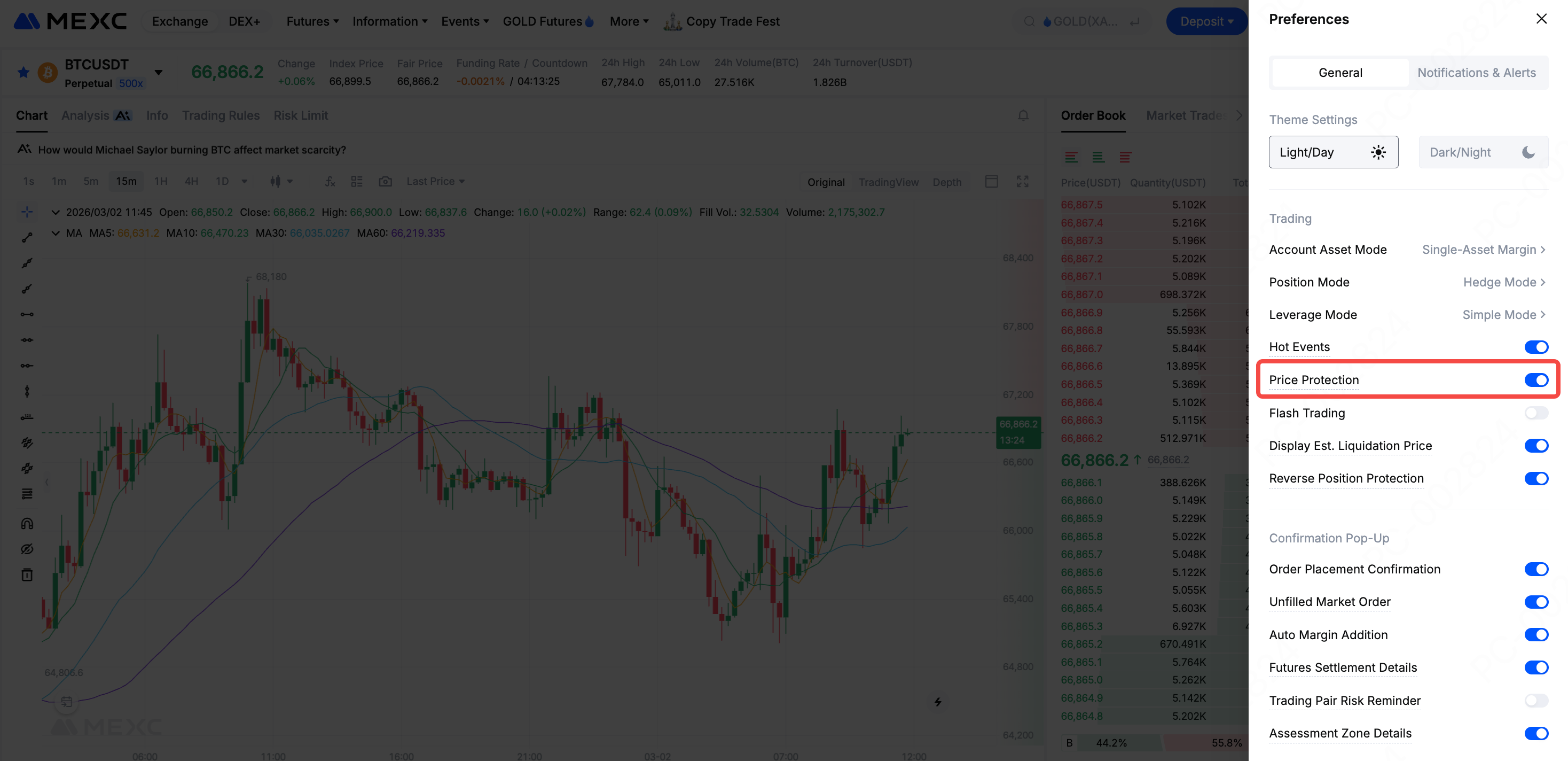
MEXC offers a price protection feature that effectively prevents losses caused by abnormal triggering of TP/SL orders during periods of extreme market volatility. We recommend enabling this feature when using market orders.
6. How to prevent trigger orders from failing due to price gaps?
In the cryptocurrency market, prices can fluctuate violently in a short period, potentially jumping directly over your set trigger price. In such cases, if the gap between the trigger price and the actual market price is too large, the order may fail to execute normally.
Here are a few suggestions to mitigate the risks associated with price gaps. Appropriately increase the distance between the trigger price and the current market price to allow room for volatility. For TP/SL orders, prioritize using market orders to ensure rapid execution once triggered. Also, periodically check and adjust untriggered orders to ensure the trigger conditions still align with current market conditions.
7. Do trigger orders occupy margin before being triggered?
In MEXC Futures trading, trigger orders do not freeze user positions or margin before they are successfully triggered. This is a key feature of trigger orders, allowing traders to manage their funds more flexibly.
Note also that although margin is not occupied before triggering, the system will check whether the account has sufficient available margin to execute the order at the moment of triggering. If the account balance is insufficient at that time, the order will fail to be executed. Therefore, it is recommended to ensure that sufficient margin is reserved in your account when setting up a trigger order.
8. How to set up a Futures trigger order on MEXC?
Web: Log in to the MEXC official website and navigate to the Futures trading page. Select Trigger order, enter Trigger Price, Price, and Quantity in sequence, configure TP/SL if necessary. Then click Open Long or Open Short.
Once set, you can view the configured orders in the Open Orders → Trigger Orders list, and modify or Cancel them at any time.
App: Enter the Futures trading page, select Trigger order, enter Trigger Price, Price, and Quantity in sequence, configure TP/SL, and click Open Long or Open Short.
Once set, you can view the configured orders in the Open Orders → Trigger Orders list, and modify or Cancel them at any time.
9. What should I do if order placement fails after a trigger order is activated?
If an order fails to be placed after your trigger order is activated, consider the following steps:
1) Since trigger orders do not freeze margin before activation, your available funds might have been allocated to other orders by the time the trigger occurs, resulting in insufficient balance.
2) Confirm whether your current position has reached the contract's holding limit. Different contracts have different maximum position limits, so exceeding these limits will prevent new positions from being opened.
3) Ensure the trading pair is in a normal trading state. During system maintenance or special market conditions, trading may be suspended, preventing any triggered orders from being executed.
If you set a limit trigger order and the market price moves rapidly after triggering, preventing execution at your preset price, the unfilled limit order will appear in your open orders list. You can choose to wait for the market price to return to your target level or manually cancel the order and reset it.
10. In Conclusion
MEXC Futures trigger orders enable traders to automatically execute trading strategies without the need to constantly monitor the market. By reasonably setting the trigger price and order price, and selecting appropriate price types and order methods, traders can more effectively manage risks and seize market opportunities.
When using trigger orders, note that triggering does not guarantee execution. Sufficient margin must be available at the time of triggering, and execution risks may arise under extreme market conditions. Traders are advised to thoroughly understand the operational mechanisms of trigger orders and use them judiciously in alignment with their trading strategies to achieve a more efficient Futures trading experience.