

Cloning Environments on AWS Beanstalk: A Practical Fix for Zero-Downtime Patching
Achieving Zero-Downtime During Patching Experiments
I was recently asked to help with an AWS Beanstalk issue. An application was running on Beanstalk, but the security team flagged it as non-compliant for OS patching because the underlying servers hadn’t been updated for about a year — the Windows Update service had stopped working. An upgrade to the latest platform failed for some reason, so the team wanted to patch the EC2 instances without affecting live traffic. The goal was to avoid any interruption. I started digging into AWS Elastic Beanstalk to understand the options available to handle this.
What is AWS Elastic Beanstalk?
It’s a service for deploying web applications and services. Elastic Beanstalk provides capacity provisioning, load balancing, autoscaling, and health monitoring. This allows you to focus on writing code.
Benefits of AWS Elastic Beanstalk
Among many others, the key benefit is that one can deploy a scalable web application within minutes, as you don’t have to worry about the complexity of underlying infrastructure like configuring VPC, EC2 instances, load balancers and autoscaling policies, and so on.
It also supports most major programming languages, including Java, .NET, Node.js, Python, and Ruby, with full support for Docker as well. Other benefits include monitoring, health checks, logging, tracing, automatic updates, auto-scaling, and multi-AZ deployments.
What does AWS Elastic Beanstalk Cost?
Nothing. Yes, that’s correct, the AWS Elastic Beanstalk does not cost anything additionally. You will pay for any resources you configure to run your application, same as you would when you configure them without using AWS Elastic Beanstalk.
Back to my problem.
Among many other features, the one that came to the rescue was environment cloning. It allows the developers to replicate an existing environment rapidly. Cloning environment was the solution we arrived at after evaluating other options like scaling up, building a completely new environment, or routing traffic to one region while working on the other region.
How to clone environments with AWS Beanstalk
Environment cloning can be done with the following simple steps:
- Open the Elastic Beanstalk console, and select the AWS Region.
- Choose Environments from the navigation panel and then choose the name of your environment from the list.
- On the environment overview page, choose Actions.
- Choose Clone environment.
- In the New Environment section, you can optionally change the Environment name, Environment URL, Description, Platform version, and Service role values that Elastic Beanstalk automatically sets based on the original environment.
- Choose Clone.
I cloned the environment. As it spawned new EC2 instances, they already had patches installed. After that, it was just a matter of changing the R53 entry to the domain created for the cloned environment so that the live traffic was routed to it.
The original environment was left untouched to allow us to fail back in case of any issue. Once we were satisfied with the cloned environment running without any issues, we updated the original environment and started sending traffic to the original environment.
AWS Elastic Beanstalk is a developer-friendly service, takes responsibility for infrastructure configuration and management. Its clone environment feature can be really handy for testing and experimenting with code running in live applications without impacting the customer.


추천 콘텐츠
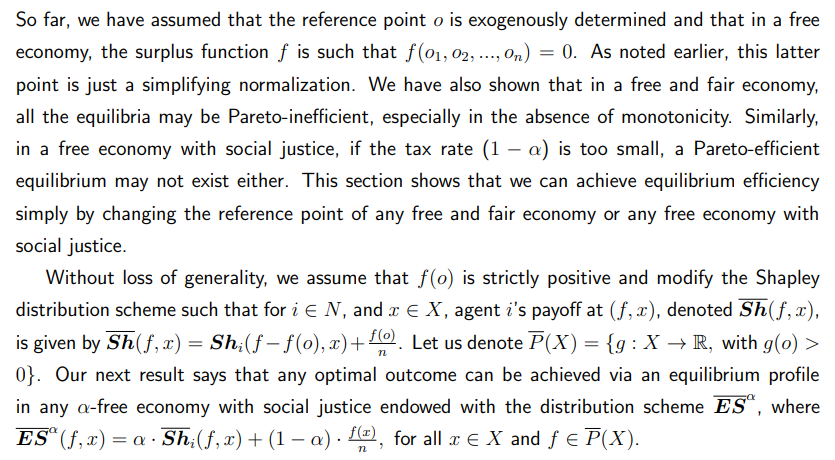
The Role of Reference Points in Achieving Equilibrium Efficiency in Fair and Socially Just Economies

CoinRabbit Reduces Crypto Lending Rates for XRP Loans and 300+ Assets




