How to Deposit and Withdraw USD on MEXCHow to Deposit and Withdraw USD on MEXC
Category List
Cancel

How to Deposit and Withdraw USD on MEXC

USD Bank Transfer (SWIFT) is now available on MEXC, enabling eligible users to securely deposit and withdraw USD between their bank accounts and their MEXC Fiat accounts.

Designed for users who prefer to transfer larger amounts via bank transfer, USD Bank Transfer (SWIFT) offers a secure, reliable, and convenient way to move funds. Once your USD deposit is credited, you can purchase cryptocurrencies via Quick Buy or use your funds for trading on the Spot market. You can also withdraw your USD balance back to your bank account.

Follow the step-by-step instructions below to deposit or withdraw USD. Before making a fiat deposit, ensure you have completed Advanced KYC Verification.

1. Deposit


Step 1: Go to the Fiat Deposit Page


Visit the Fiat Deposit page. Alternatively, hover over Buy Crypto in the top navigation bar and select Fiat Deposit.
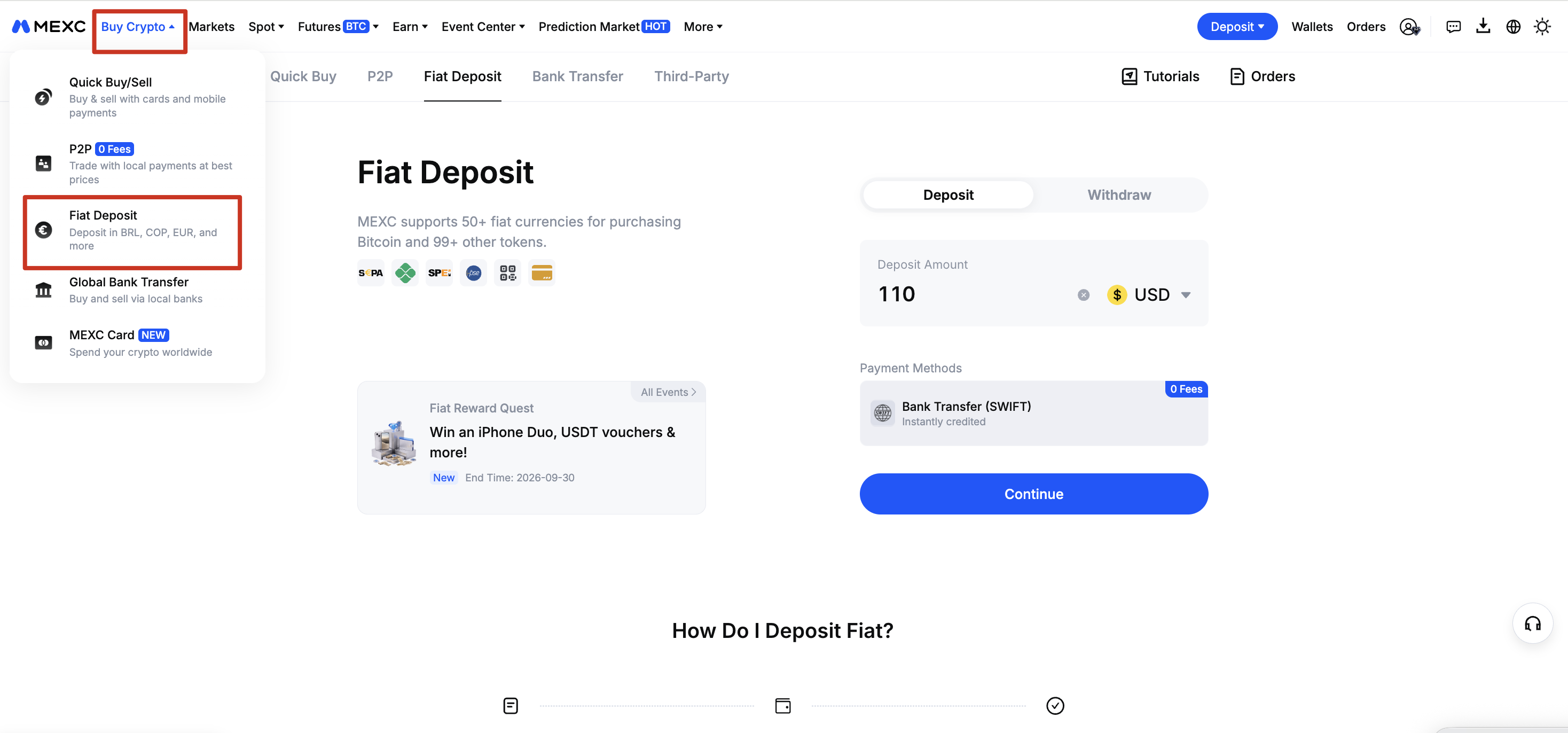

Step 2: Enter Deposit Details


1)Select USD as your fiat currency
2)Enter the amount you want to deposit
3)Choose Bank Transfer (SWIFT) as the payment method
Note: The final amount credited will be based on the actual amount received.


Step 3: Complete Account Setup


You may be required to review and provide your identity information to set up your bank transfer account, including your full name, nationality, country of residence, and other required details.

Please make sure all information is accurate and matches your verified account details.

Account creation typically takes about 2 minutes. Once completed, you can proceed with the transfer.


Step 4: Make a Bank Transfer


Review the transfer details provided by MEXC, including:
  • Receiver Name
  • IBAN
  • Recipient Account
  • Reference/Comments
  • Other bank details, if applicable

Use these details to initiate a SWIFT transfer from your bank.

Important: Enter the receiver details and reference code exactly as displayed. Incorrect information may cause the transfer to fail or be delayed.

Please note the following when making a bank transfer:

1) Recipient Account Details
  • Use the IBAN or bank account number as required by your bank.
  • Select Personal Transfer as the transfer type and Bahrain (BH) as the recipient bank's country/region.
  • If intermediary bank details are required, use those shown on the MEXC deposit page.

2) Sender Account Requirements
  • Use a bank account in your own name that matches your MEXC-verified name. Transfers from third-party accounts will be returned.

3) Transfer Reference
  • Enter the full Reference shown on the page in the transfer remarks field. Missing or incorrect references may delay or prevent order matching.

4) Fees
  • SWIFT transfers may pass through one or more intermediary banks that deduct additional fees.
  • Select OUR (sender pays all fees) at your bank. Ensure the amount received is at least equal to the order amount.


Step 5: Wait for Your Deposit to Be Credited


Once the transfer is received and confirmed, your USD will be credited to your Fiat account.

SWIFT deposits typically arrive within 1-2 business days, depending on your bank and any intermediary banks involved.

Step 6: Check Your Transaction History


Go to Wallets → Fiat to view your fiat deposit and withdrawal history.

Once credited, your USD balance is available for crypto purchases and trading.

2. Withdraw


Step 1: Go to the Fiat Withdrawal Page


Visit the Fiat Deposit page. Alternatively, hover over Buy Crypto in the top navigation bar and select Fiat Deposit. Then select Withdraw to switch to the fiat withdrawal page.


Step 2: Enter Withdrawal Details


1)Select USD as your fiat currency.
2)Enter the amount you wish to withdraw.
3)Choose Bank Transfer (SWIFT) as your withdrawal method.
4)Enter your bank account details as required.
5)Review the withdrawal details and applicable fees, then proceed.

Important: Make sure your bank account information is accurate. Incorrect or incomplete information may result in delays or a failed withdrawal.

Step 3: Complete Security Verification


Review and confirm your withdrawal details, then complete security verification (2FA).

Step 4: Wait for Your Withdrawal


Once your withdrawal request is successfully submitted, it will be processed, and the funds will be sent to your bank account via SWIFT.

SWIFT withdrawals may take 1 to 2 business days to arrive, depending on the receiving bank, intermediary banks, and banking holidays.

You can check the status of your withdrawal under Orders.

Your bank may take additional time to credit the funds to your account, even if the withdrawal is marked as completed on MEXC. The final amount credited and the time of receipt depend on your bank's processing and records.

3. Important Notes


3.1 Eligibility


USD Bank Transfer (SWIFT) is available to eligible users whose Proof of Address (POA) or Proof of Identity (POI) is from one of the following supported countries or regions:

Åland Islands, Andorra, Antarctica, Aruba, Australia, Austria, Bahrain, Barbados, Belgium, Bermuda, Bhutan, Botswana, Bouvet Island, Brazil, British Indian Ocean Territory, Brunei, Cabo Verde, Canada, Cayman Islands, Chile, Christmas Island, Cocos (Keeling) Islands, Cook Islands, Croatia, Czech Republic, Denmark, Dominica, Estonia, Falkland Islands, Faroe Islands, Fiji, Finland, France, French Guiana, French Southern Territories, Gibraltar, Greece, Greenland, Grenada, Guadeloupe, Guam, Guernsey, Heard Island and McDonald Islands, Hong Kong, Iceland, Ireland, Isle of Man, Israel, Italy, Japan, Jersey, Jordan, Kiribati, Latvia, Liechtenstein, Luxembourg, Malaysia, Marshall Islands, Martinique, Mayotte, Micronesia, Montserrat, Nauru, New Caledonia, New Zealand, Niue, Norfolk Island, Northern Mariana Islands, Norway, Oman, Palau, Pitcairn Islands, Poland, Portugal, Puerto Rico, Réunion, Romania, Saint Barthélemy, Saint Helena, Saint Kitts and Nevis, Saint Lucia, Saint Martin, Saint Pierre and Miquelon, Saint Vincent and the Grenadines, Samoa, San Marino, Sao Tome and Principe, Slovakia, Slovenia, Solomon Islands, South Georgia and the South Sandwich Islands, South Korea, Spain, Svalbard and Jan Mayen, Sweden, Switzerland, Taiwan, Timor-Leste, Tokelau, Tonga, Turks and Caicos Islands, Tuvalu, United Kingdom, Uruguay, Vatican City, Wallis and Futuna.

3.2 Fees and Limits


  • Deposit fee: 0 Fees on USD deposits until further notice
  • Withdrawal fee: Subject to the rate displayed on the withdrawal page.
  • Daily limit: Up to the equivalent of USD 20,000.

3.3 Deposit Instructions


  • The bank account holder's name must match the name used for your MEXC KYC Verification.
  • The amount credited to your MEXC Fiat Wallet will be based on the actual amount received.
  • Always use the bank details and reference code shown for the specific transaction.
  • SWIFT fees from your bank may apply. Your own bank or intermediary banks may charge additional SWIFT transfer fees.

3.4 SWIFT Transfer Field Guide


Field names may vary across banks and their online or mobile banking platforms. When making a SWIFT transfer, refer to the table below and use the details shown on the MEXC deposit page.

Common Bank FieldsRequired InformationImportant Notes
Ordering Customer / RemitterFull legal name on your bank accountMust match your bank account name exactly. Do not use initials or abbreviations.
Beneficiary NameReceiver Name shown on the MEXC deposit pageCopy the full name exactly as displayed.
Beneficiary Account / IBANIBAN or Recipient Account provided by MEXCEnter as required by your bank. If an IBAN is required, enter it in full.
SWIFT / BIC CodeSWIFT Code provided by MEXCSWIFT/BIC identifies the bank, while IBAN identifies the account. Enter both if required.
Payment Reference / Reason for PaymentReference Code shown on the MEXC deposit pageRequired. Missing or incorrect codes may prevent automatic deposit crediting.
Beneficiary Bank AddressBank city and country provided by MEXC, if requiredSome banks may request additional address details if the SWIFT code alone is insufficient.
Details of ChargesOUR (recommended)Selecting SHA may result in intermediary bank fees being deducted, reducing the amount received.

3.5 Transfer Precautions and Troubleshooting


Before making a transfer, verify the following:
  • Recipient Details: Ensure the beneficiary name, IBAN/account number, and SWIFT/BIC code match the MEXC deposit page.
  • Payment Reference: Enter the full Reference Code. Missing or incorrect codes may prevent order matching.
  • Sender Account: Use a bank account in your own name that matches your MEXC KYC-verified name. Transfers from third-party accounts will be returned.
  • Transfer Amount and Fees: Check the deposit limits and minimum deposit requirements, and account for any bank fees.
  • Transfer Records: Keep a copy of the recipient details and bank transfer receipt for future reference.

If your transfer is delayed or not credited:

SWIFT transfers may be delayed due to bank processing, incorrect recipient details, or failed order matching. If your deposit has not arrived after 3 business days, follow these steps:
  • Verify Transfer Details: Check the beneficiary name, IBAN, SWIFT/BIC code, and Reference Code on your transfer receipt.
  • Contact Your Bank: Confirm that the transfer was sent successfully and check its current status.
  • Contact MEXC Support: If your bank confirms the transfer is complete, submit an OTC ticket with your transfer receipt, transaction reference number, transfer amount, and transfer date for further investigation.

Security Reminder: Only use the bank details provided on the official MEXC deposit page. Never obtain or verify recipient account details through email, Telegram, or other unofficial channels.

If you have any questions, feel free to submit an OTC ticket for assistance.


How to Deposit and Withdraw USD on MEXC

USD Bank Transfer (SWIFT) is now available on MEXC, enabling eligible users to securely deposit and withdraw USD between their bank accounts and their MEXC Fiat accounts.

Designed for users who prefer to transfer larger amounts via bank transfer, USD Bank Transfer (SWIFT) offers a secure, reliable, and convenient way to move funds. Once your USD deposit is credited, you can purchase cryptocurrencies via Quick Buy or use your funds for trading on the Spot market. You can also withdraw your USD balance back to your bank account.

Follow the step-by-step instructions below to deposit or withdraw USD. Before making a fiat deposit, ensure you have completed Advanced KYC Verification.

1. Deposit


Step 1: Go to the Fiat Deposit Page


Visit the Fiat Deposit page. Alternatively, hover over Buy Crypto in the top navigation bar and select Fiat Deposit.


Step 2: Enter Deposit Details


1)Select USD as your fiat currency
2)Enter the amount you want to deposit
3)Choose Bank Transfer (SWIFT) as the payment method
Note: The final amount credited will be based on the actual amount received.


Step 3: Complete Account Setup


You may be required to review and provide your identity information to set up your bank transfer account, including your full name, nationality, country of residence, and other required details.

Please make sure all information is accurate and matches your verified account details.

Account creation typically takes about 2 minutes. Once completed, you can proceed with the transfer.


Step 4: Make a Bank Transfer


Review the transfer details provided by MEXC, including:
  • Receiver Name
  • IBAN
  • Recipient Account
  • Reference/Comments
  • Other bank details, if applicable

Use these details to initiate a SWIFT transfer from your bank.

Important: Enter the receiver details and reference code exactly as displayed. Incorrect information may cause the transfer to fail or be delayed.

Please note the following when making a bank transfer:

1) Recipient Account Details
  • Use the IBAN or bank account number as required by your bank.
  • Select Personal Transfer as the transfer type and Bahrain (BH) as the recipient bank's country/region.
  • If intermediary bank details are required, use those shown on the MEXC deposit page.

2) Sender Account Requirements
  • Use a bank account in your own name that matches your MEXC-verified name. Transfers from third-party accounts will be returned.

3) Transfer Reference
  • Enter the full Reference shown on the page in the transfer remarks field. Missing or incorrect references may delay or prevent order matching.

4) Fees
  • SWIFT transfers may pass through one or more intermediary banks that deduct additional fees.
  • Select OUR (sender pays all fees) at your bank. Ensure the amount received is at least equal to the order amount.


Step 5: Wait for Your Deposit to Be Credited


Once the transfer is received and confirmed, your USD will be credited to your Fiat account.

SWIFT deposits typically arrive within 1-2 business days, depending on your bank and any intermediary banks involved.

Step 6: Check Your Transaction History


Go to Wallets → Fiat to view your fiat deposit and withdrawal history.

Once credited, your USD balance is available for crypto purchases and trading.

2. Withdraw


Step 1: Go to the Fiat Withdrawal Page


Visit the Fiat Deposit page. Alternatively, hover over Buy Crypto in the top navigation bar and select Fiat Deposit. Then select Withdraw to switch to the fiat withdrawal page.


Step 2: Enter Withdrawal Details


1)Select USD as your fiat currency.
2)Enter the amount you wish to withdraw.
3)Choose Bank Transfer (SWIFT) as your withdrawal method.
4)Enter your bank account details as required.
5)Review the withdrawal details and applicable fees, then proceed.

Important: Make sure your bank account information is accurate. Incorrect or incomplete information may result in delays or a failed withdrawal.

Step 3: Complete Security Verification


Review and confirm your withdrawal details, then complete security verification (2FA).

Step 4: Wait for Your Withdrawal


Once your withdrawal request is successfully submitted, it will be processed, and the funds will be sent to your bank account via SWIFT.

SWIFT withdrawals may take 1 to 2 business days to arrive, depending on the receiving bank, intermediary banks, and banking holidays.

You can check the status of your withdrawal under Orders.

Your bank may take additional time to credit the funds to your account, even if the withdrawal is marked as completed on MEXC. The final amount credited and the time of receipt depend on your bank's processing and records.

3. Important Notes


3.1 Eligibility


USD Bank Transfer (SWIFT) is available to eligible users whose Proof of Address (POA) or Proof of Identity (POI) is from one of the following supported countries or regions:

Åland Islands, Andorra, Antarctica, Aruba, Australia, Austria, Bahrain, Barbados, Belgium, Bermuda, Bhutan, Botswana, Bouvet Island, Brazil, British Indian Ocean Territory, Brunei, Cabo Verde, Canada, Cayman Islands, Chile, Christmas Island, Cocos (Keeling) Islands, Cook Islands, Croatia, Czech Republic, Denmark, Dominica, Estonia, Falkland Islands, Faroe Islands, Fiji, Finland, France, French Guiana, French Southern Territories, Gibraltar, Greece, Greenland, Grenada, Guadeloupe, Guam, Guernsey, Heard Island and McDonald Islands, Hong Kong, Iceland, Ireland, Isle of Man, Israel, Italy, Japan, Jersey, Jordan, Kiribati, Latvia, Liechtenstein, Luxembourg, Malaysia, Marshall Islands, Martinique, Mayotte, Micronesia, Montserrat, Nauru, New Caledonia, New Zealand, Niue, Norfolk Island, Northern Mariana Islands, Norway, Oman, Palau, Pitcairn Islands, Poland, Portugal, Puerto Rico, Réunion, Romania, Saint Barthélemy, Saint Helena, Saint Kitts and Nevis, Saint Lucia, Saint Martin, Saint Pierre and Miquelon, Saint Vincent and the Grenadines, Samoa, San Marino, Sao Tome and Principe, Slovakia, Slovenia, Solomon Islands, South Georgia and the South Sandwich Islands, South Korea, Spain, Svalbard and Jan Mayen, Sweden, Switzerland, Taiwan, Timor-Leste, Tokelau, Tonga, Turks and Caicos Islands, Tuvalu, United Kingdom, Uruguay, Vatican City, Wallis and Futuna.

3.2 Fees and Limits


  • Deposit fee: 0 Fees on USD deposits until further notice
  • Withdrawal fee: Subject to the rate displayed on the withdrawal page.
  • Daily limit: Up to the equivalent of USD 20,000.

3.3 Deposit Instructions


  • The bank account holder's name must match the name used for your MEXC KYC Verification.
  • The amount credited to your MEXC Fiat Wallet will be based on the actual amount received.
  • Always use the bank details and reference code shown for the specific transaction.
  • SWIFT fees from your bank may apply. Your own bank or intermediary banks may charge additional SWIFT transfer fees.

3.4 SWIFT Transfer Field Guide


Field names may vary across banks and their online or mobile banking platforms. When making a SWIFT transfer, refer to the table below and use the details shown on the MEXC deposit page.

Common Bank FieldsRequired InformationImportant Notes
Ordering Customer / RemitterFull legal name on your bank accountMust match your bank account name exactly. Do not use initials or abbreviations.
Beneficiary NameReceiver Name shown on the MEXC deposit pageCopy the full name exactly as displayed.
Beneficiary Account / IBANIBAN or Recipient Account provided by MEXCEnter as required by your bank. If an IBAN is required, enter it in full.
SWIFT / BIC CodeSWIFT Code provided by MEXCSWIFT/BIC identifies the bank, while IBAN identifies the account. Enter both if required.
Payment Reference / Reason for PaymentReference Code shown on the MEXC deposit pageRequired. Missing or incorrect codes may prevent automatic deposit crediting.
Beneficiary Bank AddressBank city and country provided by MEXC, if requiredSome banks may request additional address details if the SWIFT code alone is insufficient.
Details of ChargesOUR (recommended)Selecting SHA may result in intermediary bank fees being deducted, reducing the amount received.

3.5 Transfer Precautions and Troubleshooting


Before making a transfer, verify the following:
  • Recipient Details: Ensure the beneficiary name, IBAN/account number, and SWIFT/BIC code match the MEXC deposit page.
  • Payment Reference: Enter the full Reference Code. Missing or incorrect codes may prevent order matching.
  • Sender Account: Use a bank account in your own name that matches your MEXC KYC-verified name. Transfers from third-party accounts will be returned.
  • Transfer Amount and Fees: Check the deposit limits and minimum deposit requirements, and account for any bank fees.
  • Transfer Records: Keep a copy of the recipient details and bank transfer receipt for future reference.

If your transfer is delayed or not credited:

SWIFT transfers may be delayed due to bank processing, incorrect recipient details, or failed order matching. If your deposit has not arrived after 3 business days, follow these steps:
  • Verify Transfer Details: Check the beneficiary name, IBAN, SWIFT/BIC code, and Reference Code on your transfer receipt.
  • Contact Your Bank: Confirm that the transfer was sent successfully and check its current status.
  • Contact MEXC Support: If your bank confirms the transfer is complete, submit an OTC ticket with your transfer receipt, transaction reference number, transfer amount, and transfer date for further investigation.

Security Reminder: Only use the bank details provided on the official MEXC deposit page. Never obtain or verify recipient account details through email, Telegram, or other unofficial channels.

If you have any questions, feel free to submit an OTC ticket for assistance.