Buy Crypto
Markets
Spot
FuturesBTC
Earn
Event Center
Rewards Hub
More
How to deposit PLN on MEXC Using BLIKHow to deposit PLN on MEXC Using BLIK
Category List
Cancel

How to deposit PLN on MEXC Using BLIK

BLIK offers Polish users a fast and convenient way to deposit PLN directly into their MEXC Fiat Wallet. Simply generate a BLIK code in your banking app, complete the payment, and your PLN will typically arrive within seconds.

Who Can Use BLIK?


To use BLIK deposits on MEXC, you must:
  • Complete Advanced KYC verification.
  • Provide a valid Proof of Address (POA) or Proof of Identity (POI) issued in Poland.
  • Use a bank that supports BLIK payments.
Availability, deposit limits, and fees are subject to the information displayed on the MEXC deposit page.

Step 1: Go to Fiat Deposit


Visit the Fiat Deposit page. Alternatively, navigate to the page by hovering over Buy Crypto in the top navigation bar and selecting Fiat Deposit.
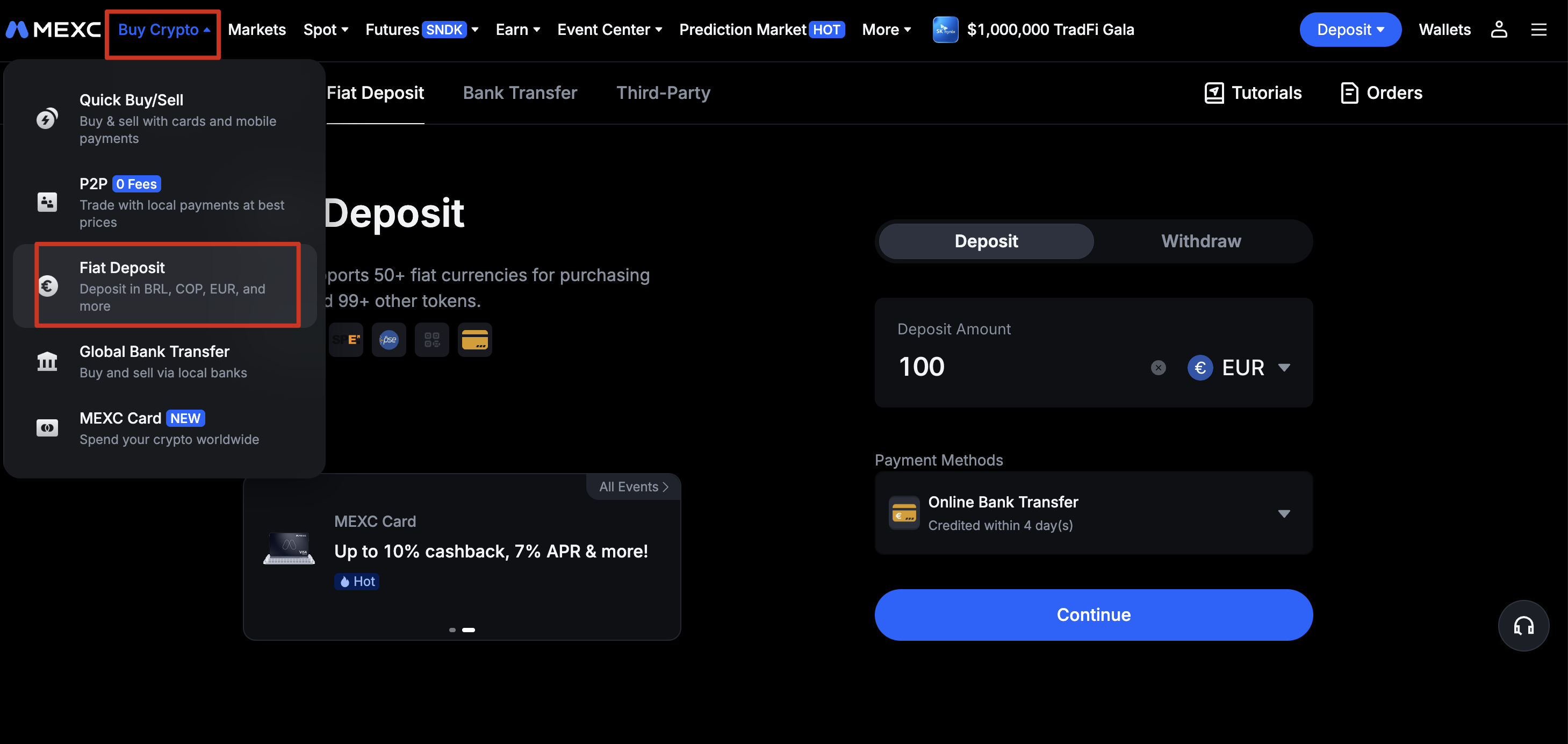

Step 2: Enter Deposit Details


1)Select PLN as your fiat currency
2)Enter the amount you wish to deposit
3)Choose Online Bank Transfer as the payment method
4) Review the deposit amount, applicable fees, and the estimated amount to be credited.

Note: Deposit limits and applicable fees may vary. Please refer to the information displayed on the deposit page before proceeding.


Step 3: Confirm Your Order


Confirm all payment and order details before proceeding.


Step 4: Pay with BLIK


1)Open your banking app and generate a one-time 6-digit BLIK code.
2)Enter the BLIK code on the payment page.
3)Return to your banking app and authorize the transaction using your PIN, biometrics, or another authentication method supported by your bank.

Important: BLIK codes are valid for a limited time. If your code expires, generate a new one in your banking app. Never share your BLIK code or banking authorization details with anyone.

Step 5: Receive Your PLN


Once the payment has been successfully authorized, the deposit will be processed.

Your PLN balance will typically be credited to your MEXC Fiat Wallet within seconds, although processing times may occasionally vary depending on your bank or payment provider.

Step 6: Check Your Deposit


Go to Wallets → Fiat to view all your Fiat deposit/withdrawal transactions.

Once the PLN has been credited, you can use your fiat balance to purchase supported cryptocurrencies on MEXC.

Why Use BLIK on MEXC?


  • Fast: PLN deposits are typically processed within seconds.
  • Simple: Generate a 6-digit code and authorize the payment in your banking app.
  • Secure: Payment authorization takes place through your bank, without entering card details.
  • Familiar: BLIK is widely used and supported by major banks in Poland.

Things to Keep in Mind


  • Your bank must support BLIK payments.
  • The minimum deposit amount per transaction is 20 PLN, and the maximum is 84,200 PLN.
  • Your bank may apply its own BLIK transaction limits or security controls.
  • Fees and the final credited amount should be reviewed before confirming the transaction.
  • If a payment fails or remains pending, first check the transaction status in your banking app and MEXC deposit history before attempting another deposit.

How to deposit PLN on MEXC Using BLIK

BLIK offers Polish users a fast and convenient way to deposit PLN directly into their MEXC Fiat Wallet. Simply generate a BLIK code in your banking app, complete the payment, and your PLN will typically arrive within seconds.

Who Can Use BLIK?


To use BLIK deposits on MEXC, you must:
  • Complete Advanced KYC verification.
  • Provide a valid Proof of Address (POA) or Proof of Identity (POI) issued in Poland.
  • Use a bank that supports BLIK payments.
Availability, deposit limits, and fees are subject to the information displayed on the MEXC deposit page.

Step 1: Go to Fiat Deposit


Visit the Fiat Deposit page. Alternatively, navigate to the page by hovering over Buy Crypto in the top navigation bar and selecting Fiat Deposit.


Step 2: Enter Deposit Details


1)Select PLN as your fiat currency
2)Enter the amount you wish to deposit
3)Choose Online Bank Transfer as the payment method
4) Review the deposit amount, applicable fees, and the estimated amount to be credited.

Note: Deposit limits and applicable fees may vary. Please refer to the information displayed on the deposit page before proceeding.


Step 3: Confirm Your Order


Confirm all payment and order details before proceeding.


Step 4: Pay with BLIK


1)Open your banking app and generate a one-time 6-digit BLIK code.
2)Enter the BLIK code on the payment page.
3)Return to your banking app and authorize the transaction using your PIN, biometrics, or another authentication method supported by your bank.

Important: BLIK codes are valid for a limited time. If your code expires, generate a new one in your banking app. Never share your BLIK code or banking authorization details with anyone.

Step 5: Receive Your PLN


Once the payment has been successfully authorized, the deposit will be processed.

Your PLN balance will typically be credited to your MEXC Fiat Wallet within seconds, although processing times may occasionally vary depending on your bank or payment provider.

Step 6: Check Your Deposit


Go to Wallets → Fiat to view all your Fiat deposit/withdrawal transactions.

Once the PLN has been credited, you can use your fiat balance to purchase supported cryptocurrencies on MEXC.

Why Use BLIK on MEXC?


  • Fast: PLN deposits are typically processed within seconds.
  • Simple: Generate a 6-digit code and authorize the payment in your banking app.
  • Secure: Payment authorization takes place through your bank, without entering card details.
  • Familiar: BLIK is widely used and supported by major banks in Poland.

Things to Keep in Mind


  • Your bank must support BLIK payments.
  • The minimum deposit amount per transaction is 20 PLN, and the maximum is 84,200 PLN.
  • Your bank may apply its own BLIK transaction limits or security controls.
  • Fees and the final credited amount should be reviewed before confirming the transaction.
  • If a payment fails or remains pending, first check the transaction status in your banking app and MEXC deposit history before attempting another deposit.