

Supercharging AI Workflows: Distributed Document Processing with Node.js, Python, and RabbitMQ
When your monolith AI service starts choking on documents
Imagine a document-processing service that handles PDF uploads, extracts text, runs sentiment analysis, and generates summaries. Under normal usage it performs well until… the day a user uploads 500 documents at once! Suddenly, the Node.js server stalls for 20 minutes, blocking other requests and leaving users without status updates or progress feedback.
This kind of failure teaches a common lesson: AI workloads should not run inside your web server.
The solution? Distribute the work across multiple AI workers, let each language do what it does best, and use a message queue to keep everything coordinated. Here's how I built a system that processes documents in parallel using Node.js as an orchestrator and both Node.js and Python as AI workers, all communicating through RabbitMQ and Celery.
\
Why this architecture makes sense
Before diving into code, let's talk about why this specific combination works:
Node.js as the orchestrator: Fast, event-driven, perfect for handling HTTP requests and coordinating tasks. Your API server stays responsive even when processing thousands of documents.
Python AI workers: Most AI/ML libraries (spaCy, transformers, scikit-learn) are Python-native. Running heavy AI processing in Python workers keeps your Node.js API lightweight.
Node.js AI workers: For tasks where JavaScript excels (PDF parsing, OCR preprocessing, certain NLP tasks), you can have Node workers too. Best of both worlds.
RabbitMQ: Reliable message broker that ensures tasks don't get lost. If a worker crashes, the task gets requeued automatically.
Celery: Battle-tested distributed task queue for Python. Handles retries, priorities, and worker scaling out of the box.
The result is a system where:
-
Your API responds in milliseconds, not minutes
-
Workers can scale independently (add 10 Python workers if you need more NLP power)
-
Failed tasks automatically retry
-
You can monitor everything in real-time
\
The architecture at a glance
Here's what we're building: \n 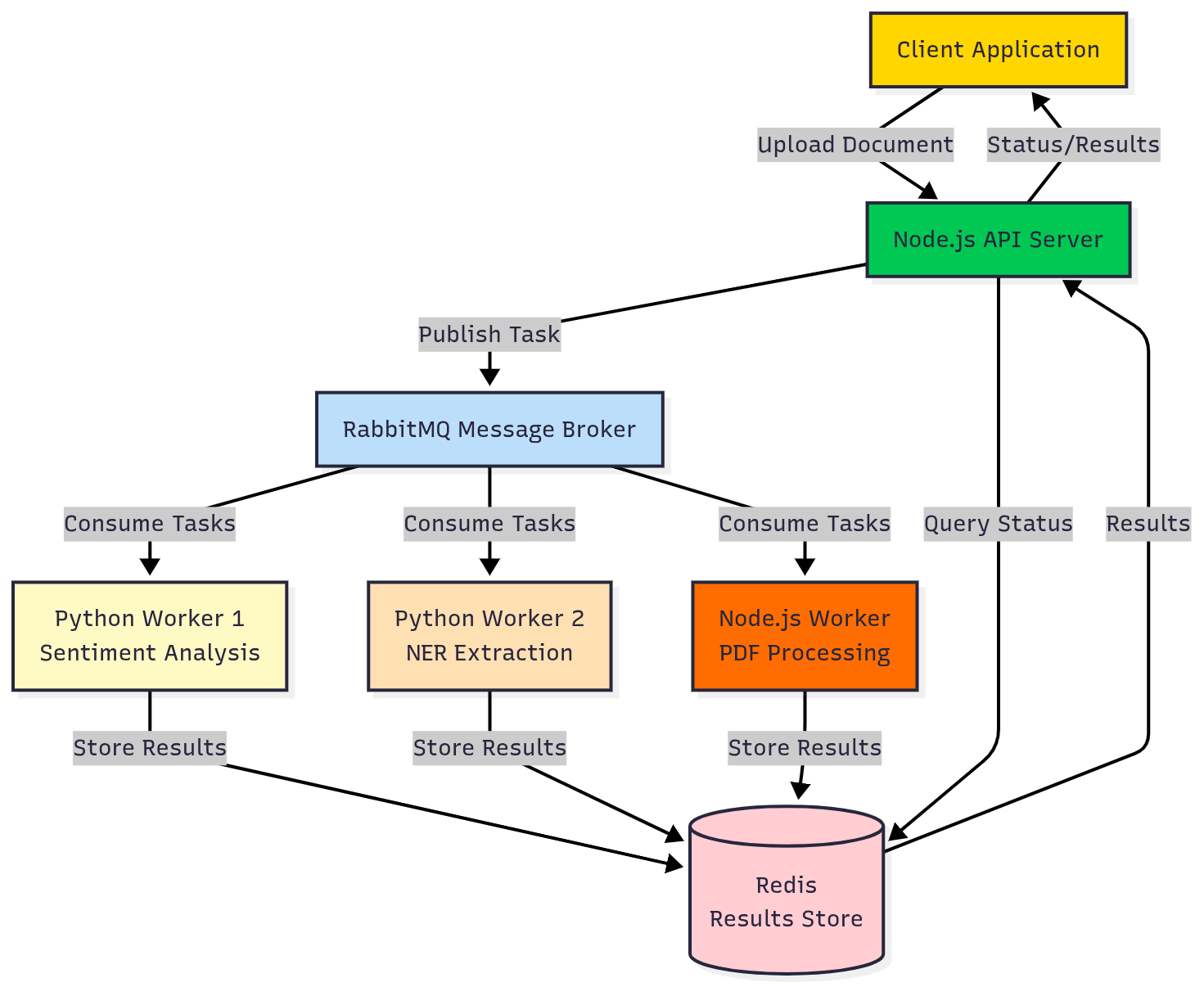
A user uploads a document through the REST API. The Node.js server saves it, publishes a task to RabbitMQ, and immediately returns a job ID. Python and Node.js workers pick up tasks based on their capabilities. Each worker processes its part (text extraction, translation, sentiment analysis) and publishes the results back. The orchestrator aggregates results and notifies the client.
\
Setting up the foundation
I'm using Docker Compose to run the entire stack locally. This makes it trivial to add workers or test in production-like conditions.
Here's the Docker Compose setup that brings everything together: \n
version: '3.8' services: rabbitmq: image: rabbitmq:3-management ports: - "5672:5672" - "15672:15672" environment: RABBITMQ_DEFAULT_USER: admin RABBITMQ_DEFAULT_PASS: admin123 redis: image: redis:7-alpine ports: - "6379:6379" api: build: context: ./api ports: - "3000:3000" depends_on: - rabbitmq - redis environment: RABBITMQ_URL: amqp://admin:admin123@rabbitmq:5672 REDIS_URL: redis://redis:6379 volumes: - ./uploads:/app/uploads python-worker: build: context: ./workers/python depends_on: - rabbitmq - redis environment: CELERY_BROKER_URL: amqp://admin:admin123@rabbitmq:5672 CELERY_RESULT_BACKEND: redis://redis:6379 deploy: replicas: 2 node-worker: build: context: ./workers/node depends_on: - rabbitmq - redis environment: RABBITMQ_URL: amqp://admin:admin123@rabbitmq:5672 REDIS_URL: redis://redis:6379 deploy: replicas: 2
Start the whole stack with docker-compose up -d and you've got a distributed AI pipeline running on your machine.
\
The Node.js API: keeping it fast
The API server has one job: receive requests, dispatch tasks, and return results. It should never block on heavy processing. \n
// api/src/server.js import express from 'express'; import amqp from 'amqplib'; import { createClient } from 'redis'; import multer from 'multer'; import { v4 as uuidv4 } from 'uuid'; const app = express(); const upload = multer({ dest: 'uploads/' }); let channel, redisClient; async function initializeConnections() { const connection = await amqp.connect(process.env.RABBITMQ_URL); channel = await connection.createChannel(); await channel.assertQueue('document_analysis', { durable: true }); redisClient = createClient({ url: process.env.REDIS_URL }); await redisClient.connect(); } app.post('/analyze', upload.single('document'), async (req, res) => { const jobId = uuidv4(); const { analysisType = 'full' } = req.body; const task = { jobId, filePath: req.file.path, fileName: req.file.originalname, analysisType, createdAt: new Date().toISOString() }; // Publish to RabbitMQ channel.sendToQueue('document_analysis', Buffer.from(JSON.stringify(task)), { persistent: true } ); // Store initial status in Redis await redisClient.set(`job:${jobId}`, JSON.stringify({ status: 'queued', progress: 0, createdAt: task.createdAt }), { EX: 86400 }); // 24h expiry res.json({ jobId, status: 'queued' }); }); app.get('/status/:jobId', async (req, res) => { const data = await redisClient.get(`job:${req.params.jobId}`); if (!data) { return res.status(404).json({ error: 'Job not found' }); } res.json(JSON.parse(data)); }); await initializeConnections(); app.listen(3000, () => console.log('API running on port 3000'));
\ Notice how /analyze returns immediately with a job ID. The actual processing happens asynchronously in the workers.
\
Python workers: heavy lifting with Celery
Python workers handle the AI-heavy tasks. I'm using Celery because it integrates perfectly with RabbitMQ and handles all the distributed queue complexity. \n
# workers/python/tasks.py from celery import Celery import redis import json from transformers import pipeline import spacy # Initialize Celery app = Celery('tasks', broker=os.getenv('CELERY_BROKER_URL'), backend=os.getenv('CELERY_RESULT_BACKEND')) # Load models once at startup nlp = spacy.load('en_core_web_sm') sentiment_analyzer = pipeline('sentiment-analysis') redis_client = redis.from_url(os.getenv('CELERY_RESULT_BACKEND')) @app.task(bind=True) def analyze_sentiment(self, job_id, text): """Analyze sentiment of document text""" try: update_progress(job_id, 30, 'Analyzing sentiment') # Process in chunks if text is large chunk_size = 512 chunks = [text[i:i+chunk_size] for i in range(0, len(text), chunk_size)] sentiments = [] for chunk in chunks: result = sentiment_analyzer(chunk)[0] sentiments.append(result) # Aggregate results avg_score = sum(s['score'] for s in sentiments) / len(sentiments) dominant_label = max(set(s['label'] for s in sentiments), key=lambda x: sum(1 for s in sentiments if s['label'] == x)) return { 'sentiment': dominant_label, 'confidence': avg_score, 'details': sentiments[:5] # First 5 chunks for detail } except Exception as e: self.retry(exc=e, countdown=60, max_retries=3) @app.task(bind=True) def extract_entities(self, job_id, text): """Extract named entities using spaCy""" try: update_progress(job_id, 50, 'Extracting entities') doc = nlp(text) entities = {} for ent in doc.ents: entity_type = ent.label_ if entity_type not in entities: entities[entity_type] = [] entities[entity_type].append({ 'text': ent.text, 'start': ent.start_char, 'end': ent.end_char }) return entities except Exception as e: self.retry(exc=e, countdown=60, max_retries=3) def update_progress(job_id, progress, message): """Update job progress in Redis""" job_key = f'job:{job_id}' data = redis_client.get(job_key) if job_data = json.loads(data) job_data['progress'] = progress job_data['message'] = message redis_client.set(job_key, json.dumps(job_data), ex=86400)
\ The beauty of Celery is that you can scale these workers independently. Need more sentiment analysis power? Just add more worker containers: docker-compose up -d --scale python-worker=5.
\
Node.js workers: handling what JavaScript does best
For tasks like PDF parsing or preprocessing, Node.js workers are perfect. They consume from the same RabbitMQ queue and work alongside Python workers. \n
// workers/node/worker.js import amqp from 'amqplib'; import { createClient } from 'redis'; import pdf from 'pdf-parse'; import fs from 'fs/promises'; const redisClient = createClient({ url: process.env.REDIS_URL }); await redisClient.connect(); async function processDocument(task) { const { jobId, filePath, analysisType } = task; try { await updateProgress(jobId, 10, 'Extracting text from PDF'); // Read and parse PDF const dataBuffer = await fs.readFile(filePath); const pdfData = await pdf(dataBuffer); const result = { text: pdfData.text, pages: pdfData.numpages, meta pdfData.info, wordCount: pdfData.text.split(/\s+/).length }; await updateProgress(jobId, 20, 'Text extracted, queuing analysis tasks'); // Publish extracted text to Python workers for AI analysis if (analysisType === 'full' || analysisType === 'sentiment') { await publishTask('sentiment_analysis', { jobId, text: result.text }); } if (analysisType === 'full' || analysisType === 'entities') { await publishTask('entity_extraction', { jobId, text: result.text }); } // Store extraction results await storeResult(jobId, 'extraction', result); } catch (error) { console.error(`Error processing document ${jobId}:`, error); await updateProgress(jobId, -1, `Error: ${error.message}`); } } async function updateProgress(jobId, progress, message) { const jobKey = `job:${jobId}`; const data = await redisClient.get(jobKey); if (data) { const jobData = JSON.parse(data); jobData.progress = progress; jobData.message = message; jobData.status = progress < 0 ? 'failed' : progress === 100 ? 'completed' : 'processing'; await redisClient.set(jobKey, JSON.stringify(jobData), { EX: 86400 }); } } // Connect to RabbitMQ and start consuming const connection = await amqp.connect(process.env.RABBITMQ_URL); const channel = await connection.createChannel(); await channel.assertQueue('document_analysis', { durable: true }); channel.prefetch(1); channel.consume('document_analysis', async (msg) => { if (msg) { const task = JSON.parse(msg.content.toString()); await processDocument(task); channel.ack(msg); } }); console.log('Node.js worker waiting for documents...');
\
Coordinating results: the aggregator pattern
One challenge with distributed workers is collecting results. I use an aggregator pattern where workers store their results in Redis with a consistent key structure, and the API aggregates them on request. \n
// api/src/aggregator.js export async function getJobResults(jobId) { const jobData = await redisClient.get(`job:${jobId}`); if (!jobData) return null; const job = JSON.parse(jobData); // Gather all result keys for this job const resultKeys = await redisClient.keys(`job:${jobId}:*`); const results = {}; for (const key of resultKeys) { const [, , resultType] = key.split(':'); const data = await redisClient.get(key); results[resultType] = JSON.parse(data); } return { jobId, status: job.status, progress: job.progress, message: job.message, createdAt: job.createdAt, results }; }
\ When a client calls /status/:jobId, they get a complete picture of all completed analyses.
\
Handling failures gracefully
In distributed systems, things fail. Workers crash, network hiccups, models timeout. Here's how to handle it:
Celery automatic retries: \n
@app.task(bind=True, autoretry_for=(Exception,), retry_kwargs={'max_retries': 3, 'countdown': 5}) def risky_task(self, data): # If this fails, Celery will retry 3 times with 5-second delays pass
Dead letter queuesfor messages that fail repeatedly: \n
await channel.assertQueue('document_analysis_dlq', { durable: true }); await channel.assertQueue('document_analysis', { durable: true, arguments: { 'x-dead-letter-exchange': '', 'x-dead-letter-routing-key': 'document_analysis_dlq' } });
\ Timeoutsto prevent workers from hanging forever: \n
@app.task(time_limit=300, soft_time_limit=270) def long_running_task(data): # Hard limit at 5 minutes, soft limit warning at 4.5 minutes pass
\
Monitoring your distributed pipeline
With multiple workers and queues, visibility is critical. I use the RabbitMQ management console (http://localhost:15672) to monitor queue depths and message rates.
For application-level monitoring, I added a metrics endpoint: \n
app.get('/metrics', async (req, res) => { const connection = await amqp.connect(process.env.RABBITMQ_URL); const channel = await connection.createChannel(); const queue = await channel.checkQueue('document_analysis'); res.json({ queueDepth: queue.messageCount, consumers: queue.consumerCount, // Could add more metrics from Redis, worker health checks, etc. }); await connection.close(); });
\ For production, you'd want Prometheus metrics and Grafana dashboards, but this gives you quick insights during development.
Here’s the local dashboard from RabbitMQ:
\
Scaling the system
The beautiful thing about this architecture is independent scaling:
Scale Python workersfor more AI processing power: \n
docker-compose up -d --scale python-worker=10
\ Scale Node workersfor more PDF processing throughput: \n
docker-compose up -d --scale node-worker=5
\ Scale the APIwhen you have high request volume: \n
docker-compose up -d --scale api=3
Each component scales independently based on your bottleneck. RabbitMQ handles the load balancing automatically.
\
Performance in practice
I tested this system with 1,000 PDF documents (average 10 pages each):
Monolith (single Node.js process): 47 minutes, API unresponsive \n Distributed (2 Node workers, 4 Python workers): 8 minutes, API responsive throughout \n Distributed (5 Node workers, 10 Python workers): 3.5 minutes, API responsive
The throughput scales nearly linearly with workers until you hit I/O or network limits.
\
Real-world gotchas I learned
Model loading time: Loading transformer models takes 10-20 seconds. Load them once when the worker starts, not per task. I wasted hours debugging "slow workers" before realizing they were reloading models every time.
Message size limits: RabbitMQ has a default message size limit. For large documents, store the file and pass the path in the message, not the content itself.
Worker memory: Python AI workers can use 2-4GB each depending on models. Plan your container resources accordingly.
Connection pooling: Create one RabbitMQ connection per worker and reuse it. Creating connections per task kills performance.
\
When to use this architecture
This pattern makes sense when:
- You're processing tasks that take more than a few seconds
- You need different languages/runtimes for different parts of your pipeline
- You want to scale components independently
- Reliability matters (RabbitMQ ensures no lost tasks)
- You might add more worker types later
It's overkill for simple CRUD APIs or tasks that complete in milliseconds. But for AI workloads, data processing pipelines, or any CPU-intensive background jobs, this architecture has saved me countless times.
\
Code
Check out the complete working code on GitHub: https://github.com/ivmarcos/distributed-ai-document-analyzer
The repository includes the full Docker Compose setup, API server, both worker types, example documents, and a test suite. Clone it and run docker-compose up to see the whole system in action.


You May Also Like

ZEC’s $330 Crossroads: $350 Breakout or $300 Crash This Week

XRP Whale on Hyperliquid Puts $7.6 Million Long Against $100 Million Short Wall




