How to Use Etherscan: Complete Beginner to Expert Guide for Ethereum Blockchain Tracking
Beginner Level
Introduction & Homepage Overview of Etherscan
Etherscan serves as the premier blockchain explorer for the Ethereum network, offering a transparent window into all activities occurring on its public ledger. It is not a cryptocurrency wallet, nor does it require an account to view information. Instead, Etherscan provides a crucial service by indexing and making searchable every transaction, block, wallet address, and smart contract on Ethereum. This transparency is fundamental to the ethos of public blockchains, allowing anyone to verify the integrity and flow of digital assets without relying on intermediaries.
At its core, Etherscan solves the problem of accessibility to blockchain data. Without such a tool, understanding the complex, cryptographic entries of a blockchain would be nearly impossible for the average user. It translates raw blockchain data into human-readable formats, empowering users to track their transactions, monitor wallet balances, inspect smart contract code, and observe network health metrics. The platform is entirely free to use, embodying the open-source spirit of the blockchain community.
Before diving into Etherscan, you may want to learn what a blockchain explorer is and how it works. If you’re interested in deeper on-chain and DeFi research, check out our guide on how to use DefiLlama to research DeFi projects.
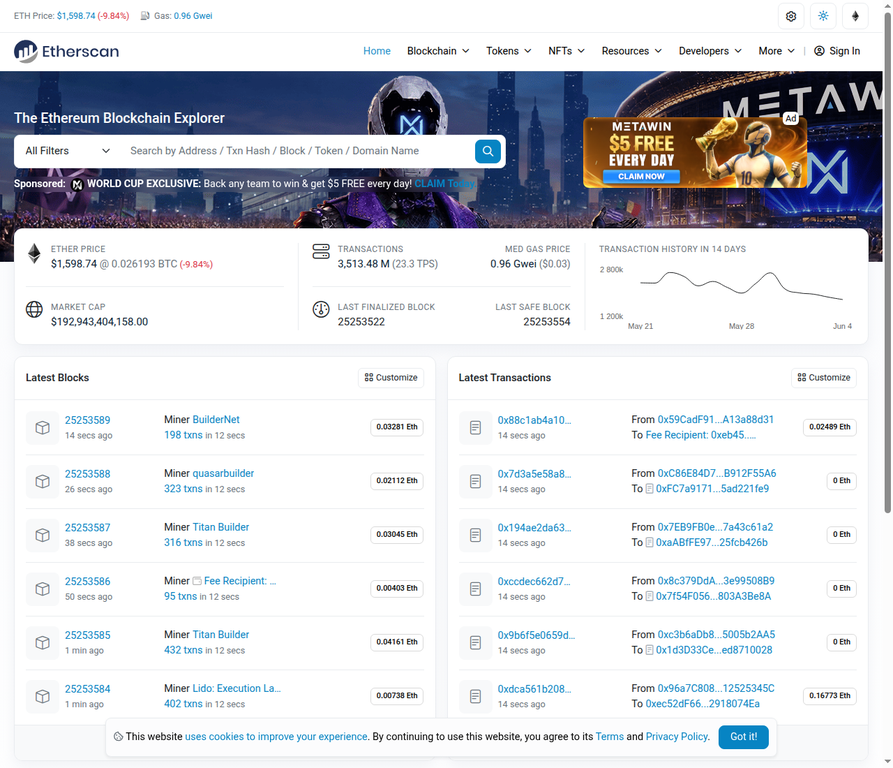 Introduction & Homepage Overview of Etherscan
Key UI Elements on the Homepage:
- Global Search Bar: Positioned prominently at the top, this allows users to search for addresses, transaction hashes, block numbers, token names, or ENS domains.
- ETH Price Ticker & Gas Tracker Summary: Displays the current price of Ethereum and real-time gas prices (in Gwei), crucial for estimating transaction costs.
- Network Stats Banner: Provides a quick overview of the network’s health, including total transactions, new addresses, and network utilization.
- Latest Blocks & Latest Transactions Panels: These sections dynamically update to show the most recently mined blocks and confirmed transactions, offering a live feed of network activity.
How to Search on Etherscan
Etherscan’s search functionality is its most powerful feature, acting as a gateway to all on-chain data. Users can search for a variety of data types, making it versatile for different investigative needs. The search bar intelligently suggests categories as you type, streamlining the process.
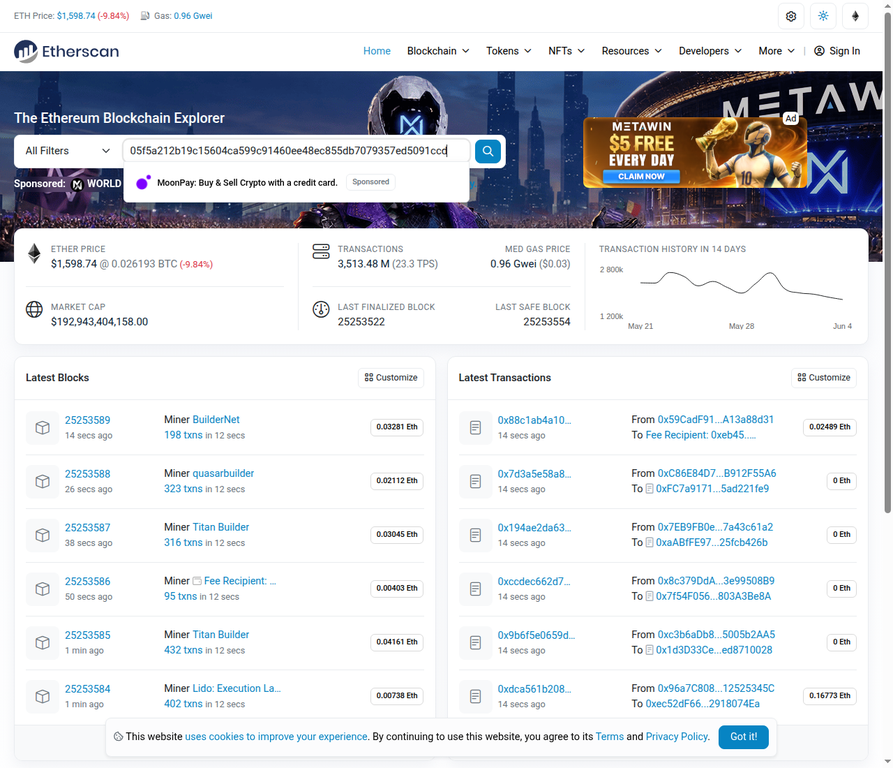 How to Search on Etherscan
What you can search:
- Wallet Addresses: To view balances, transaction history, and token holdings of any Ethereum address.
- Transaction Hashes (Txn Hash): A unique identifier for every transaction, used to track its status and details.
- Block Numbers: To inspect the contents of a specific block, including all transactions it contains.
- Token Names: To find information about ERC-20 tokens, including their contract address, market data, and holders.
- ENS Domains: Ethereum Name Service domains (e.g., vitalik.eth) resolve to human-readable wallet addresses.
Practical Example: If you’ve just sent ETH from your MetaMask or Coinbase wallet and want to confirm its status, you would copy the transaction hash provided by your wallet and paste it into the Etherscan search bar. This allows you to immediately see if the transaction is pending, confirmed, or if there were any issues.
Reading a Transaction (Txn Hash)
Understanding a transaction’s details is crucial for verifying transfers and diagnosing issues. Once you search for a transaction hash, Etherscan presents a comprehensive overview of its journey on the blockchain.
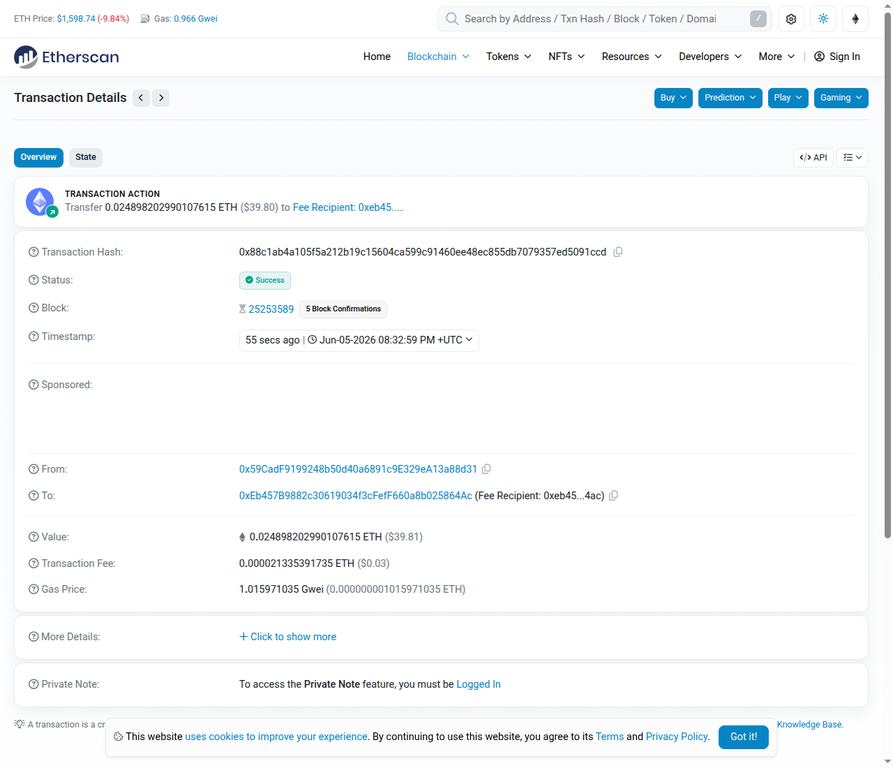 Reading a Transaction (Txn Hash)
Key Fields Explained:
- Transaction Hash: The unique identifier for this specific transaction.
- Status: Indicates whether the transaction was Success, Pending, or Failed. A pending transaction is still awaiting inclusion in a block, while a successful one has been confirmed.
- Block: The block number in which the transaction was included. The number of
block confirmations (how many blocks have been mined since this transaction) indicates its finality; more confirmations mean greater security.
- Timestamp: The exact date and time the transaction was included in a block.
- From/To Addresses: The sender and recipient wallet addresses. For smart contract interactions, the ‘To’ address will be the contract address.
- Value: The amount of ETH or tokens transferred in the transaction.
- Transaction Fee: The cost incurred to process the transaction on the network. This is calculated as Gas Price (Gwei) × Gas Used.
Understanding Transaction Status:
- Pending: The transaction has been broadcast to the network but not yet included in a block. It’s waiting for a miner/validator to pick it up.
- Confirmed (Success): The transaction has been successfully processed and included in a block. The state changes it initiated are now irreversible.
- Failed: The transaction was included in a block but failed to execute due to various reasons, most commonly an “Out of Gas” error or a contract-specific error. Even failed transactions incur a fee.
Gas Fees Explained:
Gas is the unit of computational effort required to execute operations on the Ethereum network. The Gas Price is measured in Gwei (1 Gwei = 0.000000001 ETH), and the Gas Used is the actual amount of gas consumed by the transaction. The total Transaction Fee is the product of these two values. Understanding this allows users to estimate costs and comprehend why certain transactions might be more expensive than others.
Looking Up a Wallet Address
Etherscan allows you to inspect the public ledger of any Ethereum wallet address, providing insights into its balance, transaction history, and token holdings. This feature is invaluable for transparency and for tracking funds.
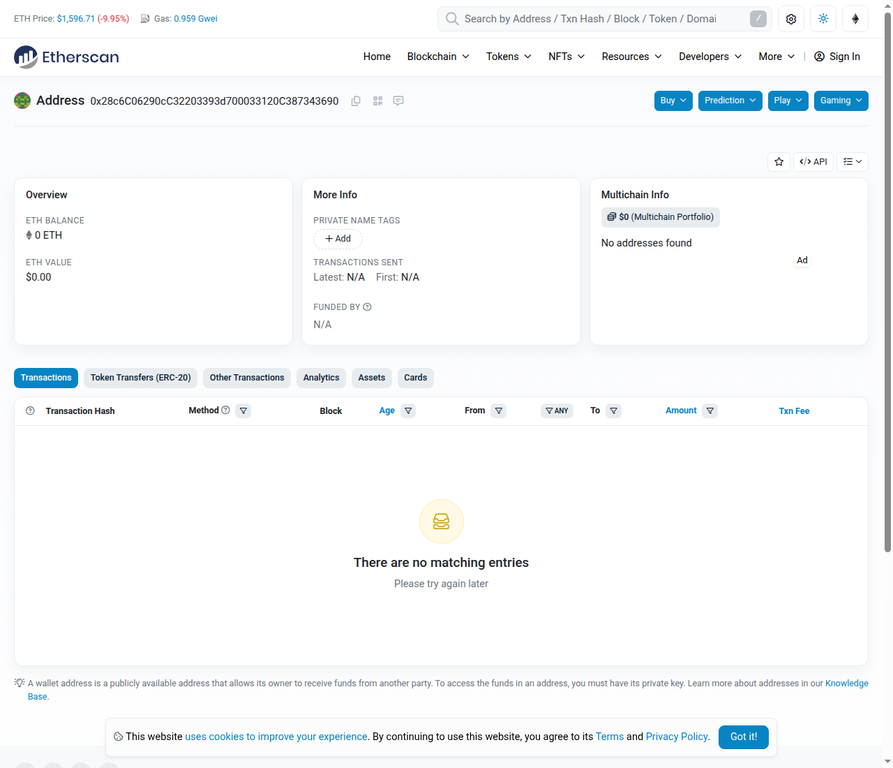 Looking Up a Wallet Address
Key Information on an Address Page:
- ETH Balance: The current amount of native Ethereum (ETH) held by the address.
- ETH Value: The fiat currency equivalent of the ETH balance.
- Token Holdings: A list of all ERC-20 tokens (and their values) held by the address. This is particularly useful as many wallets may not display all token types by default.
- Transaction History List: A chronological record of all transactions associated with the address.
Understanding Transaction Tabs:
- Transactions: Displays all standard ETH transfers to and from the address.
- Internal Txns: Shows ETH transfers that are triggered by smart contract interactions, rather than direct wallet-to-wallet transfers.
- Token Transfers (ERC-20): Lists all movements of ERC-20 tokens (fungible tokens like USDT, USDC, etc.) associated with the address.
- NFT Transfers: Details the history of ERC-721 and ERC-1155 token (NFT) movements.
This functionality allows users to verify their own wallet contents, or publicly audit the holdings and activities of any other address on the Ethereum blockchain. To find your own wallet address, you can typically copy it directly from your cryptocurrency wallet application (e.g., MetaMask, Trust Wallet) and paste it into the Etherscan search bar.
Gas Tracker
Gas fees are a critical component of transacting on the Ethereum network, and their volatility can significantly impact the cost of operations. Etherscan’s Gas Tracker provides real-time data to help users navigate these fluctuations.
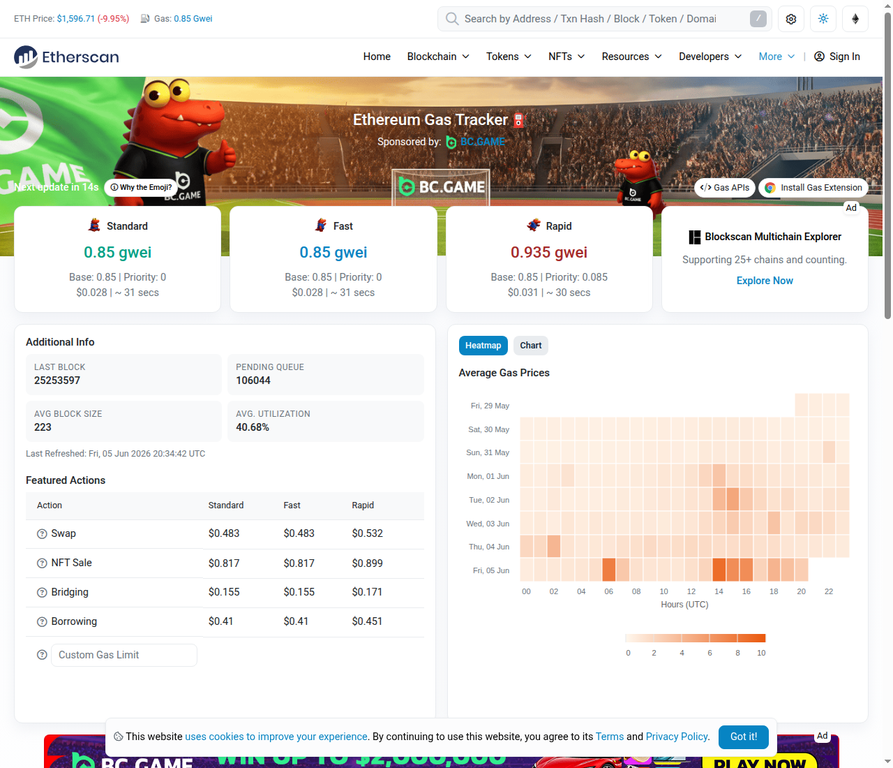 Gas Tracker
Understanding Gas and Its Fluctuations:
Gas is the pricing mechanism for operations on the Ethereum blockchain. It is paid in ETH, but measured in Gwei. The price of gas fluctuates based on network congestion: higher demand for block space leads to higher gas prices. The Gas Tracker displays:
- Real-time Gas Prices: Provides estimates for Low, Standard, and Fast transaction speeds, allowing users to choose a price point based on their urgency.
- Gas Price Chart: Illustrates historical gas price trends, which can help users identify patterns and predict optimal times for transactions.
- Top 10 Gas Guzzlers & Top 10 Gas Spenders: These tables highlight smart contracts and addresses that consume the most gas, offering insights into network activity and popular dApps.
Calculating Gas Fees:
The transaction fee is calculated as Gas Price (Gwei) × Gas Used. For example, if the gas price is 10 Gwei and a transaction uses 21,000 gas, the fee would be 210,000 Gwei (0.00021 ETH). The Gas Tracker often provides a USD equivalent, making it easier to understand the real-world cost.
Timing Transactions:
By observing the Gas Tracker, users can strategically time their transactions to take advantage of lower network congestion, typically during off-peak hours (e.g., late at night or early morning UTC, or weekends). This can lead to significant savings on transaction fees.
Token Lookup & Token Tracker
Etherscan provides a comprehensive directory and tracking system for ERC-20 tokens, which are the standard for fungible tokens on Ethereum. This feature is essential for discovering new tokens, verifying their legitimacy, and understanding their market dynamics.
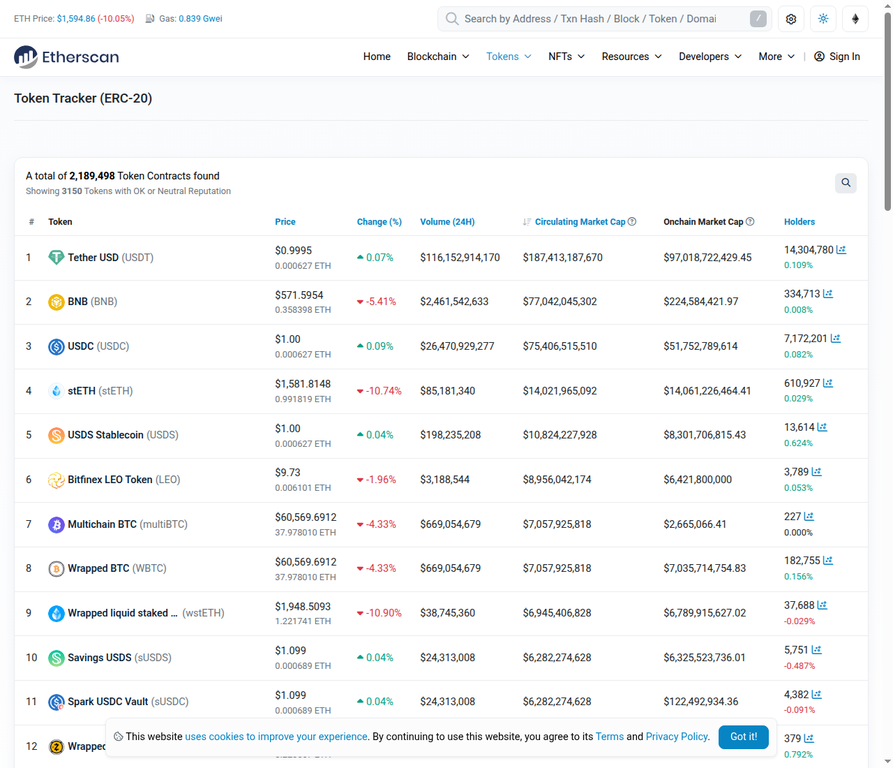 Etherscan Token Tracker List
Token Tracker Overview:
- Top ERC-20 Tokens List: Displays a leaderboard of tokens by market capitalization, price, and trading volume, offering a snapshot of the most prominent assets.
- Individual Token Pages: Clicking on a token (e.g., USDT) leads to a dedicated page with detailed information:
- Contract Address: The unique address of the token’s smart contract. This is the most critical identifier for verifying a token.
- Holders Count: The number of unique addresses holding the token, indicating its distribution and adoption.
- Transfers: A list of all token transfer transactions.
- Price Chart: Historical price data for the token.
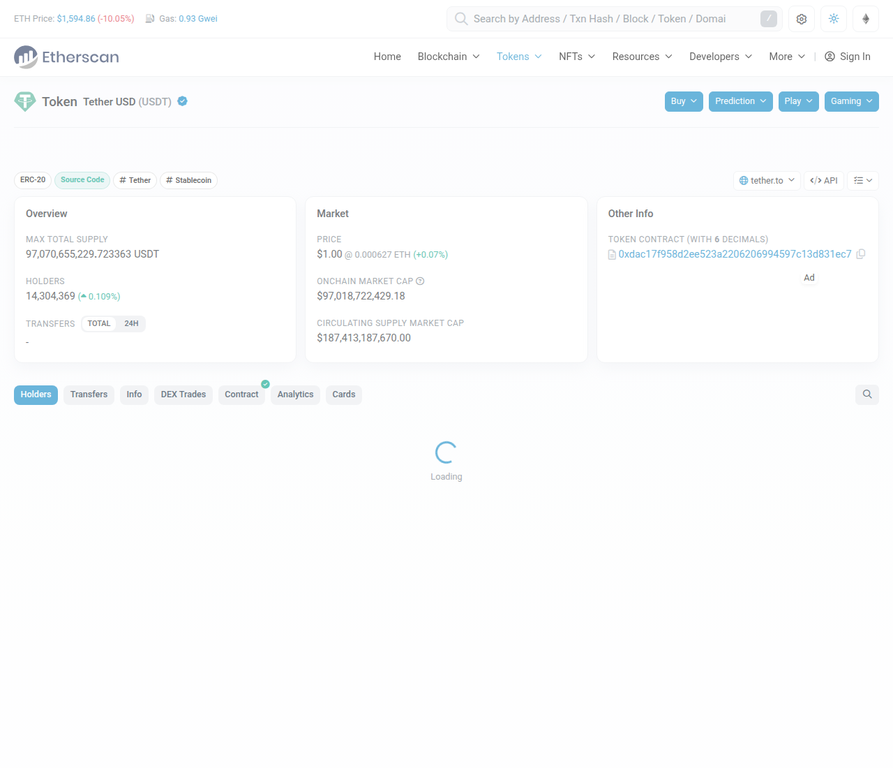 Etherscan Token Page
Verifying Token Legitimacy:
One of the most crucial aspects of Etherscan’s token lookup is its role in combating scams. Scammers often create fake tokens with identical names and symbols to legitimate projects. To verify a token’s authenticity, always:
1. Check the Contract Address: Compare the token’s contract address on Etherscan with the official contract address listed on the project’s official website or reputable sources. Never rely solely on the token name or symbol.
2. Review Holders and Transfers: A legitimate token will typically have a significant number of holders and an active transfer history. Red flags include very few holders or suspicious transaction patterns.
3. Contract Verification Status: Look for the green checkmark indicating that the token’s smart contract has been verified on Etherscan, meaning its source code matches the deployed bytecode.
Finding Your Token Holdings (ERC-20 + NFTs)
Even if your cryptocurrency wallet doesn’t display all your token holdings, Etherscan provides a definitive view of all assets associated with an Ethereum address, including both fungible (ERC-20) and non-fungible (NFT) tokens.
 Etherscan Token Holdings
Viewing All Assets in a Wallet:
By entering a wallet address into the Etherscan search bar, you can access its full portfolio. The Token Holdings dropdown, usually found on the address overview page, will expand to show all ERC-20 tokens held by that address, along with their quantities and current market values. This is particularly useful for discovering tokens that might not be automatically recognized or displayed by your wallet interface.
ERC-20 vs. ERC-721/ERC-1155 (NFTs):
- ERC-20 Tokens: These are fungible tokens, meaning each token is identical to another (e.g., 1 USDT is always equal to another 1 USDT). They are commonly used for cryptocurrencies, stablecoins, and utility tokens.
- ERC-721 and ERC-1155 Tokens (NFTs): These are non-fungible tokens, meaning each token is unique and not interchangeable. ERC-721 is typically used for unique digital assets like art or collectibles, while ERC-1155 allows for both fungible and non-fungible tokens within a single contract, often used for gaming items or certificates.
The NFT Transfers tab on an address page provides a detailed history of all NFT movements to and from that wallet, including mints, purchases, sales, and transfers. This allows users to track the provenance and ownership history of any NFT.
PART 2: INTERMEDIATE LEVEL
Smart Contract Explorer
Smart contracts are the backbone of the Ethereum blockchain, enabling decentralized applications (dApps) and automated agreements. Etherscan provides powerful tools to explore and interact with these contracts, even for users without coding knowledge.
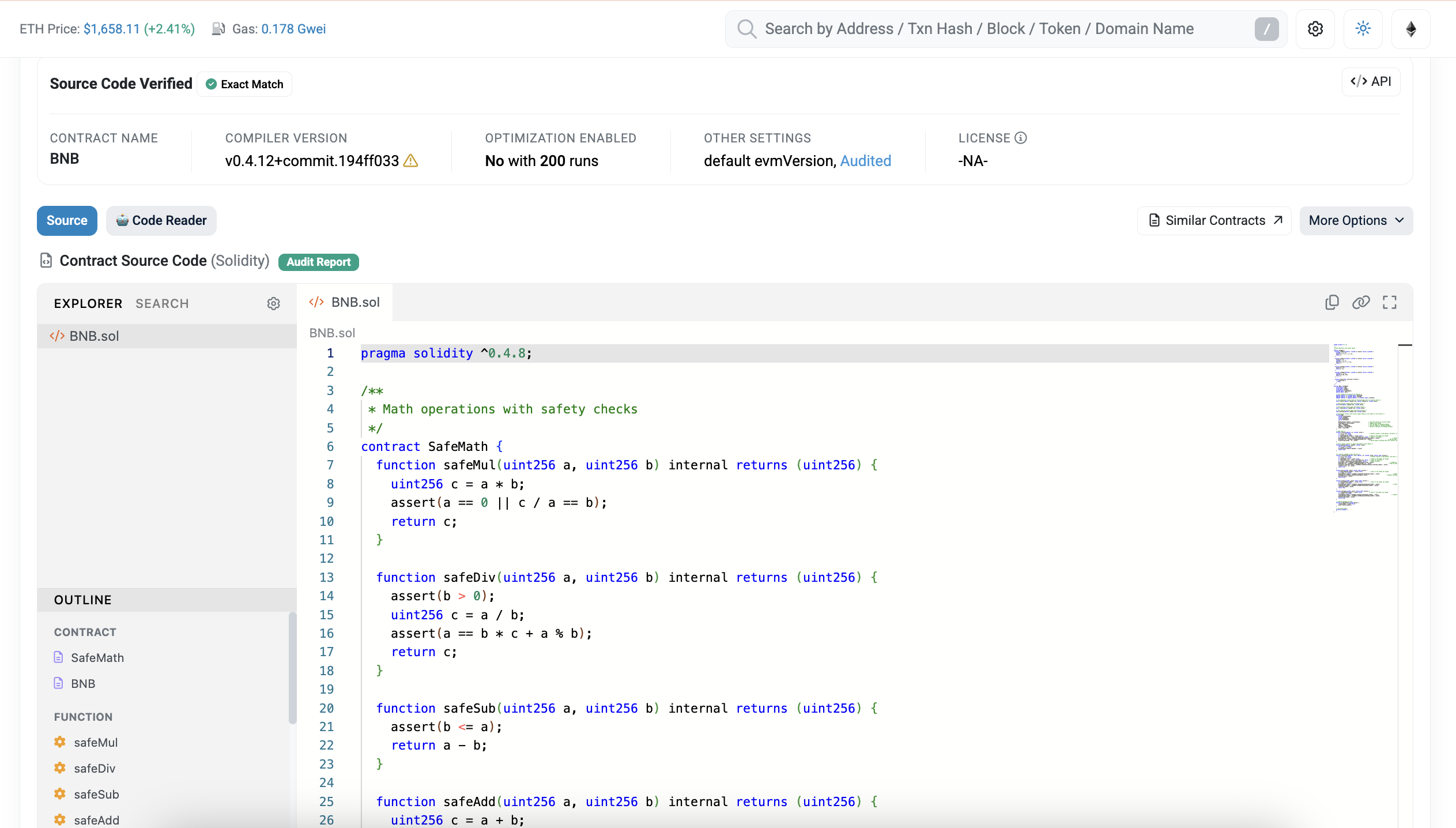 Smart Contract Explorer
Understanding Verified Contracts:
When a smart contract is deployed to the Ethereum blockchain, its bytecode is stored on-chain. For transparency and auditability, developers can choose to verify their contract on Etherscan by uploading the original Solidity source code. A green checkmark and the word “Verified” next to the contract address signify that the deployed bytecode matches the provided source code. This is a crucial indicator of trust and security, as it allows anyone to inspect the contract’s logic.
Key Sub-tabs on a Verified Contract Page:
- Code: This tab displays the Solidity source code of the contract. For developers, this is essential for auditing the contract’s functionality and identifying potential vulnerabilities. For non-developers, the presence of verified code is a strong positive signal.
- Read Contract: This sub-tab allows users to query the public state variables and call view or pure functions of the smart contract without needing to spend gas. Examples include checking the balanceOf a specific address, the totalSupply of a token, or whether a contract is paused.
- Write Contract: This sub-tab enables users to interact with the contract by executing payable or nonpayable functions, provided they connect their Web3 wallet (e.g., MetaMask). This requires spending gas and can modify the contract’s state. It’s a powerful feature for advanced users to interact with dApps directly, even if the dApp’s frontend is unavailable or broken.
Red Flags and Proxy Contracts:
- Unverified Contracts: If a contract does not have a green “Verified” badge, it’s a significant red flag. Without the source code, it’s impossible to know what the contract truly does, making it a high-risk asset.
- Proxy Contracts: Some complex dApps use proxy contracts, which delegate their logic to an implementation contract. Etherscan will often indicate if a contract is a proxy and provide a link to its implementation, allowing users to verify the underlying logic.
Token Approvals (Security Feature)
Token approvals are a critical, yet often misunderstood, aspect of interacting with dApps. When you interact with a decentralized exchange (DEX) or a lending protocol, you often grant that dApp permission to spend your tokens on your behalf. Etherscan’s Token Approval Checker helps you manage and revoke these permissions, enhancing your security.
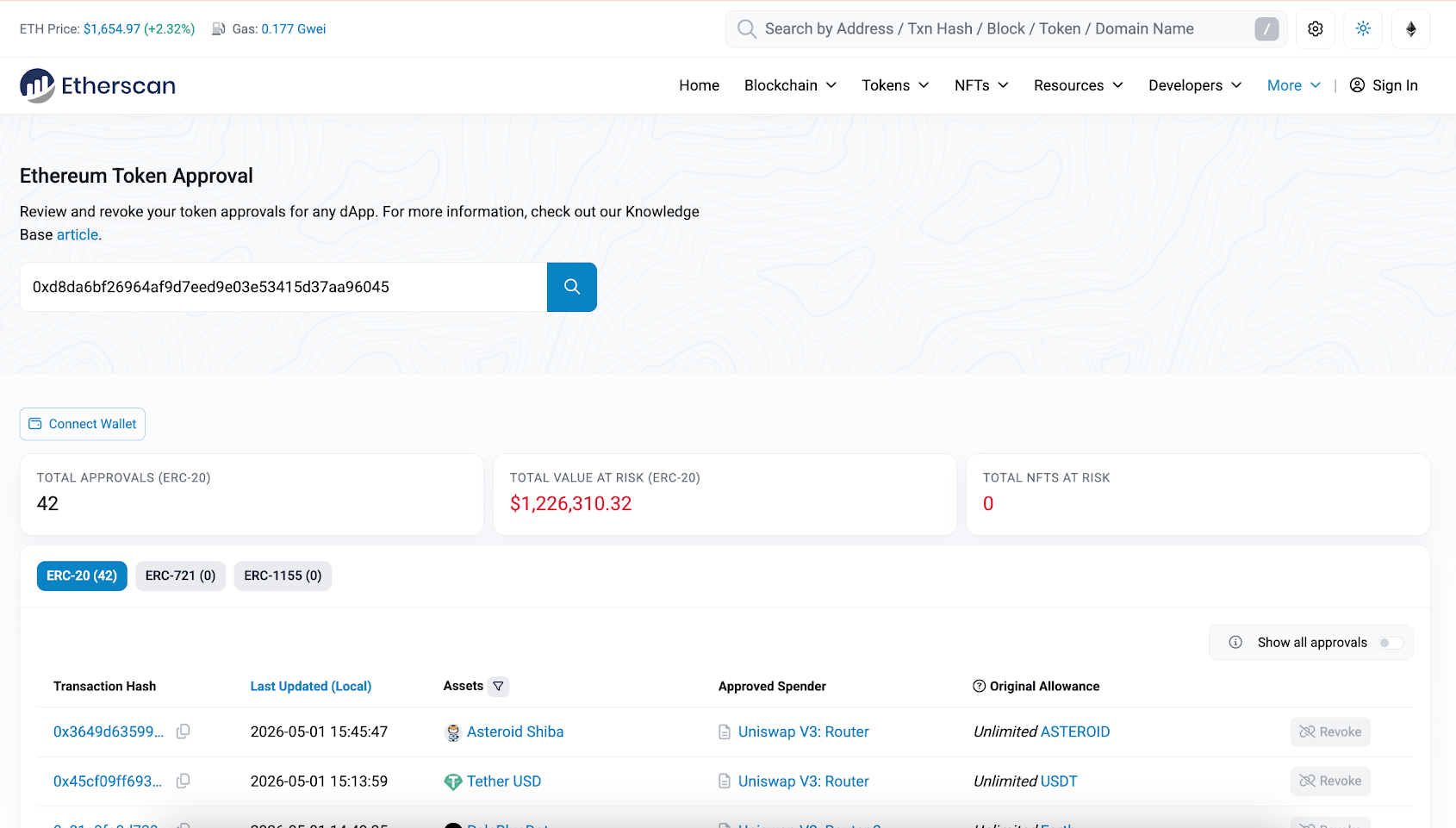 Etherscan token approval page
What is a Token Approval?
A token approval is a transaction where you authorize a smart contract (the “spender”) to transfer a certain amount of your ERC-20 tokens from your wallet. This is necessary for dApps to facilitate trades, provide liquidity, or perform other actions with your tokens. The approval can be for a specific amount or for an “unlimited” amount.
Why Unlimited Approvals are Dangerous:
While convenient, granting unlimited approvals can pose a significant security risk. If a dApp or the approved contract is compromised, a malicious actor could potentially drain all your approved tokens. Regularly auditing and revoking unnecessary approvals is a crucial security practice.
How to Audit and Revoke Approvals:
1. Visit the Token Approval Checker: Navigate to https://etherscan.io/tokenapprovalchecker.
2. Connect Your Wallet: Use the “Connect to Web3” button to link your wallet (e.g., MetaMask). Etherscan will then scan your address for all active token approvals.
3. Review Active Approvals: The page will display a list of all dApps or contracts that have permission to spend your tokens, along with the approved token and the allowance amount.
4. Revoke Unnecessary Approvals: For any approval you no longer need or that is set to an unlimited amount, click the “Revoke” button. This will initiate a transaction that, once confirmed, will remove the spender’s permission to access your tokens. This action incurs a small gas fee.
Real-world Case: Many users have lost funds due to forgotten or compromised token approvals. By regularly checking and revoking approvals, you can significantly reduce your attack surface and protect your assets from potential exploits.
Internal Transactions
While regular transactions represent direct transfers between external accounts, internal transactions (or internal message calls) are value transfers that occur as a result of smart contract execution. They are not directly recorded on the blockchain in the same way as regular transactions but are crucial for understanding the full flow of funds within complex dApp interactions.
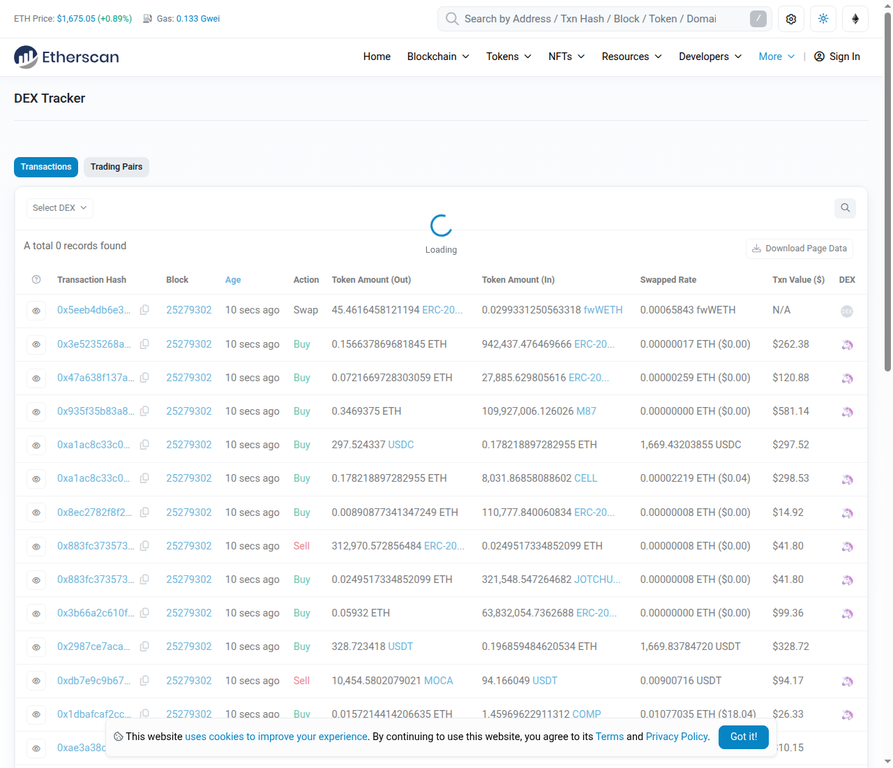 Etherscan DEX Tracker Page
Difference Between Regular and Internal Transactions:
- Regular Transactions: Initiated by an external account (a user with a private key) and directly recorded as a top-level transaction on the blockchain. They have a single sender, recipient, and value.
- Internal Transactions: Initiated by a smart contract as part of its execution. For example, when you swap tokens on a DEX, your initial transaction might trigger several internal transactions as the DEX contract moves funds between different liquidity pools or other contracts. These are not visible in the main transaction list but are crucial for tracing the full path of funds.
Tracing Funds in DeFi Transactions:
Consider a Uniswap swap: you send ETH to the Uniswap router contract, and in return, you receive an ERC-20 token. The main transaction will show ETH going from your wallet to the Uniswap contract. However, the Internal Txns tab on the transaction detail page will reveal the underlying ETH transfers that occurred within the Uniswap contract, such as ETH moving into a liquidity pool and the ERC-20 token being sent back to your address. This tab is essential for understanding the intricate mechanics of DeFi operations and for debugging unexpected outcomes.
NFT Tracker
Etherscan’s NFT Tracker provides a dedicated portal for exploring the non-fungible token ecosystem on Ethereum, offering insights into collections, individual NFTs, and market activity.
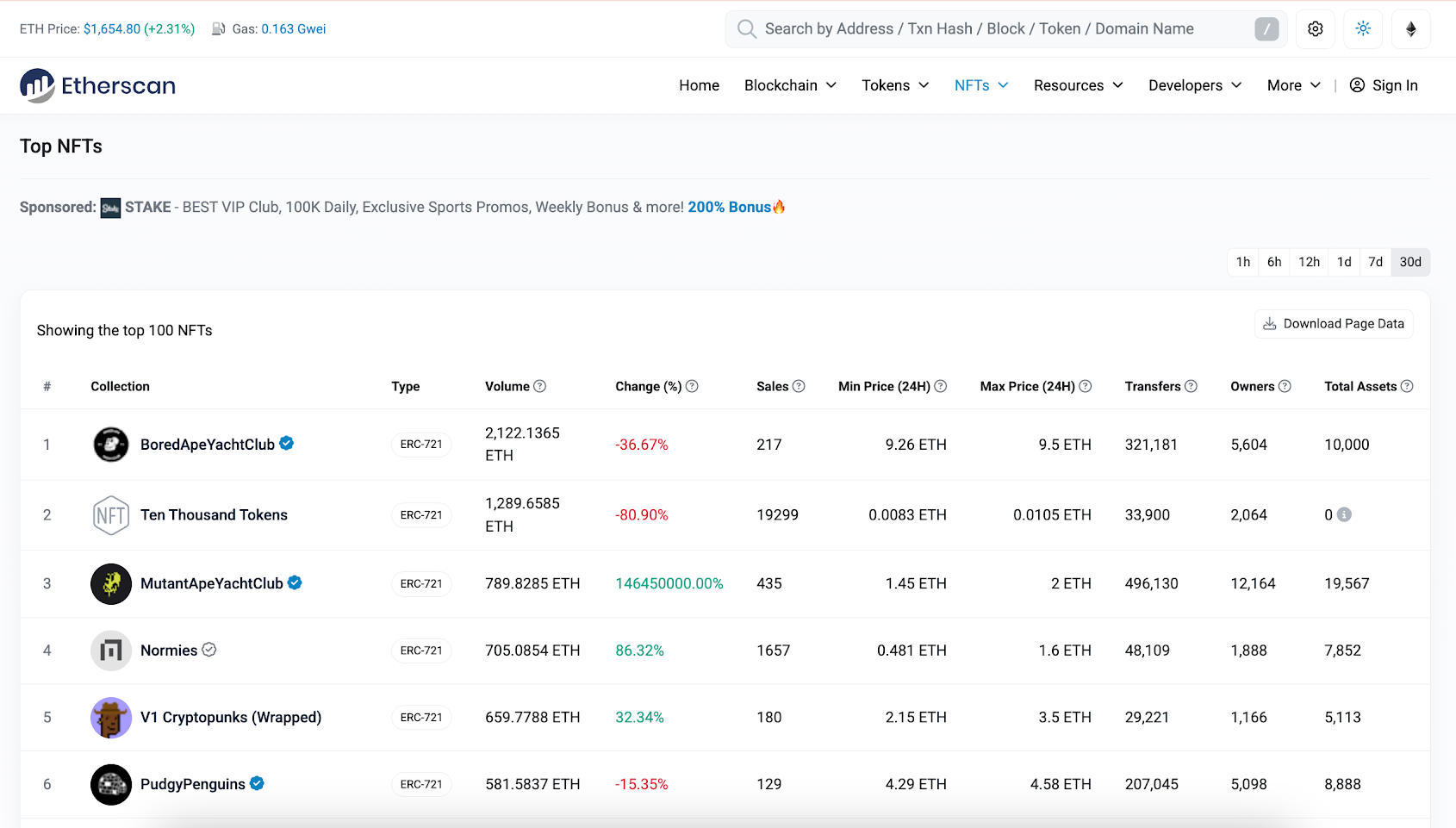 NFT Tracker Page
Exploring NFT Collections and Individual NFTs:
- NFT Top Contracts Leaderboard: This page showcases the leading NFT collections by various metrics, such as trading volume, number of sales, and unique holders. It’s a great starting point for discovering popular or trending collections.
- Individual NFT Collection Page: Clicking on a collection (e.g., CryptoPunks, Bored Ape Yacht Club) will lead to a dedicated page providing an overview of the collection. Key tabs include:
- Inventory: Displays all NFTs within the collection, often with their unique token IDs and images.
- Holders: Lists the addresses holding NFTs from the collection, indicating distribution.
- Transfers: Shows the historical transfer activity for all NFTs within that collection.
- Specific NFT Token Page: By searching for a specific NFT’s contract address and token ID, you can view its individual page. This page typically includes:
- Metadata: Details about the NFT, such as its name, description, and image link.
- Ownership History: A complete record of all previous owners and transfer timestamps, providing irrefutable proof of provenance.
Verifying NFT Authenticity and Ownership:
Etherscan is an indispensable tool for verifying the authenticity and ownership of NFTs. Unlike marketplace listings, which can be manipulated, Etherscan directly reflects the on-chain truth:
1. On-Chain Ownership: The “Owner” field on an individual NFT’s page directly shows the wallet address that currently holds the NFT. This is the definitive proof of ownership, independent of any marketplace.
2. Legitimate Contract Verification: Always ensure that the NFT you are viewing originates from the official, verified smart contract of the collection. Scammers often create fake collections with similar names; checking the contract address against official project sources is paramount.
3. Provenance Tracking: The transfer history allows you to trace an NFT’s journey from its minting to its current owner, providing a transparent record of its past.
Block Explorer Deep Dive
Blocks are the fundamental units of the Ethereum blockchain, containing a batch of transactions and other critical information. Etherscan’s block explorer allows users to delve into the details of each block, providing a granular view of network activity.
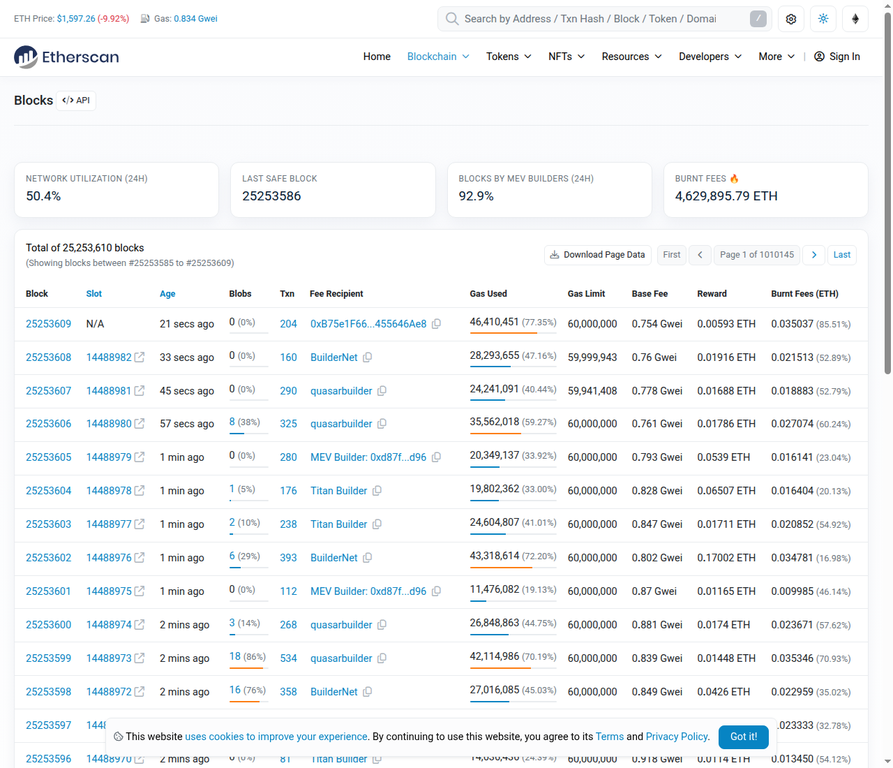 Etherscan Latest Blocks List
Understanding the Latest Blocks List:
The “Blocks” page on Etherscan displays a real-time list of newly mined blocks. For each block, key information includes:
- Block Number: A unique, sequential identifier for the block.
- Age: How long ago the block was mined.
- Txn Count: The number of transactions included in that block.
- Miner/Validator: The address of the entity that successfully proposed and validated the block.
- Reward: The ETH reward earned by the miner/validator for including the block.
Deep Dive into a Specific Block:
Clicking on a block number leads to a detailed block page, offering a comprehensive breakdown of its contents:
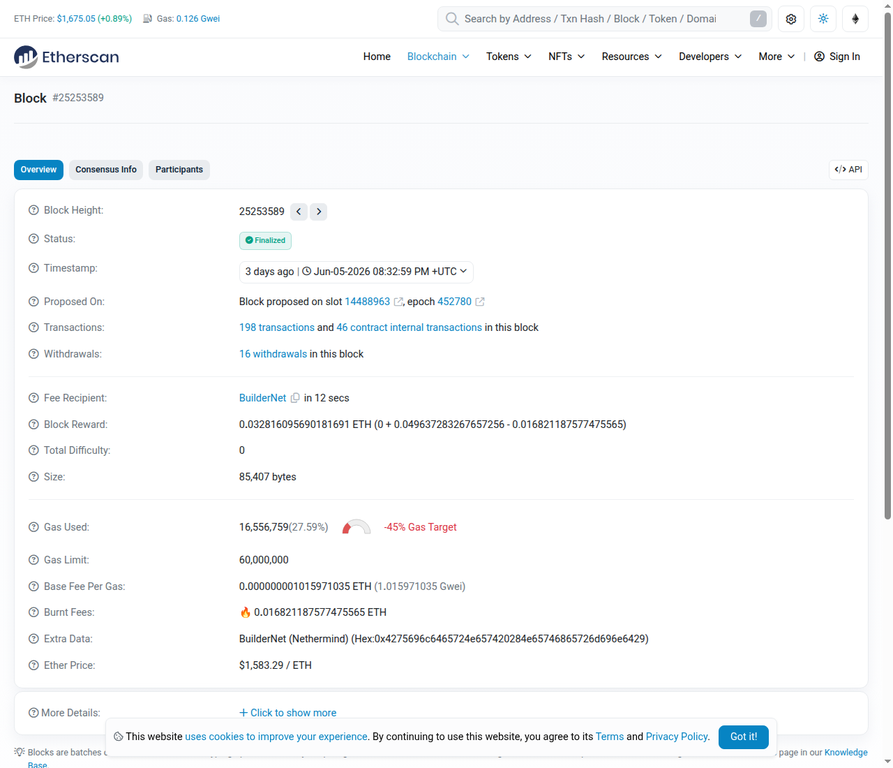 Etherscan Block Detail Page
- Block Height: The block’s unique number.
- Timestamp: The exact time the block was created.
- Transactions: A list of all transactions included within that block. This allows users to see which transactions were processed together.
- Block Reward: The ETH paid to the validator for creating the block, consisting of a base reward and transaction fees.
- Gas Used/Limit: The total gas consumed by all transactions in the block, and the maximum gas allowed in the block.
Block Finality vs. Confirmation Count:
- Block Finality: In Ethereum’s Proof-of-Stake (PoS) system, a block is considered “finalized” after a certain number of subsequent blocks have been added and attested to by validators. Finalized blocks are irreversible.
- Confirmation Count: This refers to the number of blocks that have been mined on top of a particular block. While a transaction is technically confirmed after being included in one block, a higher confirmation count (e.g., 12 or more) provides greater assurance of its immutability, especially for large value transfers.
ENS (Ethereum Name Service) Lookup
ENS (Ethereum Name Service) provides a human-readable naming system for Ethereum addresses, making it easier to send and receive funds without having to deal with long, complex hexadecimal strings. Etherscan integrates seamlessly with ENS, allowing users to look up and verify these names.
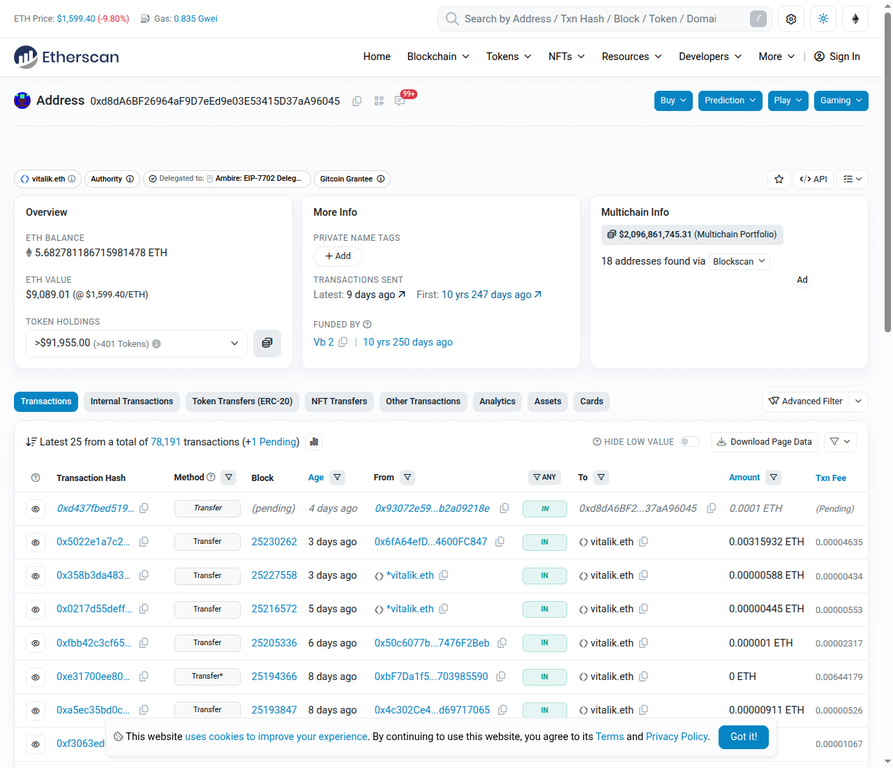 Ethereum Name Service Lookup
What are ENS Domains?
ENS domains are decentralized, human-readable names (e.g., vitalik.eth) that resolve to Ethereum addresses, content hashes, and other resources. They function similarly to DNS (Domain Name System) for the internet, but for the Ethereum blockchain. Instead of sending ETH to 0xd8dA6BF26964aF9D7eEd9e03E53415D37aA96045, you can send it to vitalik.eth.
How to Use ENS Lookup on Etherscan:
1. Search an ENS Domain: Simply type an ENS domain (e.g., vitalik.eth) into the Etherscan search bar. The search results will directly display the resolved Ethereum address associated with that name.
2. ENS Tab on Address Page: If an Ethereum address owns an ENS name, a dedicated “ENS” tab will appear on its address page, listing all ENS names registered to that address.
Benefits of ENS:
- Usability: Makes sending and receiving cryptocurrency much simpler and less prone to errors.
- Identity: Provides a decentralized identity for users and projects on the Ethereum blockchain.
- Verification: Etherscan allows you to quickly verify which address an ENS name resolves to, ensuring you are interacting with the correct entity.
PART 3: EXPERT / DEVELOPER LEVEL
Reading & Writing Smart Contracts
For developers and advanced users, Etherscan offers direct interfaces to interact with verified smart contracts. This functionality is invaluable for debugging, auditing, and even recovering funds from dApps with broken frontends.
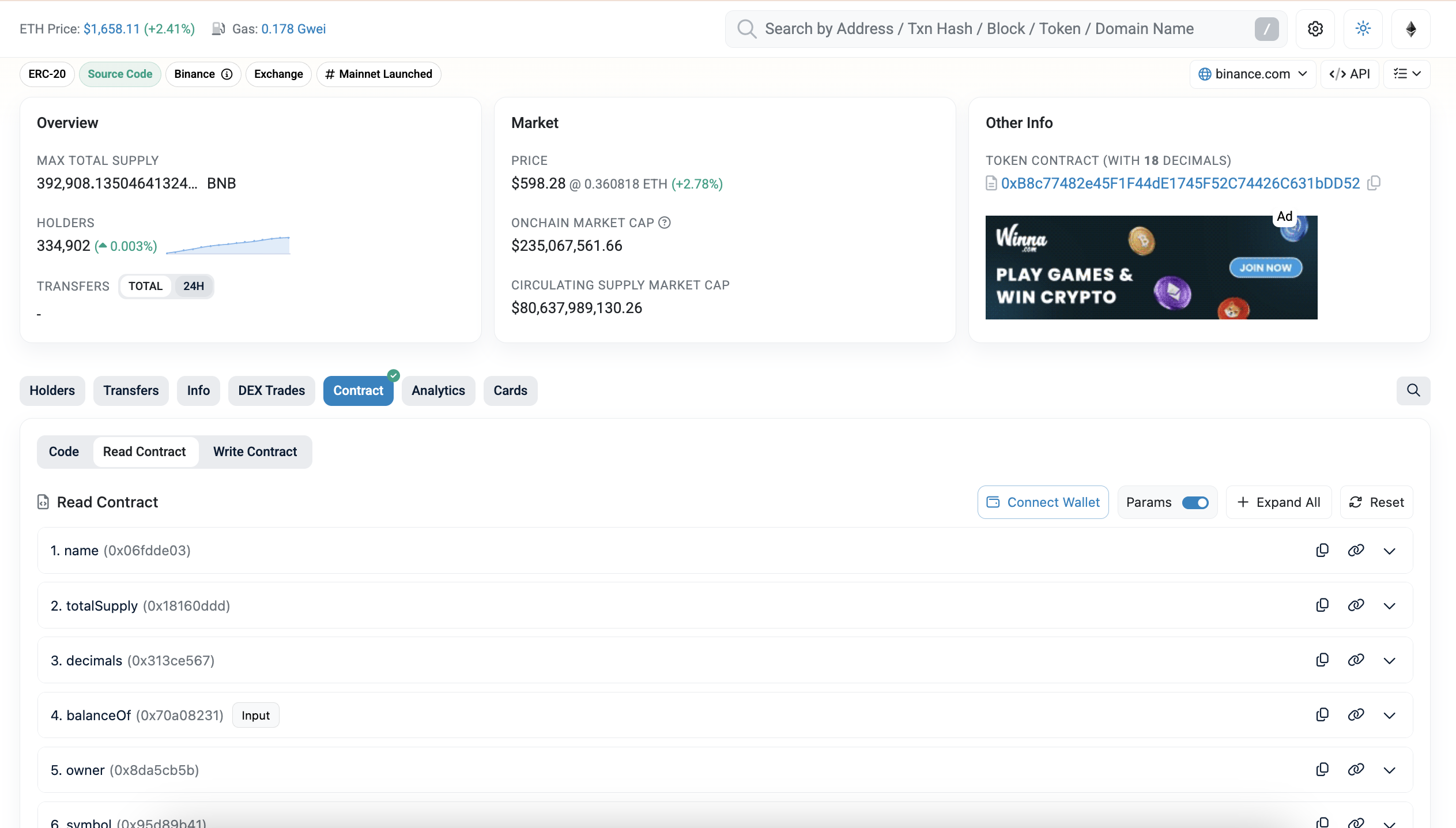 Etherscan Read Contract Tab
Reading Contract Data (No Gas Required):
The “Read Contract” tab allows you to query the public state of a smart contract without executing a transaction, meaning no gas fees are incurred. This is achieved by calling view or pure functions defined within the contract. Common use cases include:
- balanceOf(address): Check the token balance of any address for an ERC-20 contract.
- totalSupply(): Retrieve the total number of tokens in circulation.
- owner(): Identify the owner or administrator of a contract.
- paused(): Determine if a contract’s operations have been temporarily halted.
To use this, simply input the required parameters (e.g., an address for balanceOf) and click “Query” or the function button. The result will be displayed directly on the page.
Writing to a Contract (Requires Gas):
The “Write Contract” tab allows you to execute payable or nonpayable functions of a smart contract, which will modify its state on the blockchain. This requires connecting your Web3 wallet (e.g., MetaMask) via the “Connect to Web3” button and submitting a transaction, which will incur gas fees. This feature is particularly powerful for:
- Interacting with dApps Directly: If a dApp’s user interface is down or malfunctioning, you can often bypass it and interact with the underlying smart contract directly through Etherscan.
- Rescuing Funds: In scenarios where a dApp frontend is inaccessible, users can use the “Write Contract” tab to call functions like withdraw() or claim() to retrieve their staked or locked funds.
- Advanced Operations: Performing complex contract interactions that might not be exposed through a simple UI.
Important Note: Always exercise extreme caution when writing to contracts directly. Ensure you understand the function you are calling and the parameters you are providing, as incorrect inputs can lead to irreversible loss of funds.
Event Logs & Transaction Logs
Event logs are a crucial mechanism for smart contracts to communicate information about their execution to the outside world. They are not stored directly within the contract’s state but are emitted as part of a transaction’s receipt, providing an auditable history of contract activity. Etherscan’s “Logs” tab (often labeled “Event Logs”) on a transaction detail page decodes these events, making them human-readable.
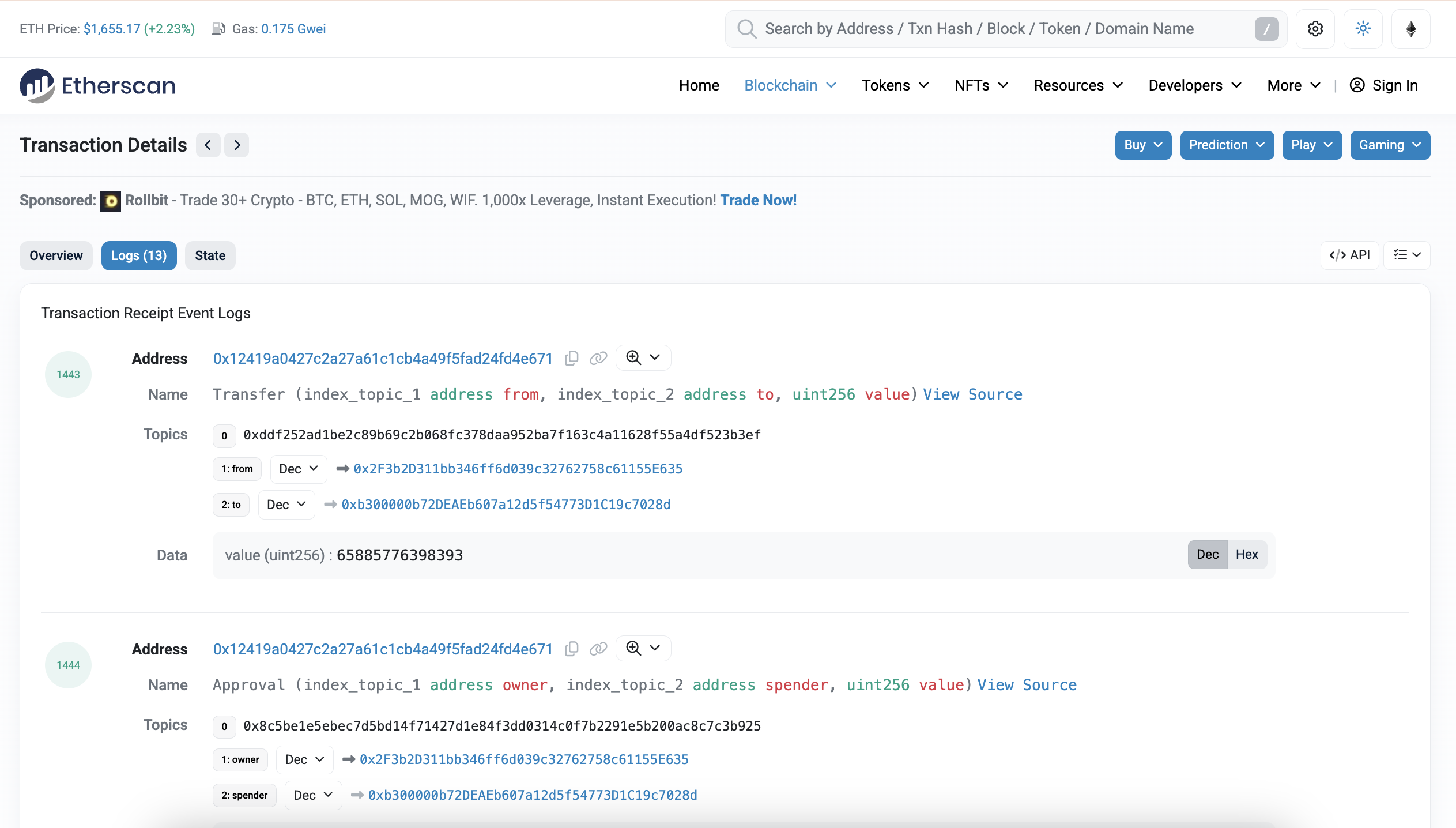 Etherscan Event Logs & Transaction Logs
What are Event Logs?
When a smart contract function is executed, it can emit “events.” These events are essentially structured data records that are permanently stored on the blockchain as part of the transaction receipt. They are commonly used for:
- Indexing: Blockchain indexers (like Etherscan, The Graph) use event logs to build searchable databases of contract activity.
- User Interfaces: dApp frontends listen for events to update their UIs in real-time.
- Analytics: Data analysts use event logs to track token transfers, liquidity pool changes, governance votes, and other on-chain metrics.
Decoding Event Logs:
On Etherscan’s “Logs” tab, you’ll typically see:
- Raw Logs: These display the low-level data emitted by the contract, including the Address of the contract that emitted the event, Topics (indexed parameters that allow for efficient filtering), and Data (non-indexed parameters).
- Decoded Event Logs: Etherscan automatically decodes these raw logs into a human-readable format, showing the event name (e.g., Transfer, Swap) and the values of its parameters (e.g., from, to, value). This makes it easy to understand what happened during a contract interaction.
Example Use Case: In a complex DeFi swap, the main transaction might only show ETH moving to a router contract. However, the event logs will reveal the Swap events emitted by the DEX, detailing exactly which tokens were exchanged, in what amounts, and between which addresses. This provides a complete audit trail of the transaction’s internal mechanics.
Etherscan API (Developer Feature)
For developers, data analysts, and anyone needing programmatic access to Ethereum blockchain data, Etherscan offers a robust Application Programming Interface (API). This allows external applications to query Etherscan’s indexed data without needing to run a full Ethereum node.
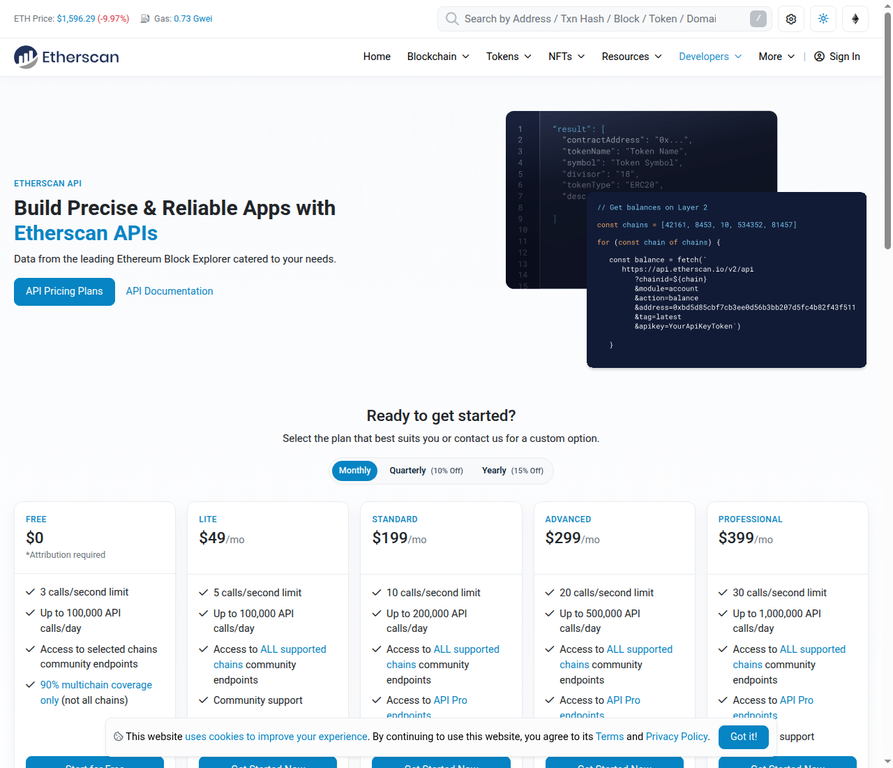 Etherscan API Plans Page
API Tiers and Usage Limits:
Etherscan provides different API tiers to cater to various usage needs:
- Free Tier: Offers a generous allowance of 5 requests per second and up to 100,000 requests per day. This is suitable for most individual developers and small projects.
- Pro Tier: For high-volume users and commercial applications, the Pro tier provides significantly higher rate limits (e.g., 100 requests per second) and often includes unlimited daily requests, along with dedicated support.
Key API Endpoints:
The Etherscan API offers a wide range of modules and endpoints to retrieve various types of blockchain data. Some of the most commonly used include:
- account module:
- getBalance: Get the ETH balance of a single address.
- getTransactions: Retrieve a list of normal or internal transactions for an address.
- getTokenBalance: Get the balance of an ERC-20 token for a specific address.
- contract module:
- getABI: Fetch the Application Binary Interface (ABI) of a verified smart contract.
- getContractSourceCode: Retrieve the Solidity source code of a verified contract.
- proxy module: Allows direct interaction with an Ethereum node (e.g., eth_call, eth_getTransactionByHash).
- gastracker module:
- gasoracle: Get the current safe, proposed, and fast gas prices.
Sample Use Case: A common application of the Etherscan API is to build a personal portfolio tracker. By using the getTransactions and getTokenBalance endpoints, a user can pull their entire transaction history and current token holdings into a spreadsheet or a custom application for analysis or tax purposes.
API Key Generation:
To use the Etherscan API, you typically need to register for a free account and generate an API key from your dashboard. This key authenticates your requests and ensures you stay within your rate limits.
Verified Contract Source Code & ABI
For developers and security auditors, Etherscan provides unparalleled transparency into smart contracts by hosting their verified source code and Application Binary Interface (ABI). This allows for deep inspection and programmatic interaction with contracts.
 Etherscan Verified Contract Code Tab
Accessing Source Code and ABI:
On a verified contract’s page, navigating to the “Contract” tab and then the “Code” sub-tab reveals several critical pieces of information:
- Solidity Source Code: The human-readable code written by the developer. This is invaluable for understanding the contract’s logic, identifying potential bugs, or verifying its intended behavior.
- ABI (Application Binary Interface) JSON: The ABI is a JSON array that describes the contract’s functions and events in a machine-readable format. It acts as a blueprint, telling external applications how to interact with the contract (e.g., what functions are available, what parameters they expect, and what data types they return).
- Constructor Arguments: These are the parameters passed to the contract’s constructor function when it was initially deployed. They often reveal important configuration details or initial settings of the contract.
- Compiler Version and Optimization Settings: Details about the Solidity compiler used and any optimization settings applied during compilation. This is important for ensuring the deployed bytecode matches the source code.
Verifying Code and Downloading ABI:
- Code Verification: Developers can use Etherscan to verify that the deployed bytecode on the blockchain precisely matches the Solidity source code they provide. This process is crucial for establishing trust and allowing public audits.
- Downloading ABI: The ABI JSON can be easily copied or downloaded from Etherscan. It is then used in Web3 development libraries (like Web3.js or Ethers.js) to construct transactions and interact with the contract programmatically.
What Constructor Arguments Reveal:
Constructor arguments can provide insights into a contract’s initial setup. For example, a token contract’s constructor might define its initial supply, name, and symbol. Analyzing these arguments can help understand the contract’s fundamental properties at the time of deployment.
Testnet Explorers (for Developers)
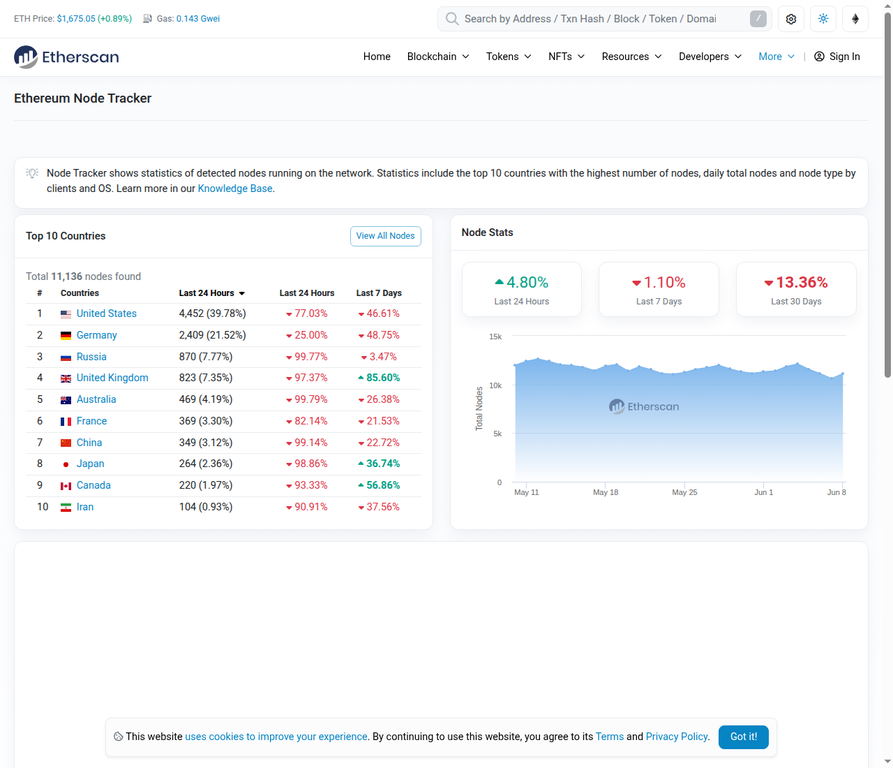
Before deploying smart contracts or dApps to the expensive and irreversible Ethereum mainnet, developers extensively test their code on testnets. Etherscan provides dedicated explorers for these test networks, mirroring the functionality of the mainnet explorer.
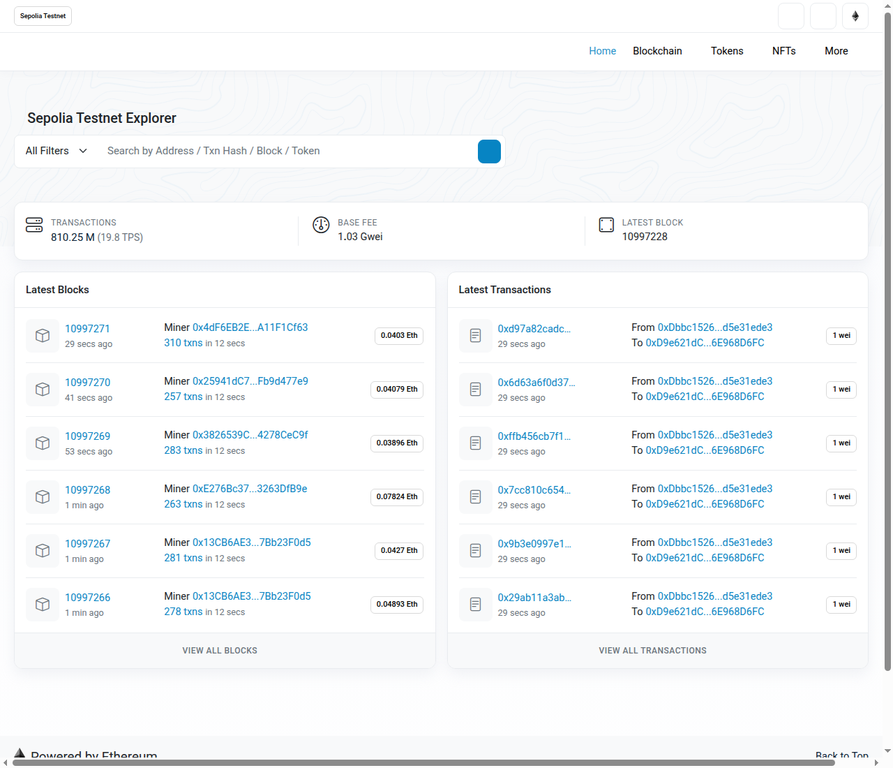 Etherscan Sepolia Testnet Explorer Homepage
Why Testnets are Essential:
Testnets are parallel blockchains that mimic the behavior of the Ethereum mainnet but use valueless test ETH. This allows developers to:
- Experiment Safely: Deploy and interact with contracts without risking real funds.
- Debug and Iterate: Identify and fix bugs in their code before a mainnet launch.
- Test dApp Functionality: Ensure their decentralized applications work as expected in a live blockchain environment.
Available Testnets:
While several testnets have existed, Sepolia is currently the primary testnet recommended for developers. Holesky is another significant testnet, primarily used for testing staking and infrastructure.
Getting Testnet ETH:
To interact with contracts on a testnet, you need test ETH. This can be obtained for free from various “faucets” (websites that distribute small amounts of test ETH). For example, the Sepolia faucet allows users to claim test ETH after a simple verification.
Identical User Interface:
Crucially, testnet Etherscan explorers (e.g., sepolia.etherscan.io) feature an identical user interface and functionality to the mainnet Etherscan. This ensures a consistent experience for developers and makes it easy to transition from testing to mainnet deployment.
Multichain / Etherscan V2 API (New in 2025)
As the blockchain ecosystem expands beyond Ethereum to numerous Layer 2 solutions and other EVM-compatible chains, Etherscan has evolved to provide a unified experience for tracking assets and interacting with contracts across this multichain landscape. The Etherscan V2 API, launched in May 2025, represents a significant step in this direction.
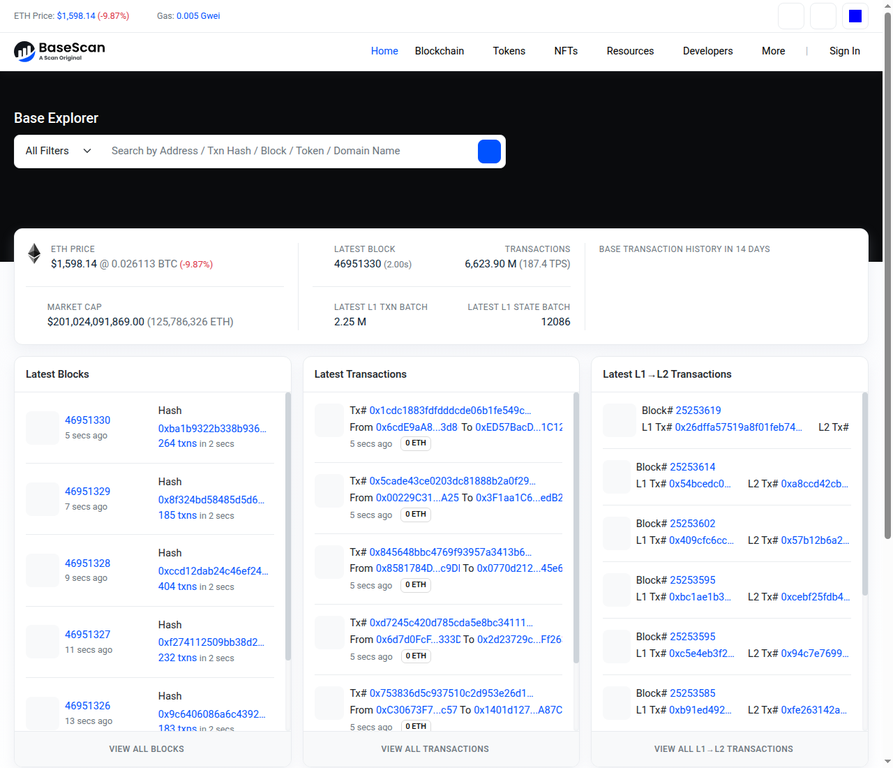 Homepage
The Etherscan V2 API Rollout:
The Etherscan V2 API is a major upgrade that allows developers to use a single API key to access data across more than 60 EVM-compatible blockchains. This eliminates the need for separate API keys and integrations for each chain, greatly simplifying multichain development and data aggregation.
Supported Chains:
Etherscan’s network of explorers now covers a vast array of popular EVM chains, including:
- Ethereum Mainnet
- Layer 2s: Base, Arbitrum, Optimism, zkSync, Linea, Scroll, etc.
- Sidechains: Polygon PoS, Gnosis Chain
- Other EVM-compatible chains: BNB Smart Chain, Avalanche C-Chain, Fantom, Cronos, Klaytn, etc.
Multichain Portfolio View:
Etherscan also offers a multichain portfolio view, allowing users to track their assets and transactions across all supported networks from a single interface. By entering an address, users can see a consolidated overview of their holdings, providing a holistic view of their decentralized finance (DeFi) activities.
Whale Watching & On-Chain Analytics
Etherscan is not just for individual transaction lookups; it’s a powerful platform for on-chain analytics, enabling users to monitor large wallet movements (“whale watching”) and gauge the overall health and activity of the Ethereum network.
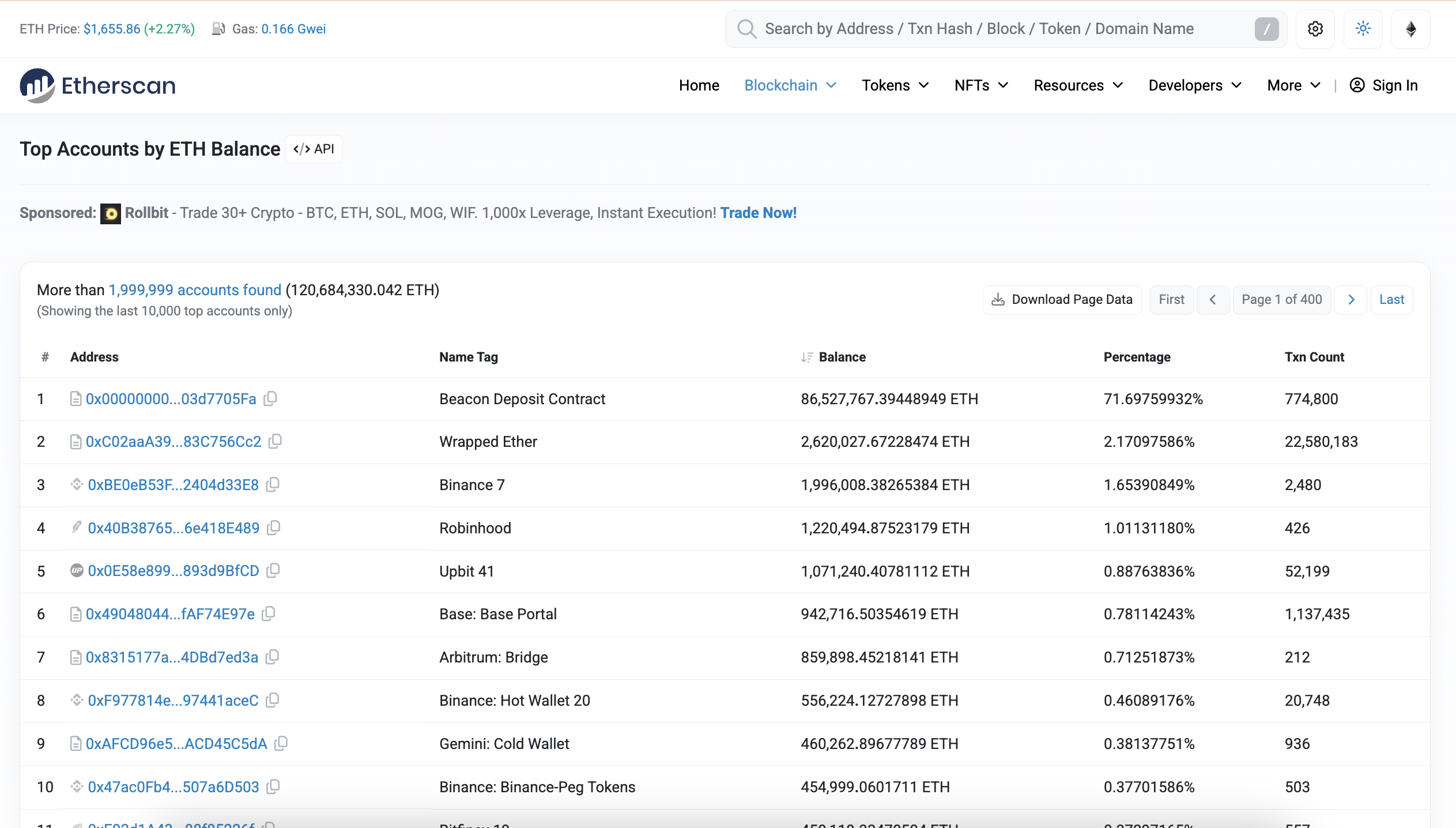 Top Accounts by ETH Balance
Monitoring Whales:
The “Top ETH Accounts” page (https://etherscan.io/accounts) lists the richest Ethereum addresses, often referred to as “whales.” By observing their transaction patterns, users can gain insights into market sentiment, potential large-scale buying or selling, and the movement of significant capital. While not a guarantee of future price action, whale movements can be an indicator of broader market trends.
On-Chain Metrics for Network Health:
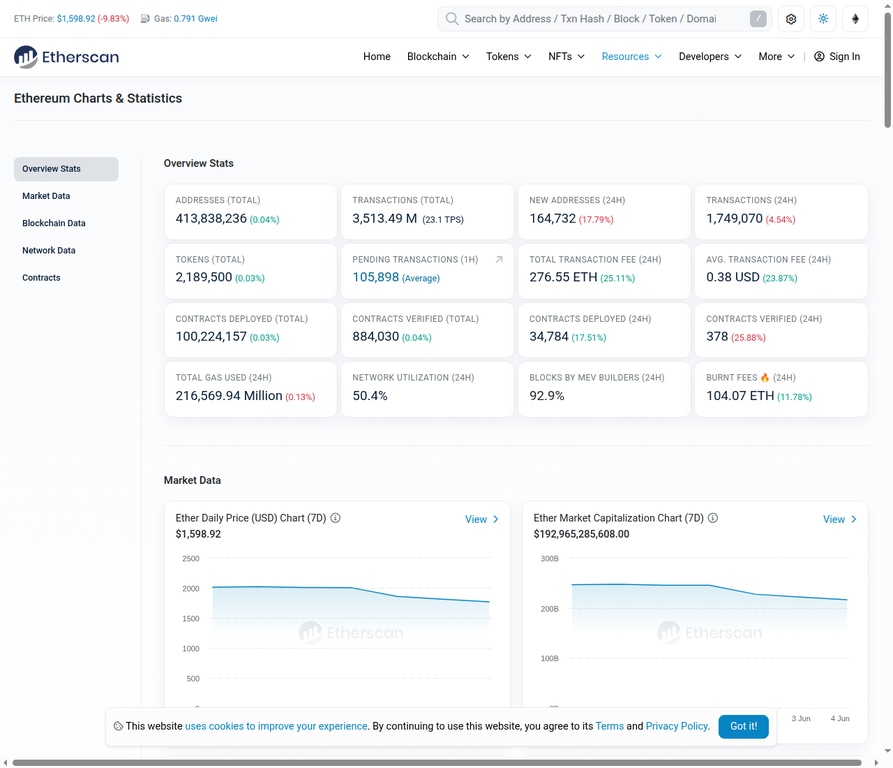
Etherscan provides various charts and statistics that offer a macroscopic view of the network. Key metrics include:
- Daily Transaction Count: The total number of transactions processed on the network each day, indicating overall activity.
- Active Addresses: The number of unique addresses that have sent or received transactions, reflecting user engagement.
- Gas Used: The total amount of gas consumed by all transactions, which correlates with network demand and congestion.
These metrics, often found on the “Charts and Stats” page (https://etherscan.io/charts), are invaluable for analysts to assess network health, adoption trends, and potential stress points. For example, a sudden spike in active addresses or gas usage might indicate increased interest or a major event on the network.
Etherscan Account Features for Analysts:
For users who register a free Etherscan account, additional features enhance on-chain analytics capabilities:
- Watchlists: Create custom lists of addresses to monitor, receiving notifications for their transactions.
- Email Alerts: Set up automated email alerts for specific events, such as a whale moving a large amount of ETH.
- Name Tags & Custom Labels: Assign human-readable names or private labels to addresses, making it easier to track entities of interest.
Creating a Free Etherscan Account (Optional but Useful)
While Etherscan is largely accessible without an account, registering for a free account unlocks several powerful features that enhance the user experience, particularly for those who frequently use the platform for tracking, analysis, or development.
Benefits of a Free Etherscan Account:
- Watchlists: Monitor specific wallet addresses or smart contracts and receive notifications for their activities. This is invaluable for tracking personal investments, competitor movements, or project updates.
- API Key Generation: A free account allows you to generate an API key for programmatic access to Etherscan’s data, enabling custom applications and data analysis.
- Name Tags: Assign public name tags to addresses, making them easier to identify across the platform. For example, you could tag a known exchange wallet.
- Custom Labels: Create private labels for your own addresses or addresses of interest, visible only to you. This helps organize your tracking efforts.
- Transaction Notifications: Receive email alerts for incoming or outgoing transactions from watched addresses.
How to Add a Custom Label:
After logging in, navigate to your account dashboard. You can typically find an option to add a custom label to any address. This allows you to personalize your Etherscan experience, for instance, labeling your Ledger wallet as “My Ledger” or a specific dApp contract as “Uniswap V3 Router.”
BONUS SECTIONS
How to Spot a Scam Token
The open nature of blockchain, while powerful, also allows malicious actors to create scam tokens designed to trick unsuspecting users. Etherscan is your best defense against these schemes.
Why Two Tokens Can Have the Same Name/Symbol:
Unlike traditional financial systems, there’s no central authority preventing multiple smart contracts from using the same token name or symbol (e.g., multiple tokens named “USDT” or “ETH”). This is a common tactic used by scammers to mimic legitimate projects.
Always Verify the Contract Address:
The golden rule of token verification is to always check the contract address. The token name and symbol are easily faked, but the contract address is unique to the deployed smart contract. Before interacting with any token, compare its contract address on Etherscan with the official address listed on the project’s official website, reputable aggregators (like CoinGecko or CoinMarketCap), or trusted community channels.
Red Flags to Look For on Etherscan:
- 0 Holders or Very Few Holders: A newly launched token with a legitimate purpose will typically gain holders over time. A token with almost no holders, especially if it’s mimicking a popular one, is suspicious.
- Unverified Contract: A unverified contract means the source code is not publicly available. This is a major red flag, as you cannot audit what the contract does.
- No Transfer History: A token with no or very little transfer activity, despite being listed or promoted, could indicate a scam.
- Honeypot Indicators: Some scam contracts are designed as “honeypots,” allowing users to buy but not sell. While Etherscan doesn’t explicitly label these, suspicious contract code (if verified) or a history of users being unable to sell can be indicators.
How to Use Etherscan for Tax Purposes
For cryptocurrency users, accurately tracking transactions for tax reporting can be complex. Etherscan simplifies this process by allowing you to export your transaction history, which can then be integrated with tax software.
Exporting Transaction History as CSV:
1. Navigate to Your Address Page: Enter your Ethereum wallet address into the Etherscan search bar.
2. Find the “Download CSV” Option: On your address overview page, look for a button or link that says “Download CSV Export” or similar. This option is usually available for normal transactions, ERC-20 token transfers, and sometimes internal transactions.
3. Select Date Range (if available): Etherscan often allows you to specify a date range for the export, which is useful for generating reports for specific tax years.
4. Download the CSV File: The file will contain a detailed record of your transactions.
Data Included in the Export:
The CSV export typically includes essential data points for each transaction:
- Date/Time: When the transaction occurred.
- Txn Hash: The unique identifier for the transaction.
- From Address: The sender of the transaction.
- To Address: The recipient of the transaction.
- Value: The amount of ETH or tokens transferred.
- Gas Fee: The cost of the transaction in ETH.
Integration with Tax Tools:
This CSV data can be imported into various cryptocurrency tax software platforms like Koinly, CoinLedger, TokenTax, or Accointing. These tools then analyze your transaction history, calculate capital gains/losses, and generate tax reports compliant with your local regulations, significantly simplifying the tax filing process.
Etherscan vs. Other Explorers
While Etherscan is synonymous with Ethereum, the “Etherscan” brand extends across a vast network of blockchain explorers for various EVM-compatible chains. This ecosystem provides a consistent and familiar interface for users navigating the broader decentralized landscape.
The Etherscan Family of Explorers:
The same team behind Etherscan develops and maintains explorers for many other popular blockchains, including:
- Basescan: For the Base Layer 2 network.
- Arbiscan: For the Arbitrum Layer 2 network.
- Optimism Scan: For the Optimism Layer 2 network.
- Polygonscan: For the Polygon PoS chain.
- BscScan: For the BNB Smart Chain.
- Snowtrace: For the Avalanche C-Chain.
- Fantomscan: For the Fantom Opera network.
Consistency and Interoperability:
Crucially, these explorers share a highly similar user interface, feature set, and underlying API structure. This consistency means that once you learn how to use Etherscan for Ethereum, you can easily navigate and utilize any other “-scan” explorer for different chains. The Etherscan V2 API allows a single API key to work across many of these networks, streamlining development and data aggregation for multichain applications.
Etherscan Knowledge Applies Across Multiple Blockchain Explorers
The same principles covered in this Etherscan guide apply to other blockchain explorers such as Solscan for Solana, BscScan for BNB Smart Chain, Arbiscan for Arbitrum, and Basescan for Base. While the interface and network-specific features may vary slightly, users can generally track transactions, inspect wallet addresses, verify token transfers, analyze smart contracts, and monitor on-chain activity using a similar workflow.
Once you understand how to navigate Etherscan, you’ll find it much easier to explore other blockchain ecosystems, as most modern explorers provide comparable tools for transaction tracking, wallet analysis, token verification, and network monitoring.
Conclusion
Etherscan stands as an indispensable tool in the Ethereum ecosystem, democratizing access to blockchain data and empowering users from beginners to expert developers. Its comprehensive features, ranging from simple transaction lookups to advanced smart contract interactions and multichain analytics, make it the go-to platform for understanding and navigating the complexities of decentralized finance and Web3. By mastering Etherscan, users gain a powerful lens into the transparent and immutable world of blockchain, enabling informed decisions, enhanced security, and deeper engagement with the decentralized web.


You May Also Like

Robotics Automation Prototyping: Engineering Kinetic Agility into End-Effectors

Kaiko Highlights Wrapped BTC Market Dynamics — What’s Next for Investors?

Fed Governor Calls For Strong Stablecoin Oversight As CLARITY Act’s Final Text Gets Delayed