

BlackRock Leads $455 Million Ethereum ETF Inflows, as ETH Price Shoots 4%
World’s largest asset manager BlackRock led the $450 million inflows registered across all US Ethereum ETF issuers on August 26.
Inflows into Ether ETFs have shot up significantly this week, crossing the $13 billion milestone since inception. The ETH ETH $4 641 24h volatility: 2.9% Market cap: $559.26 B Vol. 24h: $35.82 B price has bounced back once again, gaining 4.5% today, and surging past $4,600 levels.
Spot Ethereum ETF Inflows Surge Again, Led by BlackRock
US-listed Ethereum ETFs recorded $455 million in net inflows on Tuesday, marking their fourth straight day of gains.
Data from SoSoValue shows that both BlackRock and Fidelity led the surge, with ETHA adding $323 million and FETH bringing in $85.5 million. Grayscale’s ETHE and its Mini Ethereum Trust also reported positive inflows.
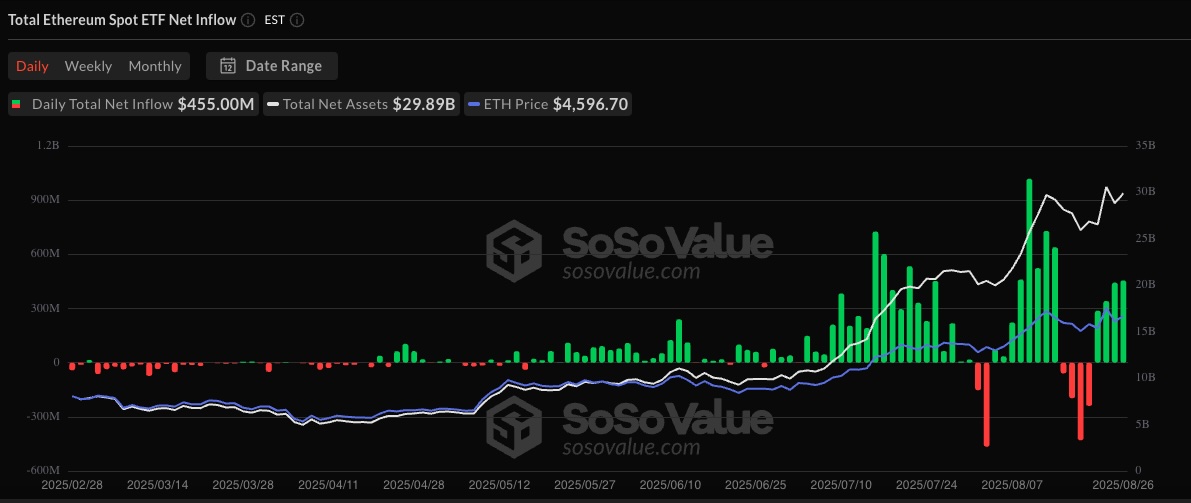
Spot Ethereum ETF inflows are on the rise. | Source: SoSoValue
Amid the ongoing development, BlackRock iShares Ethereum Trust (ETHA) is hitting new records with $16.5 billion in assets under management.
The asset manager purchased an additional 71,037 ETH, valued at $323.08 million, with $2 billion in trading volume on August 26. This marks the fourth consecutive day of inflows for the fund, bringing its cumulative total to $984 million.
The BlackRock Ethereum ETF now holds a total of 3.775 million of Ethereum, with more than 2million ETH accumulated just over the past two months.
On Tuesday, the ETHA share price surged another 4%, closing at the high of $34.82. Also, the share price is up by over 100% in the last six months, highlighting strong demand for the BlackRock fund.
Meanwhile, Bitcoin ETFs recorded $88.2 million in total daily inflows across six funds, continuing a trend where Ether ETFs are outpacing their Bitcoin BTC $111 769 24h volatility: 2.0% Market cap: $2.22 T Vol. 24h: $37.81 B counterparts.
On Monday, inflows into Ethereum ETFs were more than double those of spot Bitcoin ETFs, signaling a “significant rotational shift” from Bitcoin to Ethereum.
ETH Price Rises 4% Above $4,600
ETH price is once again showing strength after a pullback to $4,300 last week. Since then, Ethereum has regained 7% and is currently trading above $4,600 levels.
Analyst Daan Crypto Trades noted that ETH price is maintaining its diagonal support while consolidating in the current price range. Key levels to monitor include the 2021 all-time high near $4,900 and local support between $4,000 and $4,100.
Price action within this range is expected to remain volatile until a clear breakout direction emerges.
ETH Treasury firms continue to purchase in big numbers. Bitmine Technologies (NYSE: BMNR) purchased nearly 200,000 ETH over the past week.
nextThe post BlackRock Leads $455 Million Ethereum ETF Inflows, as ETH Price Shoots 4% appeared first on Coinspeaker.
You May Also Like

Tether Backs Ark Labs’ $5.2 Million Bet on Bitcoin’s Stablecoin Revival

MySQL Single Leader Replication with Node.js and Docker
command: --server-id=1 --log-bin=ON The --server-id option gives each MySQL server in your replication setup its own name tag. Each one has to be unique and without it, replication won’t work at all. Another cool option not included here is binlog_format=ROW. This tells MySQL how to keep track of changes before passing them along to the replicas. By default, MySQL already uses row-based replication, but you can explicitly set it to ROW to be sure or switch it to STATEMENT if you’d rather log the actual SQL statements instead of row-by-row changes. \ Run our containers on docker Now, in the terminal, we can run the following command to spin up our database containers: docker-compose up -d \ Setting Up Our Master (Primary) Server To configure our master server, we would have to first access the running instance on docker using the following command docker exec -it mysql-master bash This command opens an interactive Bash shell inside the running Docker container named mysql-master, allowing us to run commands directly inside that container. \ Now that we’re inside the container, we can access the MySQL server and start running commands. type: mysql -uroot -p This will log you into MySQL as the root user. You’ll be prompted to enter the password you set in your docker-compose.yml file. \ Next, we need to create a special user that our replicas will use to connect to the master server and pull data. Inside the MySQL prompt, run the following commands: \ CREATE USER 'repl_user'@'%' IDENTIFIED BY 'replication_pass'; GRANT REPLICATION SLAVE ON . TO 'repl_user'@'%'; FLUSH PRIVILEGES; Here’s what’s happening: CREATE USER makes a new MySQL user called repl_user with the password replication_pass. GRANT REPLICATION SLAVE gives this user permission to act as a replication client. FLUSH PRIVILEGES tells MySQL to reload the user permissions so they take effect immediately. \ Time to Configure the Replica (Secondary) Servers a. First, let’s access the replica containers the same way we did with the master. Run this command in your terminal for each of the replica containers: \ docker exec -it <replica_container_name> bash mysql -uroot -p <replica_container_name> should be replace with the name of the replica container you are trying to setup b. Now it’s time to tell our replica where to get its data from. While inside the replica’s MySQL shell, run the following command to configure replication using the master’s details: CHANGE REPLICATION SOURCE TO SOURCE_HOST='mysql-master', SOURCE_USER='repl_user', SOURCE_PASSWORD='replication_pass', GET_SOURCE_PUBLIC_KEY=1; With the replication settings in place, let’s fire up the replica and get it syncing with the master. Still inside the MySQL shell on the replica, run: START REPLICA; This starts the replication process. To make sure everything is working, check the replica’s status with:
SHOW REPLICA STATUS\G; Look for Replica_IO_Running and Replica_SQL_Running — if both say Yes, congratulations! 🎉 Your replica is now successfully connected to the master and replicating data in real time.
Testing Our Replication Setup from the Node.js App Now that our replication is successfully set up, we can configure our Node.js server to observe the real-time effect of data being replicated from the master server to the replica server whenever we write to it. We start by installing the following dependencies:
npm i express mysql2 sequelize \ Now create a folder called src in the root directory and add the following files inside that folder connection.js, index.js and model.js. Our current directory should look like this We can now set up our connections to our master and replica server in the connection.js file as shown below
const Sequelize = require("sequelize"); const sequelize = new Sequelize({ dialect: "mysql", replication: { write: { host: "127.0.0.1", username: "root", password: "master", database: "replicaDb", }, read: [ { host: "127.0.0.1", username: "root", password: "slave", database: "replicaDb", port: 3307 }, { host: "127.0.0.1", username: "root", password: "slave", database: "replicaDb", port: 3308 }, { host: "127.0.0.1", username: "root", password: "slave", database: "replicaDb", port: 3309 }, ], }, }); async function connectdb() { try { await sequelize.authenticate(); } catch (error) { console.error("❌ unable to connect to the follower database", error); } } connectdb(); module.exports = { sequelize, }; \ We can now create a User table in the model.js file
const {DataTypes} = require("sequelize"); const { sequelize } = require("./connection"); const User = sequelize.define("User", { name: { type: DataTypes.STRING, allowNull: false, }, email: { type: DataTypes.STRING, unique: true, allowNull: false, }, }); module.exports = User \ and finally in our index.js file we can start our server and listen for connections on port 3000. from the code sample below, all inserts or updates will be routed by sequelize to the master server. while all read queries will be routed to the read replicas.
const express = require("express"); const { sequelize } = require("./connection"); const User = require("./model"); const app = express(); app.use(express.json()); async function main() { await sequelize.sync({ alter: true }); app.get("/", (req, res) => { res.status(200).json({ message: "first step to setting server up", }); }); app.post("/user", async (req, res) => { const { email, name } = req.body; let newUser = await User.build({ name, email, }); // This INSERT will go to the write (master) connection newUser = newUser.save({ returning: false }); res.status(201).json({ message: "User successfully created", }); }); app.get("/user", async (req, res) => { // This SELECT query will go to one of the read replicas const users = await User.findAll(); res.status(200).json(users); }); app.listen(3000, () => { console.log("server has connected"); }); } main(); When you make a POST request to the /users endpoint, take a moment to check both the master and replica servers to observe how data is replicated in real time. Right now, we are relying on Sequelize to automatically route requests, which works for development but isn’t robust enough for a production environment. In particular, if the master node goes down, Sequelize cannot automatically redirect requests to a newly elected leader. In the next part of this series, we’ll explore strategies to handle these challenges
