

How to Use MEXC Convert Vouchers: A Guide and FAQs
Key Takeaways:
- A Convert voucher is a reward issued by MEXC that lets you choose a cryptocurrency to receive through Convert.
- You can use a Convert voucher under My Rewards on MEXC. The cryptocurrency you receive is credited directly to your Spot account.
- To use a Convert voucher, you must meet its validity, minimum balance, and KYC verification requirements.
- Convert vouchers cannot be withdrawn or transferred, but the cryptocurrency you receive from the conversion can be held, traded, or withdrawn.
- If a conversion fails, your Convert voucher will not be used. You can try again before it expires.
1. Convert Voucher Basics
1.1 What is a Convert voucher?
A Convert voucher is a reward issued by MEXC that you can redeem for eligible cryptocurrencies through Convert. You can choose the cryptocurrency you want to receive from those currently supported by Convert. MEXC uses the voucher's face value to convert stablecoins into your chosen cryptocurrency, then credits it directly to your Spot account.
1.2 How do Convert vouchers differ from standard token rewards?
Standard token rewards are typically issued in a fixed asset with no option to substitute. Convert vouchers let you select a supported cryptocurrency based on your investment preferences and market outlook. This flexibility makes Convert vouchers a popular form of reward on MEXC.
1.3 How does a Convert voucher work?
Suppose you have a Convert voucher worth 10 USDT, and Convert currently supports major cryptocurrencies such as Bitcoin and Ethereum. If you select Bitcoin, MEXC will convert the voucher's 10 USDT value into Bitcoin and credit it directly to your Spot account. MEXC handles the entire conversion on your behalf at no additional cost to you.
2. How to Use Convert Vouchers
2.1 How do I use a Convert voucher?
You can use a Convert voucher on MEXC in four simple steps:
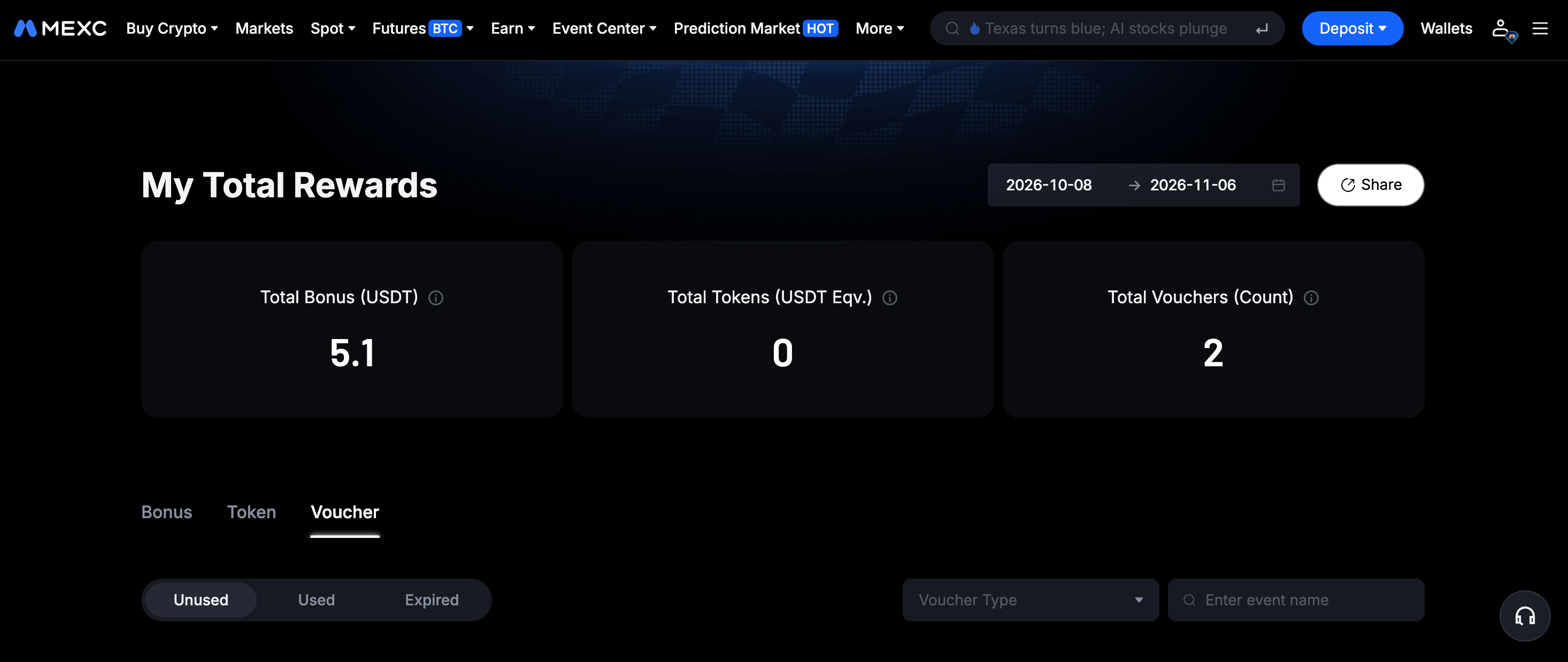
1) Log in to your MEXC account and open the voucher tab under My Total Rewards.
2) Find a Convert voucher under "Unused" and click the button to use it. The Convert window will open automatically.
3) In the Convert window, select the cryptocurrency you want to receive and review the live quote.
4) Confirm the conversion. Your chosen cryptocurrency will be credited directly to your Spot account.
You can also view and use your available Convert vouchers on the Convert page.
2.2 Where can I view my Convert vouchers?
Log in to your MEXC account and open the voucher tab to view the face value, cryptocurrency, validity period, and status of all your Convert vouchers.
Vouchers have three statuses: Unused, Used, and Expired. You can click to use an unused voucher. Used vouchers show when they were redeemed, while expired vouchers can no longer be used.
2.3 What should I do if KYC verification is required?
Some Convert vouchers require KYC verification. If you try to use a voucher without the required verification level, you will be prompted to complete the appropriate level of KYC verification first. Follow the on-screen instructions to complete verification. Your voucher status will then update automatically, allowing you to use it.
3. Convert Voucher Rules and Requirements
3.1 What requirements must I meet to use a Convert voucher?
You must meet all of the following requirements to use a Convert voucher:
1) Use the voucher within the validity period shown on it.
2) Hold at least the minimum balance specified on the voucher in your Spot account. For example, if a voucher requires a minimum balance of 10 USDT, your Spot account must hold at least 10 USDT before you can use it.
3) Meet the KYC verification level specified on the voucher.
4) Select a cryptocurrency currently supported by that voucher. The available cryptocurrencies are shown on the selection page when you use the voucher.
3.2 How many vouchers can I use per Convert order?
You can use only one Convert voucher per Convert order. Multiple vouchers cannot be combined in a single order. If you have several vouchers, you will need to use each one in a separate order.
3.3 Can I use a Convert voucher after it expires?
No. You must use a Convert voucher before the expiration time shown on it. Once it expires, it becomes invalid and cannot be restored, extended, or exchanged for another reward.
For example, if a voucher is issued today at 15:00 and is valid for one day, it will expire tomorrow at 14:59:59. After receiving a voucher, check its expiration time in the voucher tab and use it promptly.
3.4 Which cryptocurrencies can I receive with a Convert voucher?
The cryptocurrencies you can receive are shown on the Convert selection page. Some vouchers support all cryptocurrencies available through Convert, while others support only specified cryptocurrencies. Check the selection page when using your voucher to see the available options.
4. Convert Voucher Assets and Security
4.1 Can I withdraw cryptocurrency received with a Convert voucher?
Yes. The voucher itself is a platform reward and cannot be withdrawn, transferred, or redeemed for cash. However, the cryptocurrency credited to your Spot account through the voucher belongs entirely to you. You can hold it long term, trade it on the Spot market, or withdraw it to an external wallet through the platform's standard withdrawal process, with no additional voucher-related restrictions.
4.2 Will my Convert voucher be consumed if a conversion fails?
No. If the conversion fails when you confirm the quote, whether due to exchange rate fluctuations or another reason, your voucher will not be consumed. You can refresh the quote and try again before the voucher expires.
4.3 How is the amount I receive calculated?
The amount you receive is based on the live exchange rate when you confirm the conversion. Because cryptocurrency prices fluctuate, the amount may differ depending on when you convert. Check the amount shown in the quote carefully before confirming.
4.4 Which account receives the converted assets?
Your chosen cryptocurrency is credited directly to your MEXC Spot account, with no manual transfer required. Once the conversion is complete, you can view the credited assets in your Spot account's asset list.