How to Change the Phone Number Linked to Your MEXC AccountHow to Change the Phone Number Linked to Your MEXC Account
कैटेगरी की लिस्ट
कैंसिल करें

How to Change the Phone Number Linked to Your MEXC Account

Overview

  • When to change: When you change your phone number or want to enhance account security.
  • How to change: Supported via both the MEXC App and the Web.
  • Security restriction: Crypto and fiat withdrawals are disabled for 24 hours after the change.
  • Time required: The entire process takes about 3–5 minutes.

When using the MEXC cryptocurrency trading platform, you may need to change the phone number linked to your account for various reasons. MEXC provides a convenient feature to update your linked phone number. The following sections explain in detail how to change the phone number linked to your MEXC account via the App and the Web, helping you complete the process smoothly.

1. Change the Linked Phone Number via the MEXC App


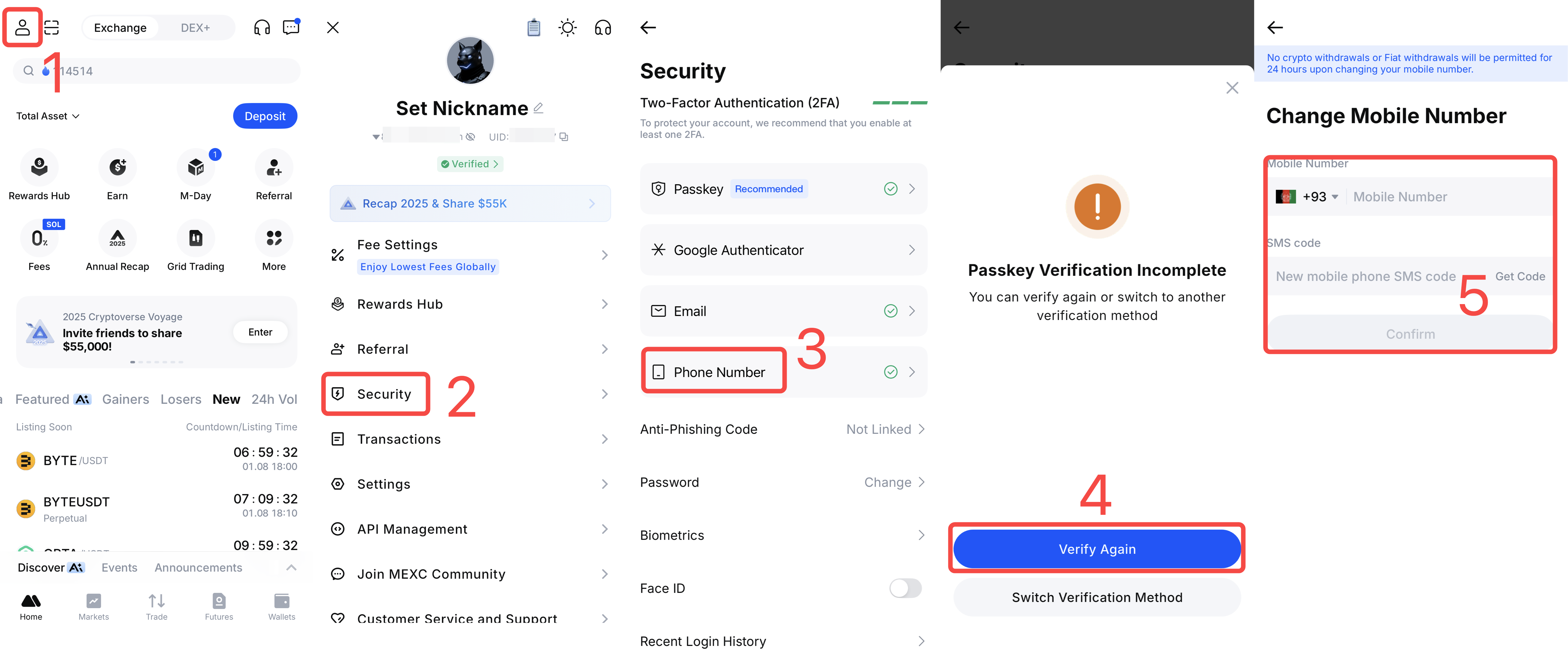
1) Open the MEXC App. On the home page, tap your profile icon to enter the account management page.
2) Find and tap Security.
3) On the Security page, locate Phone Number and tap to enter the change mobile number page.
4) The system will require you to complete two-factor verification or passkey verification to confirm that the action is performed by you.
5) After verification, you will enter the mobile number change page. Enter the new mobile number you want to link, then tap Get Code. The system will immediately send an SMS verification code to the new number. After receiving the code, enter it and tap Confirm to complete the change.

2. Change the Linked Phone Number via the Web


Open the MEXC website in your browser and sign in to your account. After logging in, move your cursor over your profile icon to open the dropdown menu, then select Security.


On the Security page, locate the Mobile Verification section and click Change.


Carefully read the on-page notice to understand the security restrictions after the change. After confirming, select the confirmation checkbox and click Change Anyway.


Complete passkey verification. This step ensures that the action is performed by the account owner and prevents unauthorized changes.


After verification, enter your new mobile number on the change page. Click Get Code and enter the SMS verification code sent to the new number. Then click Confirm to complete the entire process.


3. Security Recommendations When Changing Your Linked Mobile Number


To protect your account assets, crypto and fiat withdrawals will be temporarily disabled for 24 hours after changing the linked mobile number. Please plan the timing accordingly to avoid affecting your normal trading activities.

Recommendations
  • Change your mobile number when you do not need to make crypto or fiat withdrawals.
  • If you have upcoming trading plans, complete the mobile number change in advance.
  • Ensure the new mobile number can receive SMS verification codes normally.
  • Keep your new mobile number secure and do not share it with others.

4. Changing A Linked Mobile Number FAQ


4.1 What should I do if I cannot receive the verification code?


Check whether your mobile signal is stable and whether SMS messages are being blocked. You may wait a moment and request the code again, or contact MEXC Customer Service for assistance.

4.2 Can I change back to a mobile number that was previously used?


Yes. As long as the number is not currently linked to another MEXC account, it can be linked again.

4.3 Is there a fee for changing the mobile number?


No. MEXC does not charge any fees for changing your linked mobile number.

With this guide, users should have a clear understanding of the process for changing the mobile number linked to your MEXC account. Whether you use the app or the web, the process is simple and usually takes only a few minutes.

If you encounter any issues or have questions during the process, you may contact the official MEXC Customer Service team at any time for professional assistance and support.


How to Change the Phone Number Linked to Your MEXC Account

Overview

  • When to change: When you change your phone number or want to enhance account security.
  • How to change: Supported via both the MEXC App and the Web.
  • Security restriction: Crypto and fiat withdrawals are disabled for 24 hours after the change.
  • Time required: The entire process takes about 3–5 minutes.

When using the MEXC cryptocurrency trading platform, you may need to change the phone number linked to your account for various reasons. MEXC provides a convenient feature to update your linked phone number. The following sections explain in detail how to change the phone number linked to your MEXC account via the App and the Web, helping you complete the process smoothly.

1. Change the Linked Phone Number via the MEXC App


1) Open the MEXC App. On the home page, tap your profile icon to enter the account management page.
2) Find and tap Security.
3) On the Security page, locate Phone Number and tap to enter the change mobile number page.
4) The system will require you to complete two-factor verification or passkey verification to confirm that the action is performed by you.
5) After verification, you will enter the mobile number change page. Enter the new mobile number you want to link, then tap Get Code. The system will immediately send an SMS verification code to the new number. After receiving the code, enter it and tap Confirm to complete the change.


2. Change the Linked Phone Number via the Web


Open the MEXC website in your browser and sign in to your account. After logging in, move your cursor over your profile icon to open the dropdown menu, then select Security.


On the Security page, locate the Mobile Verification section and click Change.


Carefully read the on-page notice to understand the security restrictions after the change. After confirming, select the confirmation checkbox and click Change Anyway.


Complete passkey verification. This step ensures that the action is performed by the account owner and prevents unauthorized changes.


After verification, enter your new mobile number on the change page. Click Get Code and enter the SMS verification code sent to the new number. Then click Confirm to complete the entire process.


3. Security Recommendations When Changing Your Linked Mobile Number


To protect your account assets, crypto and fiat withdrawals will be temporarily disabled for 24 hours after changing the linked mobile number. Please plan the timing accordingly to avoid affecting your normal trading activities.

Recommendations
  • Change your mobile number when you do not need to make crypto or fiat withdrawals.
  • If you have upcoming trading plans, complete the mobile number change in advance.
  • Ensure the new mobile number can receive SMS verification codes normally.
  • Keep your new mobile number secure and do not share it with others.

4. Changing A Linked Mobile Number FAQ


4.1 What should I do if I cannot receive the verification code?


Check whether your mobile signal is stable and whether SMS messages are being blocked. You may wait a moment and request the code again, or contact MEXC Customer Service for assistance.

4.2 Can I change back to a mobile number that was previously used?


Yes. As long as the number is not currently linked to another MEXC account, it can be linked again.

4.3 Is there a fee for changing the mobile number?


No. MEXC does not charge any fees for changing your linked mobile number.

With this guide, users should have a clear understanding of the process for changing the mobile number linked to your MEXC account. Whether you use the app or the web, the process is simple and usually takes only a few minutes.

If you encounter any issues or have questions during the process, you may contact the official MEXC Customer Service team at any time for professional assistance and support.