क्रिप्टो खरीदें
मार्केट
स्पॉट
फ़्यूचर्सBTC
कमाएँ
इवेंट सेंटर
रिवॉर्ड हब
अधिक
How to Place Spot Limit Orders on a Candlestick ChartHow to Place Spot Limit Orders on a Candlestick Chart
कैटेगरी की लिस्ट
कैंसिल करें

How to Place Spot Limit Orders on a Candlestick Chart

Key Takeaways

  • MEXC Spot trading allows users to place limit orders directly on a candlestick chart, making order placement more efficient.
  • This feature is available on both the Original and TradingView charts, with the same setup and order placement process.
  • The feature is currently available only on the web, and only limit orders can be placed directly on the Spot candlestick chart.

1. What Is a Limit Order


Limit order allows users to set the price at which they want to buy or sell. If executed, the order will be filled at the specified price or a better price.

Compared with market orders, limit orders give users more control over the execution price and help reduce the risk of an order being filled at an unexpected price during sharp market movements. For users who want to buy or sell, or take profit at a specific price, a limit order is one of the most common and basic order types in Spot trading.

MEXC Spot trading supports placing limit orders directly on the candlestick chart. This allows users to monitor market movements and place a limit order without leaving the chart.

2. How to Place a Limit Buy Order on the Candlestick Chart


Open the MEXC website and log in. From the top navigation bar, select Spot, then click Spot Trading to open the trading page.

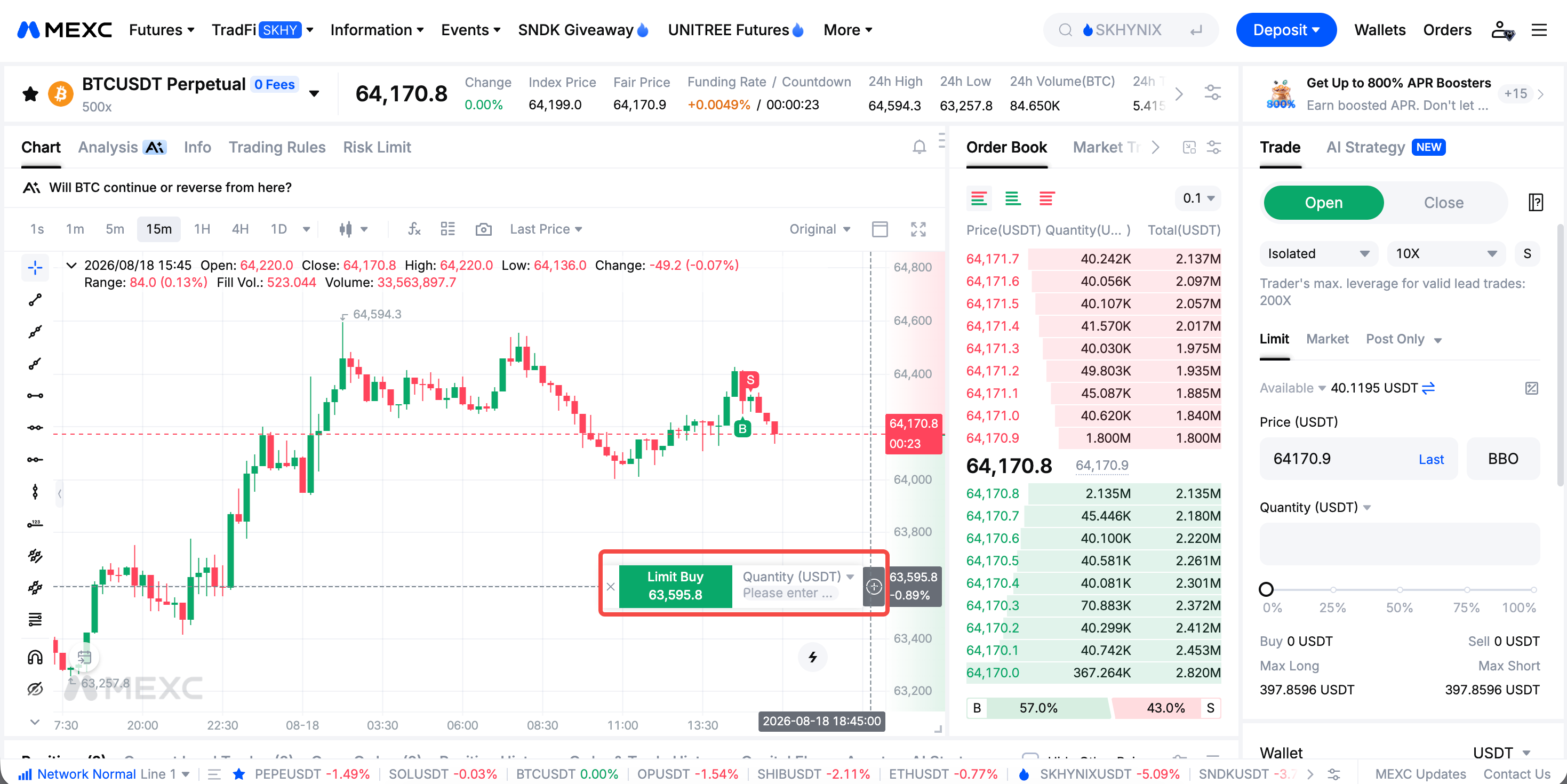
Move the cursor over the candlestick chart. A plus icon will appear on the right side of the chart. When the cursor is below the latest market price, click the plus icon. The Limit Buy button will appear, and the order price will be set based on the cursor's position.

Enter the Quantity, then click the green Limit Buy button to place the limit buy order. After the order is placed successfully, a confirmation message will appear.

Scroll down and view the limit buy order under Open Orders to track its status.

3. How to Quickly Place a Limit Sell Order on the Candlestick Chart


The process for placing a limit sell order is similar to that for a limit buy order. When the cursor is above the latest market price, click the plus icon. The Limit Sell button will appear.

Enter the Quantity, then click the red Limit Sell button to place the limit sell order. A confirmation message will also appear after the order is placed successfully.

After placing the order, you can view the limit sell order under Open Orders at the bottom of the page. If you need to adjust your strategy, you can cancel an unfilled order at any time.


4. Benefits and Key Considerations of Placing Limit Orders on ChartK-Line Limit Orders


The main advantage of placing limit orders on the candlestick chart is that users can placesubmit orders while monitoring current market price movements. This makes it easier to act on their price analysis directly from the chartturn a price assessment into a trading action and can improve order placement efficiency. For beginners, this visual approach also makes the pricing logic of limit orders easier to understand: place a buy order below the current price and a sell order above the current price.

Please note that MEXC Spot currently supports only limit orders placed directly on the candlestick chart. To use market orders, take-profit and stop-loss orders, or other more advanced order strategies, go to the order panel on the trading page.


How to Place Spot Limit Orders on a Candlestick Chart

Key Takeaways

  • MEXC Spot trading allows users to place limit orders directly on a candlestick chart, making order placement more efficient.
  • This feature is available on both the Original and TradingView charts, with the same setup and order placement process.
  • The feature is currently available only on the web, and only limit orders can be placed directly on the Spot candlestick chart.

1. What Is a Limit Order


Limit order allows users to set the price at which they want to buy or sell. If executed, the order will be filled at the specified price or a better price.

Compared with market orders, limit orders give users more control over the execution price and help reduce the risk of an order being filled at an unexpected price during sharp market movements. For users who want to buy or sell, or take profit at a specific price, a limit order is one of the most common and basic order types in Spot trading.

MEXC Spot trading supports placing limit orders directly on the candlestick chart. This allows users to monitor market movements and place a limit order without leaving the chart.

2. How to Place a Limit Buy Order on the Candlestick Chart


Open the MEXC website and log in. From the top navigation bar, select Spot, then click Spot Trading to open the trading page.

Move the cursor over the candlestick chart. A plus icon will appear on the right side of the chart. When the cursor is below the latest market price, click the plus icon. The Limit Buy button will appear, and the order price will be set based on the cursor's position.

Enter the Quantity, then click the green Limit Buy button to place the limit buy order. After the order is placed successfully, a confirmation message will appear.

Scroll down and view the limit buy order under Open Orders to track its status.


3. How to Quickly Place a Limit Sell Order on the Candlestick Chart


The process for placing a limit sell order is similar to that for a limit buy order. When the cursor is above the latest market price, click the plus icon. The Limit Sell button will appear.

Enter the Quantity, then click the red Limit Sell button to place the limit sell order. A confirmation message will also appear after the order is placed successfully.

After placing the order, you can view the limit sell order under Open Orders at the bottom of the page. If you need to adjust your strategy, you can cancel an unfilled order at any time.


4. Benefits and Key Considerations of Placing Limit Orders on ChartK-Line Limit Orders


The main advantage of placing limit orders on the candlestick chart is that users can placesubmit orders while monitoring current market price movements. This makes it easier to act on their price analysis directly from the chartturn a price assessment into a trading action and can improve order placement efficiency. For beginners, this visual approach also makes the pricing logic of limit orders easier to understand: place a buy order below the current price and a sell order above the current price.

Please note that MEXC Spot currently supports only limit orders placed directly on the candlestick chart. To use market orders, take-profit and stop-loss orders, or other more advanced order strategies, go to the order panel on the trading page.