क्रिप्टो खरीदें
मार्केट
स्पॉट
फ़्यूचर्सBTC
कमाएँ
इवेंट सेंटर
रिवॉर्ड हब
अधिक
How to Use MEXC IM: A Complete Guide to Contacting Your Dedicated Account ManagerHow to Use MEXC IM: A Complete Guide to Contacting Your Dedicated Account Manager
कैटेगरी की लिस्ट
कैंसिल करें

How to Use MEXC IM: A Complete Guide to Contacting Your Dedicated Account Manager

Key Takeaways:

  • MEXC IM is a free, real-time messaging feature that allows affiliates to contact their dedicated account managers directly within the platform.
  • After logging in to MEXC, open Notifications and select the pinned Chat Messages entry to access the chat interface.
  • The chat interface displays the account manager's online status. Official accounts carry a blue Account Manager label and a verification badge.
  • In addition to MEXC IM, affiliates can contact their account managers through the email address or Telegram account provided on the Affiliate Portal.
  • MEXC representatives will not send advertisements or request sensitive information such as passwords or verification codes. Always check for the official verification badge before communicating.

1. What Is MEXC IM?


IM, or instant messaging, is a free, real-time messaging feature for MEXC affiliates. Previously, affiliates generally contacted their account managers by email or through third-party messaging platforms, which involved additional steps and could slow down communication.

To improve communication efficiency, MEXC has upgraded the messaging experience on its Affiliate Portal. Affiliates can now contact their dedicated account managers directly through the platform, allowing them to communicate in real time and get questions addressed more efficiently.

Whether you're a new or existing MEXC affiliate, the IM feature can help you obtain official support without leaving the platform.

2. How to Open MEXC IM


You can access MEXC IM in a few steps:
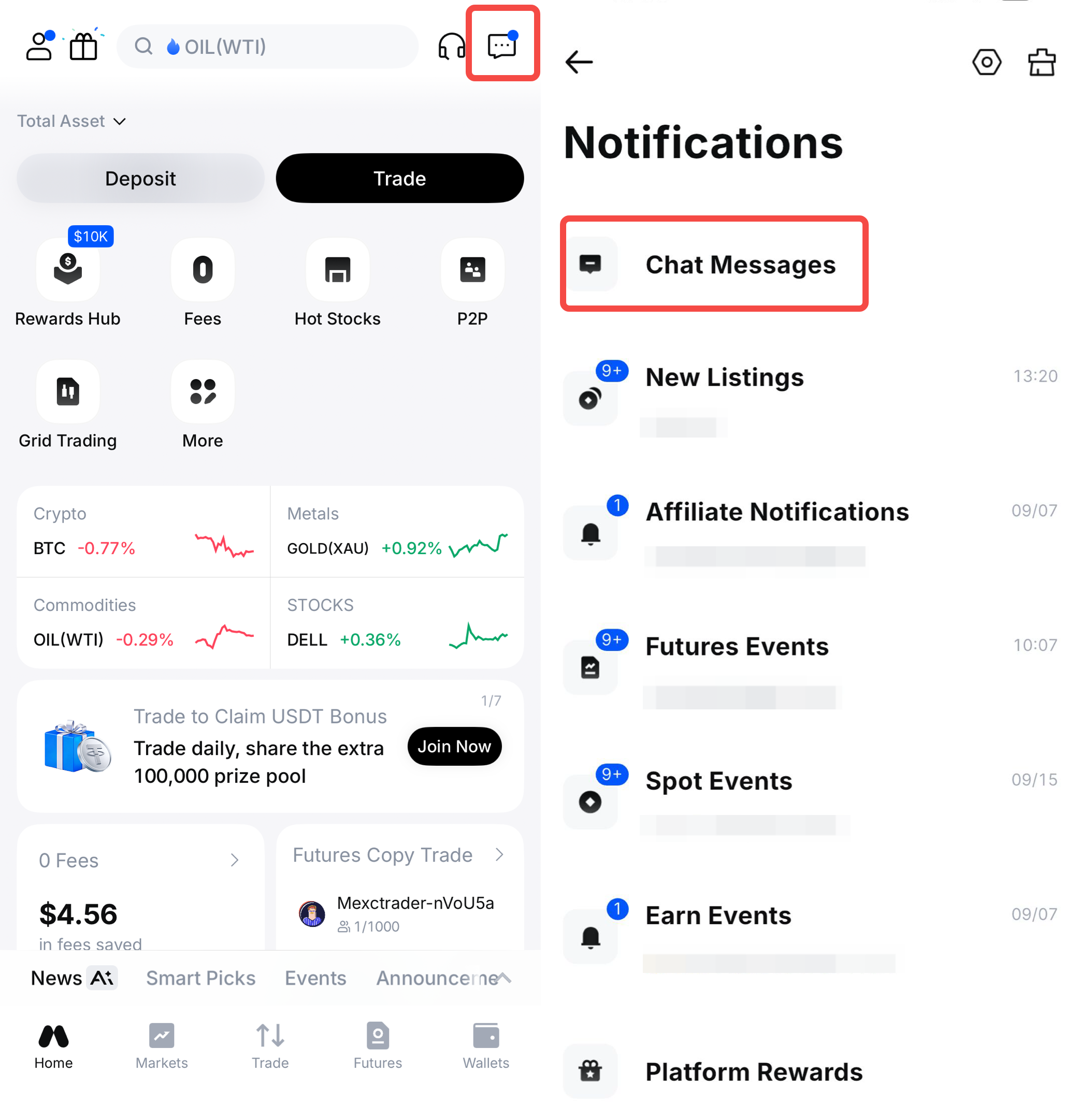
1)Open Notifications. Log in to your MEXC account and select Notifications on the MEXC app or website.
2)Open the pinned Chat Messages section. Find Chat Messages at the top of the notification list and select it to enter the chat interface.
3)Start a conversation. From the chat interface, you can review previous messages or send a message directly to your account manager.

After your affiliate account is successfully activated, the system will automatically provide your dedicated account manager's information. You do not need to search for or add the account manually.

3. Key Features of MEXC IM


online status: The chat interface shows whether your account manager is currently online. If your account manager is online, you can start a real-time conversation. If they are offline, you can leave a message for them to review when they return.


Official verification badge: To help affiliates verify the identity of their account managers, MEXC provides an official verification badge for each authorized account manager. A verified account displays both a blue Account Manager label and an official verification badge. Check for both indicators before communicating.


Automatic updates when account managers changes: If your account manager leaves MEXC, the system will automatically remove the verification badge from their account. The account will no longer be recognized as an official MEXC account manager account, and you should not continue using it for business-related inquiries. If you need assistance, contact MEXC Customer Service so that another representative can be assigned to you.


4. Two Ways to Contact Your Account Manager


MEXC currently provides affiliates with two ways to contact their account managers:

1)MEXC IM: Find your dedicated account manager in the chat interface. If the account manager is online, you can start a conversation directly. If they are offline, you can leave a message. This is generally the fastest and most secure contact method.

2)Email or Telegram: After logging in to the Affiliate Portal, you can find your account manager's email address and Telegram contact details in the corner of the page. You may use these channels if you prefer to communicate outside the MEXC platform.


When communicating outside MEXC IM, verify your account manager's identity through an official MEXC channel before sharing information.

5. Important Considerations When Using MEXC IM


1)Check for the official verification badge. Any account claiming to belong to an MEXC account manager without both the verification badge and the Account Manager label may be fraudulent.

2)MEXC IM does not send advertisements. If you receive promotional content through the chat, verify its source before taking any action.

3)MEXC representatives will not request sensitive information. Do not share your account password, verification codes, or other sensitive information. If anyone requests such information, stop communicating with the account and report it to MEXC immediately.

The introduction of MEXC IM is part of MEXC's ongoing efforts to improve its user support experience. Through real-time messaging, online status updates, and official verification badges, affiliates can communicate directly with their dedicated account managers within the platform.

How to Use MEXC IM: A Complete Guide to Contacting Your Dedicated Account Manager

Key Takeaways:

  • MEXC IM is a free, real-time messaging feature that allows affiliates to contact their dedicated account managers directly within the platform.
  • After logging in to MEXC, open Notifications and select the pinned Chat Messages entry to access the chat interface.
  • The chat interface displays the account manager's online status. Official accounts carry a blue Account Manager label and a verification badge.
  • In addition to MEXC IM, affiliates can contact their account managers through the email address or Telegram account provided on the Affiliate Portal.
  • MEXC representatives will not send advertisements or request sensitive information such as passwords or verification codes. Always check for the official verification badge before communicating.

1. What Is MEXC IM?


IM, or instant messaging, is a free, real-time messaging feature for MEXC affiliates. Previously, affiliates generally contacted their account managers by email or through third-party messaging platforms, which involved additional steps and could slow down communication.

To improve communication efficiency, MEXC has upgraded the messaging experience on its Affiliate Portal. Affiliates can now contact their dedicated account managers directly through the platform, allowing them to communicate in real time and get questions addressed more efficiently.

Whether you're a new or existing MEXC affiliate, the IM feature can help you obtain official support without leaving the platform.

2. How to Open MEXC IM


You can access MEXC IM in a few steps:
1)Open Notifications. Log in to your MEXC account and select Notifications on the MEXC app or website.
2)Open the pinned Chat Messages section. Find Chat Messages at the top of the notification list and select it to enter the chat interface.
3)Start a conversation. From the chat interface, you can review previous messages or send a message directly to your account manager.

After your affiliate account is successfully activated, the system will automatically provide your dedicated account manager's information. You do not need to search for or add the account manually.


3. Key Features of MEXC IM


online status: The chat interface shows whether your account manager is currently online. If your account manager is online, you can start a real-time conversation. If they are offline, you can leave a message for them to review when they return.


Official verification badge: To help affiliates verify the identity of their account managers, MEXC provides an official verification badge for each authorized account manager. A verified account displays both a blue Account Manager label and an official verification badge. Check for both indicators before communicating.


Automatic updates when account managers changes: If your account manager leaves MEXC, the system will automatically remove the verification badge from their account. The account will no longer be recognized as an official MEXC account manager account, and you should not continue using it for business-related inquiries. If you need assistance, contact MEXC Customer Service so that another representative can be assigned to you.


4. Two Ways to Contact Your Account Manager


MEXC currently provides affiliates with two ways to contact their account managers:

1)MEXC IM: Find your dedicated account manager in the chat interface. If the account manager is online, you can start a conversation directly. If they are offline, you can leave a message. This is generally the fastest and most secure contact method.

2)Email or Telegram: After logging in to the Affiliate Portal, you can find your account manager's email address and Telegram contact details in the corner of the page. You may use these channels if you prefer to communicate outside the MEXC platform.


When communicating outside MEXC IM, verify your account manager's identity through an official MEXC channel before sharing information.

5. Important Considerations When Using MEXC IM


1)Check for the official verification badge. Any account claiming to belong to an MEXC account manager without both the verification badge and the Account Manager label may be fraudulent.

2)MEXC IM does not send advertisements. If you receive promotional content through the chat, verify its source before taking any action.

3)MEXC representatives will not request sensitive information. Do not share your account password, verification codes, or other sensitive information. If anyone requests such information, stop communicating with the account and report it to MEXC immediately.

The introduction of MEXC IM is part of MEXC's ongoing efforts to improve its user support experience. Through real-time messaging, online status updates, and official verification badges, affiliates can communicate directly with their dedicated account managers within the platform.