क्रिप्टो खरीदें
मार्केट
स्पॉट
फ़्यूचर्सBTC
कमाएँ
इवेंट सेंटर
रिवॉर्ड हब
अधिक
How to Use Share to EarnHow to Use Share to Earn
कैटेगरी की लिस्ट
कैंसिल करें

How to Use Share to Earn

Overview

  • Share to Earn is a content promotion reward feature launched by MEXC for affiliates and KOLs.
  • Users can earn rewards by joining events, downloading materials, publishing content, and submitting links.
  • It currently supports two major content platforms: X and YouTube.
  • MEXC provides official materials and AI-powered tools to help users create content more efficiently.
  • Rewards are calculated and distributed based on event rules, content performance, and review results.

1. What Is Share to Earn?


To improve the efficiency of affiliates and KOLs participating in platform events, help them create high-quality promotional content, and earn additional rewards through content sharing, MEXC has officially launched the Share to Earn feature.

Share to Earn is an event participation tool designed by MEXC for affiliates and KOLs. Users can use this feature to browse available events, join events, access official promotional materials, publish content on designated platforms, submit content links, and earn rewards based on content performance.

Currently, Share to Earn supports publishing platforms including but not limited to X and YouTube.

2. Why Participate in Share to Earn?


Easy content creation: MEXC provides templates for images, videos, and copy, making content creation easier and more convenient.
AI-powered support: Built-in AI tools help optimize images and copy.
Transparent tracking: Users can view their ranking, estimated rewards, and reward distribution status at any time.
Performance-based rewards: The better your content performs, the more rewards you may receive.

3. How to Use Share to Earn


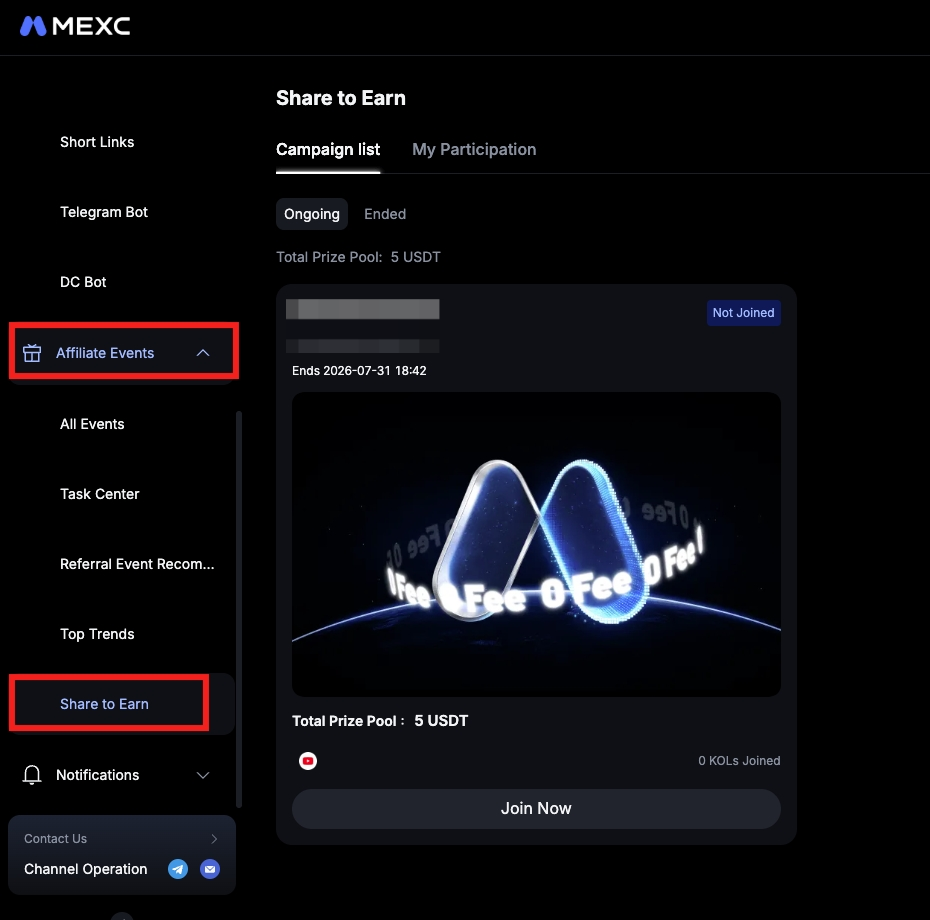
Entry: Log in to MEXC → Affiliate Events → Share to Earn.


3.1 Select an event


After entering the feature page, users can browse event information under the Campaign list, including Ongoing and Ended events. To view your personal participation records, switch to My Participation.

Under Ongoing, each event card displays key information such as the event name, event period, total prize pool, supported publishing platforms, and the number of KOLs who have joined. Users can choose a suitable event based on their interests and content strengths, then click Join Event to complete registration.

For events that have not yet started, users can enter the event details page in advance to view the rules and download materials to prepare for participation.


3.2 Review requirements and create content


After joining the event, users will enter the event details page. Please pay close attention to the following two key sections:
  • Content Requirements: MEXC will specify the content guidelines for the event in this section, including required information, publishing platforms, and other relevant requirements. Users should read this section carefully before creating content to ensure that their content meets the event standards.
  • Official Materials: MEXC provides a complete material package, including logos, images, videos, and recommended copy. Users can download individual materials as needed or select Download All Assets to download them in bulk.

MEXC also provides an AI image editing feature. After users enter a prompt, the system will generate 3 candidate images based on the selected image. Users can choose one and apply it to the event materials.

Material selection rules:
  • X events: Images and videos cannot be selected at the same time. Up to 4 images can be selected, while there is no limit on the number of videos.
  • YouTube events: Only video materials are supported, with no quantity limit.


After creating the content, users must publish it on the designated platform and return to MEXC to submit the following information:

1. Publicly accessible content link: Please make sure your post or video is publicly accessible.

2. Profile screenshot: Users must upload a screenshot of the profile page of the publishing account, which will be used by MEXC to verify the publisher's identity.

After submission, the MEXC system will automatically retrieve publisher information and use AI to compare it with the uploaded profile screenshot to verify the authenticity and ownership of the content.


4. View Participation Records and Reward Status


Users can view their participation status under My Participation. At the top of this section, the page displays the Total Participated and the Total Rewards. Participation records are divided into the following three categories:

  • Pending Submission: Displays ongoing events that have been joined but have not yet had content submitted, or ongoing events where the submission was rejected. Users can submit or resubmit content here.
  • Participating: Displays ongoing events where content has been successfully submitted. The system will also show estimated rewards, which represent the amount the user may receive if the event ended at the current moment.
  • Ended: Displays events that have ended. If rewards are still being settled, the page will show the estimated amount. If rewards have been distributed, the actual reward amount will be displayed. If the submission is deemed invalid, the reward will be shown as 0 USDT.

After entering the event details page, users can also view their current ranking, content performance data such as views, likes, comments, and reposts, as well as the performance of the top 3 users on the leaderboard for comparison and optimization.

5. Important Notes for Share to Earn


  • Share to Earn is only available to eligible MEXC affiliates and KOLs.
  • Users should carefully read and follow the event content requirements before publishing content.
  • Submitted content links must be publicly accessible. Private links will not pass review.
  • Users must upload a genuine and clear profile screenshot to complete identity verification.
  • Rewards will be calculated based on event rules, submission validity, content performance, and review results.
  • Estimated rewards are for reference only. Final rewards are subject to the actual amount distributed.
  • If a submission is rejected or deemed invalid, users may resubmit a valid link before the event ends.
  • MEXC reserves the right to adjust event rules, review standards, and feature experience based on actual operational needs.

6. Share to Earn FAQ


6.1 Which publishing platforms does Share to Earn currently support?


Currently, Share to Earn supports two major platforms: X and YouTube. MEXC may add more supported platforms based on future event needs.

6.2 Can I prepare before the event starts?


Yes. For events that have not yet started, users can view event details, download official materials, and use AI tools to prepare content in advance, so they can submit content as soon as the event begins.

6.3 Can I select both images and videos for X events?


No. According to the material selection rules, images and videos cannot be selected at the same time for X events. Users can select up to 4 images or select video materials separately.

6.4 How do I use the AI image editing feature?


Users can access the AI image editing feature in the image materials section on the event participation page. After entering a prompt, the system will generate 3 candidate images. Users can then select the image they are satisfied with and apply it to the event materials.

6.5 Why do I need to upload a profile screenshot?


The profile screenshot is an important basis for MEXC to verify content ownership. The system will use AI to compare the screenshot with publisher information to confirm that the content was published by the user, helping ensure event fairness.

6.6 What should I do if my submission is rejected?


If your submission is rejected, MEXC will display the rejection reason on the resubmission page. You can make adjustments based on the prompt and resubmit a valid link before the event ends.

6.7 What is the difference between estimated rewards and actual rewards?


Estimated rewards are reference amounts calculated in real time based on current content performance and event rules. They may change as content data changes. Actual rewards are the final amounts distributed after the event ends, MEXC completes review, and settlement is finalized. The actual credited amount shall prevail.

6.8 When will actual rewards be distributed?


After the event ends, MEXC will conduct review and settlement. Once approved, the actual reward amount will be displayed on the page. The specific crediting time is subject to MEXC platform notifications.

How to Use Share to Earn

Overview

  • Share to Earn is a content promotion reward feature launched by MEXC for affiliates and KOLs.
  • Users can earn rewards by joining events, downloading materials, publishing content, and submitting links.
  • It currently supports two major content platforms: X and YouTube.
  • MEXC provides official materials and AI-powered tools to help users create content more efficiently.
  • Rewards are calculated and distributed based on event rules, content performance, and review results.

1. What Is Share to Earn?


To improve the efficiency of affiliates and KOLs participating in platform events, help them create high-quality promotional content, and earn additional rewards through content sharing, MEXC has officially launched the Share to Earn feature.

Share to Earn is an event participation tool designed by MEXC for affiliates and KOLs. Users can use this feature to browse available events, join events, access official promotional materials, publish content on designated platforms, submit content links, and earn rewards based on content performance.

Currently, Share to Earn supports publishing platforms including but not limited to X and YouTube.

2. Why Participate in Share to Earn?


Easy content creation: MEXC provides templates for images, videos, and copy, making content creation easier and more convenient.
AI-powered support: Built-in AI tools help optimize images and copy.
Transparent tracking: Users can view their ranking, estimated rewards, and reward distribution status at any time.
Performance-based rewards: The better your content performs, the more rewards you may receive.

3. How to Use Share to Earn


Entry: Log in to MEXC → Affiliate Events → Share to Earn.


3.1 Select an event


After entering the feature page, users can browse event information under the Campaign list, including Ongoing and Ended events. To view your personal participation records, switch to My Participation.

Under Ongoing, each event card displays key information such as the event name, event period, total prize pool, supported publishing platforms, and the number of KOLs who have joined. Users can choose a suitable event based on their interests and content strengths, then click Join Event to complete registration.

For events that have not yet started, users can enter the event details page in advance to view the rules and download materials to prepare for participation.


3.2 Review requirements and create content


After joining the event, users will enter the event details page. Please pay close attention to the following two key sections:
  • Content Requirements: MEXC will specify the content guidelines for the event in this section, including required information, publishing platforms, and other relevant requirements. Users should read this section carefully before creating content to ensure that their content meets the event standards.
  • Official Materials: MEXC provides a complete material package, including logos, images, videos, and recommended copy. Users can download individual materials as needed or select Download All Assets to download them in bulk.

MEXC also provides an AI image editing feature. After users enter a prompt, the system will generate 3 candidate images based on the selected image. Users can choose one and apply it to the event materials.

Material selection rules:
  • X events: Images and videos cannot be selected at the same time. Up to 4 images can be selected, while there is no limit on the number of videos.
  • YouTube events: Only video materials are supported, with no quantity limit.


After creating the content, users must publish it on the designated platform and return to MEXC to submit the following information:

1. Publicly accessible content link: Please make sure your post or video is publicly accessible.

2. Profile screenshot: Users must upload a screenshot of the profile page of the publishing account, which will be used by MEXC to verify the publisher's identity.

After submission, the MEXC system will automatically retrieve publisher information and use AI to compare it with the uploaded profile screenshot to verify the authenticity and ownership of the content.


4. View Participation Records and Reward Status


Users can view their participation status under My Participation. At the top of this section, the page displays the Total Participated and the Total Rewards. Participation records are divided into the following three categories:

  • Pending Submission: Displays ongoing events that have been joined but have not yet had content submitted, or ongoing events where the submission was rejected. Users can submit or resubmit content here.
  • Participating: Displays ongoing events where content has been successfully submitted. The system will also show estimated rewards, which represent the amount the user may receive if the event ended at the current moment.
  • Ended: Displays events that have ended. If rewards are still being settled, the page will show the estimated amount. If rewards have been distributed, the actual reward amount will be displayed. If the submission is deemed invalid, the reward will be shown as 0 USDT.

After entering the event details page, users can also view their current ranking, content performance data such as views, likes, comments, and reposts, as well as the performance of the top 3 users on the leaderboard for comparison and optimization.

5. Important Notes for Share to Earn


  • Share to Earn is only available to eligible MEXC affiliates and KOLs.
  • Users should carefully read and follow the event content requirements before publishing content.
  • Submitted content links must be publicly accessible. Private links will not pass review.
  • Users must upload a genuine and clear profile screenshot to complete identity verification.
  • Rewards will be calculated based on event rules, submission validity, content performance, and review results.
  • Estimated rewards are for reference only. Final rewards are subject to the actual amount distributed.
  • If a submission is rejected or deemed invalid, users may resubmit a valid link before the event ends.
  • MEXC reserves the right to adjust event rules, review standards, and feature experience based on actual operational needs.

6. Share to Earn FAQ


6.1 Which publishing platforms does Share to Earn currently support?


Currently, Share to Earn supports two major platforms: X and YouTube. MEXC may add more supported platforms based on future event needs.

6.2 Can I prepare before the event starts?


Yes. For events that have not yet started, users can view event details, download official materials, and use AI tools to prepare content in advance, so they can submit content as soon as the event begins.

6.3 Can I select both images and videos for X events?


No. According to the material selection rules, images and videos cannot be selected at the same time for X events. Users can select up to 4 images or select video materials separately.

6.4 How do I use the AI image editing feature?


Users can access the AI image editing feature in the image materials section on the event participation page. After entering a prompt, the system will generate 3 candidate images. Users can then select the image they are satisfied with and apply it to the event materials.

6.5 Why do I need to upload a profile screenshot?


The profile screenshot is an important basis for MEXC to verify content ownership. The system will use AI to compare the screenshot with publisher information to confirm that the content was published by the user, helping ensure event fairness.

6.6 What should I do if my submission is rejected?


If your submission is rejected, MEXC will display the rejection reason on the resubmission page. You can make adjustments based on the prompt and resubmit a valid link before the event ends.

6.7 What is the difference between estimated rewards and actual rewards?


Estimated rewards are reference amounts calculated in real time based on current content performance and event rules. They may change as content data changes. Actual rewards are the final amounts distributed after the event ends, MEXC completes review, and settlement is finalized. The actual credited amount shall prevail.

6.8 When will actual rewards be distributed?


After the event ends, MEXC will conduct review and settlement. Once approved, the actual reward amount will be displayed on the page. The specific crediting time is subject to MEXC platform notifications.