

Reasons and Solutions for Abnormal Asset Display or Zero Balance
If you find that your account asset balance does not match your expectations, please do not worry. This article lists several common causes and corresponding troubleshooting methods to help you quickly identify the issue.
1. Common Issues and Solutions
1.1 Logged into a wrong account
Reason: You may have multiple accounts (such as a main account, sub-accounts, or accounts created through different sign-up methods). The account you are currently logged into may not be the one where your assets are stored.
Typical Case (Mobile Number Sign-Up): When signing up with a mobile number, entering "+84 13800000000" and "+84 013800000000" (with an extra leading "0" in the mobile number) will be recognized by the system as two different accounts. In this situation, you may have inadvertently logged into a similar but different account.
Troubleshooting Suggestions: Log out of the current account and carefully verify the mobile number you usually use (pay attention to whether there is a leading "0"), check the email address or third-party login method, and log in again using the correct account information.
1.2 Hide Small Balances feature enabled
Reason: The platform provides a Hide Small Balances feature, which automatically hides token holdings that value falls below a preset threshold. By default, assets worth less than 1 USDT will be hidden, which is why you cannot see these assets.
Troubleshooting Suggestion: Locate the Hide Small Balances toggle on the Assets page, disable the feature, refresh the page, and check the previously hidden tokens again.
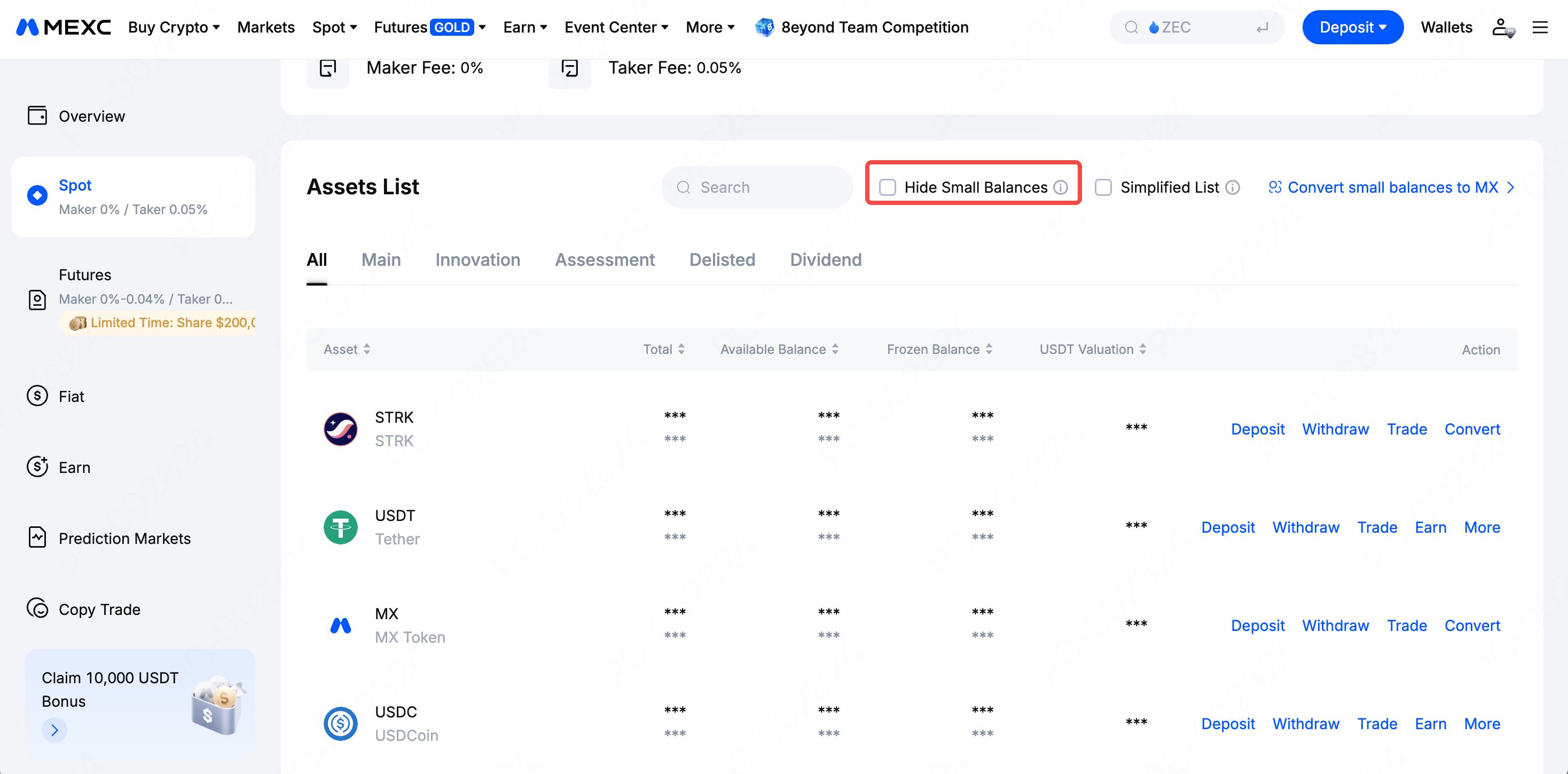
1.3 Token has been delisted or trading has been suspended
Reason: If a token you hold has been delisted by the platform, it may no longer appear in your spot account, but can still be viewed through Delisted on the Hide Small Balances or the Assets page.
Troubleshooting Suggestions: Go to Assets → Spot → Hide Small Balances or search for the token name to confirm whether it has been moved to the non-trading zone due to delisting.
1.4 Decline in token prices leads to a reduction in overall valuation
Reason: Crypto asset prices are highly volatile. Even if your holdings remain unchanged, the total asset valuation denominated in fiat currency or stablecoins will decrease accordingly when market prices fall.
Troubleshooting Suggestion: Compare the holdings snapshot at a specific point in time with the current market value. This is not a loss of assets, but rather normal market price fluctuation.
1.5 Transactions resulting in losses (including Spot and Futures)
Reason: Whether in Spot trading or Futures trading, when you sell an asset at a price lower than the purchase cost, or when a Futures position is forcibly liquidated or actively closed at a loss, the account equity will decrease directly.
Troubleshooting Suggestions:
- Check the Spot order history to see if there are any records of selling at a loss.
- Check the Realized PNL and Closed Orders in the Futures account to confirm whether there were any forced liquidations or trading losses.
1.6 A withdrawal was carried out
Reason: If you have previously withdrawn assets from the platform to an external wallet or another account, these assets will be deducted from your platform account balance.
Troubleshooting Suggestion: Go to Funding History → Withdrawal, verify the withdrawal time, address, and amount, and confirm whether the operation was intended.
If you are still unable to resolve the issue after following the steps above, please contact the MEXC customer service team for professional support.
2. How to Comprehensively Analyze the Causes of Asset Changes
MEXC provides professional PNL Analysis tools to help you accurately understand asset changes. You can access them through the following entry points:
Spot Profit & Loss Analysis: View the total PNL, daily PNL, and each token PNL details for Spot trading.
- Web: MEXC official website → Wallets → Spot → Today's PNL → Spot PNL Analysis
- App: MEXC App homepage → Wallets → Spot → Today's PNL → Spot PNL Analysis
Futures Profit & Loss Analysis: View detailed data of the Futures account, including total PNL, funding rate, realized/unrealized PNL, and more.
- Web: MEXC official website → Wallets → Futures → Today's PNL → Futures PNL Analysis
- App: MEXC App homepage → Wallets → Futures → Today's PNL → Futures PNL Analysis
Recommended Reading: