Tangem has just rolled out version 5.27 of its wallet app, and this update brings some powerful new features designed to make exploring Web3 safer.Tangem has just rolled out version 5.27 of its wallet app, and this update brings some powerful new features designed to make exploring Web3 safer.

Tangem v5.27: Your Gateway to Safer DeFi
2025/09/09 17:16
Tangem V5.27: Your Gateway To Safer Defi

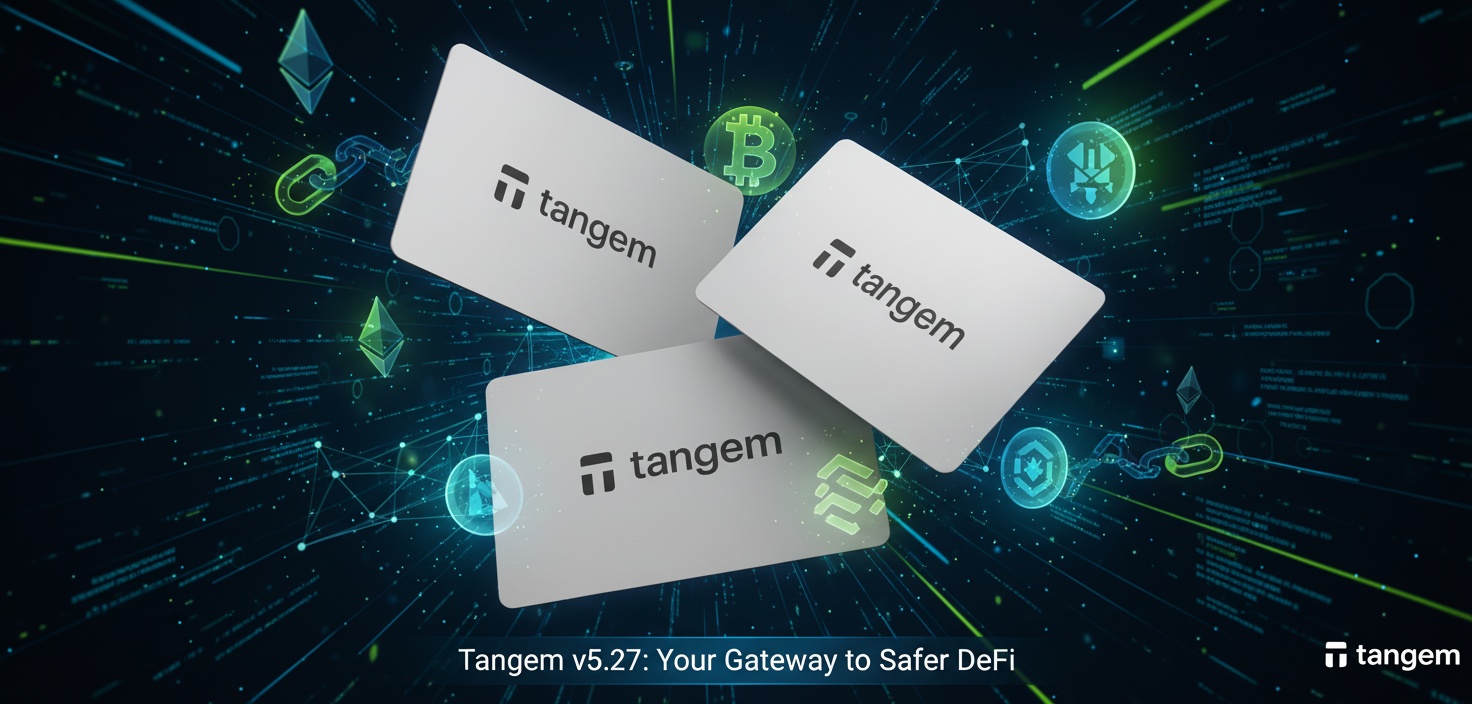
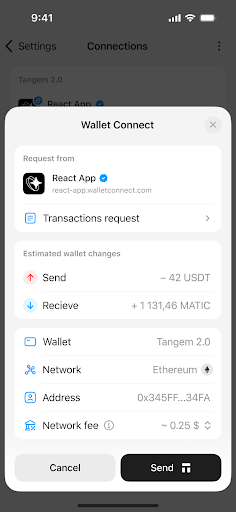
Tangem’s wallet update 5.27 brings a meaningful step forward for users who want to interact with decentralized apps safely and without friction. This release focuses on a redesigned WalletConnect experience, deeper transaction verification, and added token support for Stellar (XLM) and XRP Ledger (XRP). Below you’ll find a clear, practical, and detailed breakdown of the new features plus step-by-step instructions to use WalletConnect with Tangem.

What’s new at a glance

  • Redesigned WalletConnect interface for a simpler, more consistent connection across Solana, Ethereum and EVM chains.

  • Integrated scam detection and dApp vetting powered by Blockaid.

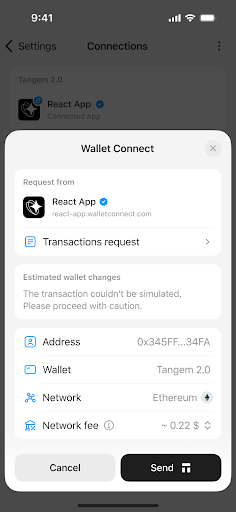
  • Transaction simulation to “dry-run” transactions off-chain and generate a human readable preview.

  • Transaction verification (VTX): transaction + simulation + validation report bundled and cryptographically signed by a verification provider.

  • Improved handling of blind signing by showing precise, verifiable effects before you sign.

  • Know Your dApps (KYDA): automatic checks against malicious or phishing domains and smart-contract analysis.

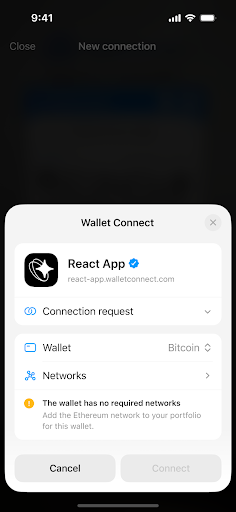
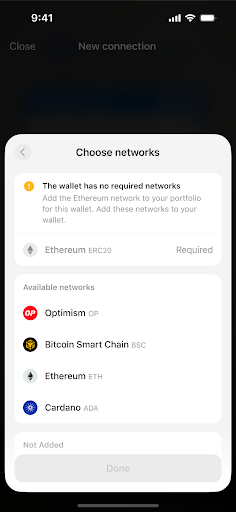
  • Better network detection and support for multi-network sessions within a single WalletConnect connection.

  • Native token support for Stellar (XLM) and for tokens on the XRP Ledger.

Why these updates matter

Interacting with dApps exposes users to two main risks: connecting to fake or malicious sites, and signing transactions without fully understanding what they do. Tangem 5.27 attacks both problems at the UI and protocol level. The result is a flow that keeps your private keys on the hardware device while giving you human readable verification and automated risk signals before you ever approve a signature.

WalletConnect on Tangem: step-by-step guide

Preparation

  1. Update the Tangem app to version 5.27.

  2. Make sure the blockchain networks you need are added to your wallet (for example Ethereum, Solana, BNB, Polygon, etc.). You can add networks from the app settings if needed.

Connect to a dApp (standard flow)

  1. On the dApp website, choose Connect Wallet and select WalletConnect.

  2. In the Tangem app, open Settings > WalletConnect > + to enable the QR scanner.

  3. Scan the QR code shown on the dApp, or tap a deep link if you are using mobile.

  4. Tangem sends the dApp’s URL and the smart contract addresses to Blockaid for vetting.

  5. You receive a connection request in the Tangem app. Review the dApp identity and any security flags. If Blockaid approves, you will see a verification checkmark. If Blockaid flags the dApp as high risk or suspicious, you will see a warning and must explicitly acknowledge the risk to continue.

  6. Approve the connection in the Tangem app. Then tap your Tangem card or ring to confirm the signature operations that follow.

  7. After finishing, go to Tangem’s WalletConnect menu to view and disconnect active sessions. Always disconnect when you are done.

Notes: after updating to v5.27 you do not need to reconnect or reauthorize previously connected dApps. Active sessions should continue working without extra steps.
Tangem V5.27: A Safer And Smarter Gateway To Web3Tangem V5.27: A Safer And Smarter Gateway To Web3

Transaction simulation and blind signing protection

One of the most impactful changes is the transaction simulation layer. Here is how it works in practice:

  • Before you sign, the wallet runs an off-chain simulation of your intended transaction.

  • The simulation computes exact balance changes, contract calls, token transfers, and potential errors.

  • Tangem shows a human readable preview so you can see precisely what will happen on-chain: tokens moved, recipients, and contract effects.
    This approach reduces blind signing risk by giving you a readable representation of what you are approving. If something looks off, you can cancel before any signature is produced.

Transaction verification (VTX) explained

Tangem uses a mechanism called VTX to guarantee integrity between what you review and what is submitted on-chain:

  • A verification provider such as Blockaid bundles three items into a single payload: the raw transaction, the simulation output, and a validation report.

  • This payload is cryptographically signed by the verification provider. You review and sign the VTX instead of the raw transaction.

  • Because the VTX is signed, Tangem can verify that the simulation you saw is exactly the transaction that will be executed. This prevents tampering between the preview stage and submission.

Know Your dApps (KYDA) and Blockaid security checks

When you attempt a WalletConnect session, Tangem reaches out to Blockaid. Blockaid runs multiple checks in under a second:

  • URL and domain checks against an up-to-date repository of phishing and scam domains.

  • Static code scans that search contract bytecode for common scam patterns, hidden admin functions, or rug-pull hooks.

  • ABI and function inspection to flag risky functions, such as unauthorized minting or owner-only withdrawal methods.

  • Behavioral analysis and a risk scoring engine. High risk scores trigger extra warnings or a double-confirmation flow.
    If a dApp is blacklisted, Tangem will block it. If a dApp is low reputation or newly created, Tangem will show a security alert. You may override some warnings, but only after explicit acknowledgement of the risk.

Network detection and multi-network sessions

Tangem now automatically detects whether the network the dApp is requesting is supported in your wallet. You can also allow a single WalletConnect session to interact with multiple networks, for example a dApp that uses both Ethereum and a Layer 2. The app will surface which networks are in use and any network mismatches before you sign.
Tangem V5.27: A Safer And Smarter Gateway To Web3Tangem V5.27: A Safer And Smarter Gateway To Web3

Expanded token support: Stellar and XRP Ledger

Version 5.27 adds native support for tokens on Stellar (XLM) and for tokens on the XRP Ledger. You can now:

  • Store, send, and receive Stellar-based tokens directly in Tangem.

  • Manage XRP Ledger tokens from within the same Tangem interface.
    This widens the range of assets you can securely hold on your Tangem card or ring.

Best practices when using WalletConnect with Tangem

  • Always verify the dApp domain and prefer bookmarked or official links.

  • Treat Tangem warnings and double-confirmation prompts as red flags. If in doubt, cancel and research the dApp.

  • Keep the Tangem app updated so you receive the latest blacklist data and security logic.

  • Use the WalletConnect menu to disconnect sessions when you are finished.

  • Revoke unused token allowances periodically using services like revoke.cash or a reputable block explorer.

  • Never approve transactions that promise unrealistic returns, instant giveaways, or require unexpected approvals.

Final notes

Tangem v5.27 blends hardware-backed signing with real-time dApp verification. The transaction simulation and VTX model give you a human readable, cryptographically verified way to see what a transaction will do before you sign. The KYDA checks and Blockaid integration reduce the chance of connecting to fraudulent sites. And with native support for Stellar and XRP Ledger tokens, Tangem becomes a more complete wallet for everyday crypto management.

This article was originally published as Tangem v5.27: Your Gateway to Safer DeFi on Crypto Breaking News – your trusted source for crypto news, Bitcoin news, and blockchain updates.


Disclaimer: The articles reposted on this site are sourced from public platforms and are provided for informational purposes only. They do not necessarily reflect the views of MEXC. All rights remain with the original authors. If you believe any content infringes on third-party rights, please contact service@support.mexc.com for removal. MEXC makes no guarantees regarding the accuracy, completeness, or timeliness of the content and is not responsible for any actions taken based on the information provided. The content does not constitute financial, legal, or other professional advice, nor should it be considered a recommendation or endorsement by MEXC.

You May Also Like

What Every Platform Eventually Learns About Handling User Payments Across Borders

What Every Platform Eventually Learns About Handling User Payments Across Borders

There is a moment almost every global platform hits. It rarely shows up in dashboards or board meetings. It reveals itself quietly, one payout del
Share
Medium2025/12/10 21:54
U.S. AI leaders form foundation to compete with China

U.S. AI leaders form foundation to compete with China

The post U.S. AI leaders form foundation to compete with China appeared on BitcoinEthereumNews.com. A group of leading U.S. artificial intelligence firms has formed a new foundation to establish open standards for “agentic” AI. The founding members, OpenAI, Anthropic, and Block, have pooled their proprietary agent- and AI-related technologies into a new open-source project called the Agentic AI Foundation (AAIF), under the auspices of the Linux Foundation. This development follows tensions in the global race for dominance in artificial intelligence, leading U.S. AI firms and policymakers to unite around a new push to preserve American primacy. Open standards like MCP drive innovation and cross-platform collaboration Cloudflare CTO Dane Knecht noted that open standards and protocols, such as MCP, are critical for establishing an evolving developer ecosystem for building agents. He added, “They ensure anyone can build agents across platforms without the fear of vendor lock-in.” American companies face a dilemma because they are seeking continuous income from closed APIs, even as they are falling behind in fundamental AI development, risking long-term irrelevance to China. And that means American companies must standardize their approach for MCP and agentic AI, allowing them to focus on building better models rather than being locked into an ecosystem. The foundation establishes both a practical partnership and a milestone for community open-sourcing, with adversaries uniting around a single goal of standardization rather than fragmentation. It also makes open-source development easier and more accessible for users worldwide, including those in China. Anthropic donated its Model Context Protocol (MCP), a library that allows AIs to utilize tools creatively outside API calls, to the Linux Foundation. Since its introduction a year ago, MCP has gained traction, with over 10,000 active servers, best-in-class support from platforms including ChatGPT, Gemini, Microsoft Copilot, and VS Code, as well as 97 million monthly SDK downloads. “Open-source software is key to creating a world with secure and innovative AI tools for…
Share
BitcoinEthereumNews2025/12/10 22:10
Summarize Any Stock’s Earnings Call in Seconds Using FMP API

Summarize Any Stock’s Earnings Call in Seconds Using FMP API

Turn lengthy earnings call transcripts into one-page insights using the Financial Modeling Prep APIPhoto by Bich Tran Earnings calls are packed with insights. They tell you how a company performed, what management expects in the future, and what analysts are worried about. The challenge is that these transcripts often stretch across dozens of pages, making it tough to separate the key takeaways from the noise. With the right tools, you don’t need to spend hours reading every line. By combining the Financial Modeling Prep (FMP) API with Groq’s lightning-fast LLMs, you can transform any earnings call into a concise summary in seconds. The FMP API provides reliable access to complete transcripts, while Groq handles the heavy lifting of distilling them into clear, actionable highlights. In this article, we’ll build a Python workflow that brings these two together. You’ll see how to fetch transcripts for any stock, prepare the text, and instantly generate a one-page summary. Whether you’re tracking Apple, NVIDIA, or your favorite growth stock, the process works the same — fast, accurate, and ready whenever you are. Fetching Earnings Transcripts with FMP API The first step is to pull the raw transcript data. FMP makes this simple with dedicated endpoints for earnings calls. If you want the latest transcripts across the market, you can use the stable endpoint /stable/earning-call-transcript-latest. For a specific stock, the v3 endpoint lets you request transcripts by symbol, quarter, and year using the pattern: https://financialmodelingprep.com/api/v3/earning_call_transcript/{symbol}?quarter={q}&year={y}&apikey=YOUR_API_KEY here’s how you can fetch NVIDIA’s transcript for a given quarter: import requestsAPI_KEY = "your_api_key"symbol = "NVDA"quarter = 2year = 2024url = f"https://financialmodelingprep.com/api/v3/earning_call_transcript/{symbol}?quarter={quarter}&year={year}&apikey={API_KEY}"response = requests.get(url)data = response.json()# Inspect the keysprint(data.keys())# Access transcript contentif "content" in data[0]: transcript_text = data[0]["content"] print(transcript_text[:500]) # preview first 500 characters The response typically includes details like the company symbol, quarter, year, and the full transcript text. If you aren’t sure which quarter to query, the “latest transcripts” endpoint is the quickest way to always stay up to date. Cleaning and Preparing Transcript Data Raw transcripts from the API often include long paragraphs, speaker tags, and formatting artifacts. Before sending them to an LLM, it helps to organize the text into a cleaner structure. Most transcripts follow a pattern: prepared remarks from executives first, followed by a Q&A session with analysts. Separating these sections gives better control when prompting the model. In Python, you can parse the transcript and strip out unnecessary characters. A simple way is to split by markers such as “Operator” or “Question-and-Answer.” Once separated, you can create two blocks — Prepared Remarks and Q&A — that will later be summarized independently. This ensures the model handles each section within context and avoids missing important details. Here’s a small example of how you might start preparing the data: import re# Example: using the transcript_text we fetched earliertext = transcript_text# Remove extra spaces and line breaksclean_text = re.sub(r'\s+', ' ', text).strip()# Split sections (this is a heuristic; real-world transcripts vary slightly)if "Question-and-Answer" in clean_text: prepared, qna = clean_text.split("Question-and-Answer", 1)else: prepared, qna = clean_text, ""print("Prepared Remarks Preview:\n", prepared[:500])print("\nQ&A Preview:\n", qna[:500]) With the transcript cleaned and divided, you’re ready to feed it into Groq’s LLM. Chunking may be necessary if the text is very long. A good approach is to break it into segments of a few thousand tokens, summarize each part, and then merge the summaries in a final pass. Summarizing with Groq LLM Now that the transcript is clean and split into Prepared Remarks and Q&A, we’ll use Groq to generate a crisp one-pager. The idea is simple: summarize each section separately (for focus and accuracy), then synthesize a final brief. Prompt design (concise and factual) Use a short, repeatable template that pushes for neutral, investor-ready language: You are an equity research analyst. Summarize the following earnings call sectionfor {symbol} ({quarter} {year}). Be factual and concise.Return:1) TL;DR (3–5 bullets)2) Results vs. guidance (what improved/worsened)3) Forward outlook (specific statements)4) Risks / watch-outs5) Q&A takeaways (if present)Text:<<<{section_text}>>> Python: calling Groq and getting a clean summary Groq provides an OpenAI-compatible API. Set your GROQ_API_KEY and pick a fast, high-quality model (e.g., a Llama-3.1 70B variant). We’ll write a helper to summarize any text block, then run it for both sections and merge. import osimport textwrapimport requestsGROQ_API_KEY = os.environ.get("GROQ_API_KEY") or "your_groq_api_key"GROQ_BASE_URL = "https://api.groq.com/openai/v1" # OpenAI-compatibleMODEL = "llama-3.1-70b" # choose your preferred Groq modeldef call_groq(prompt, temperature=0.2, max_tokens=1200): url = f"{GROQ_BASE_URL}/chat/completions" headers = { "Authorization": f"Bearer {GROQ_API_KEY}", "Content-Type": "application/json", } payload = { "model": MODEL, "messages": [ {"role": "system", "content": "You are a precise, neutral equity research analyst."}, {"role": "user", "content": prompt}, ], "temperature": temperature, "max_tokens": max_tokens, } r = requests.post(url, headers=headers, json=payload, timeout=60) r.raise_for_status() return r.json()["choices"][0]["message"]["content"].strip()def build_prompt(section_text, symbol, quarter, year): template = """ You are an equity research analyst. Summarize the following earnings call section for {symbol} ({quarter} {year}). Be factual and concise. Return: 1) TL;DR (3–5 bullets) 2) Results vs. guidance (what improved/worsened) 3) Forward outlook (specific statements) 4) Risks / watch-outs 5) Q&A takeaways (if present) Text: <<< {section_text} >>> """ return textwrap.dedent(template).format( symbol=symbol, quarter=quarter, year=year, section_text=section_text )def summarize_section(section_text, symbol="NVDA", quarter="Q2", year="2024"): if not section_text or section_text.strip() == "": return "(No content found for this section.)" prompt = build_prompt(section_text, symbol, quarter, year) return call_groq(prompt)# Example usage with the cleaned splits from Section 3prepared_summary = summarize_section(prepared, symbol="NVDA", quarter="Q2", year="2024")qna_summary = summarize_section(qna, symbol="NVDA", quarter="Q2", year="2024")final_one_pager = f"""# {symbol} Earnings One-Pager — {quarter} {year}## Prepared Remarks — Key Points{prepared_summary}## Q&A Highlights{qna_summary}""".strip()print(final_one_pager[:1200]) # preview Tips that keep quality high: Keep temperature low (≈0.2) for factual tone. If a section is extremely long, chunk at ~5–8k tokens, summarize each chunk with the same prompt, then ask the model to merge chunk summaries into one section summary before producing the final one-pager. If you also fetched headline numbers (EPS/revenue, guidance) earlier, prepend them to the prompt as brief context to help the model anchor on the right outcomes. Building the End-to-End Pipeline At this point, we have all the building blocks: the FMP API to fetch transcripts, a cleaning step to structure the data, and Groq LLM to generate concise summaries. The final step is to connect everything into a single workflow that can take any ticker and return a one-page earnings call summary. The flow looks like this: Input a stock ticker (for example, NVDA). Use FMP to fetch the latest transcript. Clean and split the text into Prepared Remarks and Q&A. Send each section to Groq for summarization. Merge the outputs into a neatly formatted earnings one-pager. Here’s how it comes together in Python: def summarize_earnings_call(symbol, quarter, year, api_key, groq_key): # Step 1: Fetch transcript from FMP url = f"https://financialmodelingprep.com/api/v3/earning_call_transcript/{symbol}?quarter={quarter}&year={year}&apikey={api_key}" resp = requests.get(url) resp.raise_for_status() data = resp.json() if not data or "content" not in data[0]: return f"No transcript found for {symbol} {quarter} {year}" text = data[0]["content"] # Step 2: Clean and split clean_text = re.sub(r'\s+', ' ', text).strip() if "Question-and-Answer" in clean_text: prepared, qna = clean_text.split("Question-and-Answer", 1) else: prepared, qna = clean_text, "" # Step 3: Summarize with Groq prepared_summary = summarize_section(prepared, symbol, quarter, year) qna_summary = summarize_section(qna, symbol, quarter, year) # Step 4: Merge into final one-pager return f"""# {symbol} Earnings One-Pager — {quarter} {year}## Prepared Remarks{prepared_summary}## Q&A Highlights{qna_summary}""".strip()# Example runprint(summarize_earnings_call("NVDA", 2, 2024, API_KEY, GROQ_API_KEY)) With this setup, generating a summary becomes as simple as calling one function with a ticker and date. You can run it inside a notebook, integrate it into a research workflow, or even schedule it to trigger after each new earnings release. Free Stock Market API and Financial Statements API... Conclusion Earnings calls no longer need to feel overwhelming. With the Financial Modeling Prep API, you can instantly access any company’s transcript, and with Groq LLM, you can turn that raw text into a sharp, actionable summary in seconds. This pipeline saves hours of reading and ensures you never miss the key results, guidance, or risks hidden in lengthy remarks. Whether you track tech giants like NVIDIA or smaller growth stocks, the process is the same — fast, reliable, and powered by the flexibility of FMP’s data. Summarize Any Stock’s Earnings Call in Seconds Using FMP API was originally published in Coinmonks on Medium, where people are continuing the conversation by highlighting and responding to this story
Share
Medium2025/09/18 14:40