

Buy if Touched Orders for RealStocks: Triggers, Order Comparisons, and a Step-by-Step Guide
Key Takeaways
- A Buy if Touched order is a conditional order with a trigger price below the current market price, allowing investors to buy automatically when the price falls to their desired level.
- The order process consists of three stages: setup, trigger monitoring, and execution. Each trigger condition takes effect only once.
- Buy if Touched and Buy Stop orders have opposite trigger directions. The key difference between a Buy if Touched order and a Limit order is whether a trigger mechanism is involved.
- This article explains how to place a Buy if Touched order in the MEXC app and what to prepare before placing an order.
1. Buy if Touched Order Basics
1.1 What Is a Buy if Touched Order?
A Buy if Touched order is a conditional order. Investors set a trigger price below the current market price. When the market price falls to or below the trigger price, the system automatically submits a market or limit buy order based on the selected execution method.
A Buy if Touched order is designed to help investors buy at a lower price. It allows users to execute a predefined trading plan automatically when the price falls to their target level without constantly monitoring the market.
1.2 Can You Provide an Example of a Buy if Touched Order?
Suppose a stock is currently trading at USD 40. After analyzing the stock, you determine that it would be worth buying if its price falls to USD 15. You can then place a Buy if Touched order with a trigger price of USD 15.
When the stock price falls to USD 15 or below, the system automatically submits a market or limit buy order. Until the trigger price is reached, the order remains pending and will not be executed.
1.3 Who May Find Buy if Touched Orders Useful?
Buy if Touched orders may be suitable for:
1)Investors who have a specific target entry price and want to buy on a pullback.
2)Investors with short positions who want to buy automatically at a target price to close their positions and take profit.
3)Investors who cannot monitor the market continuously and want to automate their trading plans.
Beginners may consider using a small amount of capital to familiarize themselves with the order mechanism before applying it to their trading strategies.
2. How Buy if Touched Orders Work
2.1 What Is the Complete Execution Process?
The execution process consists of three stages:
1)Set up the order: Set the trigger price, purchase quantity, and time in force. The trigger price must be below the current market price.
2)Wait for the trigger: Once submitted, the order remains pending while the system monitors the market. It will not be executed until the market price reaches the trigger price.
3)Trigger execution: When the market price falls to or below the trigger price, the system immediately submits a market or limit buy order based on the selected execution method.
2.2 Will the Trigger Condition Take Effect Again After the Order Is Triggered?
No. Once triggered, the trigger condition will not take effect again, regardless of whether the resulting order is fully filled.
If the order is not fully filled within its validity period, the system will automatically cancel the unfilled portion. A new order must be submitted if further trading is required.
2.3 Which Time-in-Force Options Are Available?
MEXC supports the following time-in-force options for Buy if Touched orders in RealStocks trading:
- Valid for the day: The order remains valid only for the current trading day.
- Good Till Canceled: The order remains valid until it is filled or manually canceled.
- Set Validity: The order remains valid until the date selected by the user.
Any unfilled portion will be canceled automatically once the validity period ends.
2.4 During Which Trading Sessions Can the Order Be Triggered?
Buy if Touched orders currently support two session settings:
1)Regular Trading Hours: The system monitors the trigger condition only during regular trading hours. The order will not be triggered during pre-market or after-hours trading, even if the price reaches the trigger price.
2)RTH+Pre/Post-Mkt: The system monitors the trigger condition during pre-market, regular, and after-hours trading. The order will be triggered if the price reaches the trigger price during any of these sessions.
The session can be selected based on the trading strategy. Liquidity is generally lower and price volatility may be higher during pre-market and after-hours trading. Selecting RTH+Pre/Post-Mkt may therefore involve greater slippage risk.
3. Buy if Touched Orders vs. Other Order Types
3.1 What Is the Difference Between a Buy if Touched Order and a Buy Stop Order?
These orders have opposite trigger directions.
A Buy Stop order has a trigger price above the current market price. It may be used to buy after an upward breakout or to limit losses on a short position.
A Buy if Touched order has a trigger price below the current market price. It may be used to buy on a pullback or take profit on a short position at a target price.
In simple terms, a Buy Stop order follows the price upward, while a Buy if Touched order waits for the price to fall to a specified level.
3.2 What Is the Difference Between a Buy if Touched Order and a Limit Order?
The key difference is the trigger mechanism.
A Limit order is submitted directly to the market and may be filled once the market reaches the specified price. A Buy if Touched order is not submitted to the market until its trigger condition is met. Once the market reaches the preset trigger price, the system submits the corresponding buy order.
A Buy if Touched order currently supports two execution methods after it is triggered:
1)Market order: The system submits a Market order after the trigger condition is met. This offers faster execution and greater execution certainty, but the execution price is not guaranteed and may be affected by slippage.
2)Limit order: The system submits a Limit order at the preset price after the trigger condition is met. This allows users to control the maximum purchase price, but the order may not be filled if the limit price is unavailable.
Choose an execution method based on your needs. A Market order may be more suitable when execution certainty is the priority, while a Limit order may be preferable when strict price control is required.
4. How to Use a Buy if Touched Order on MEXC
4.1 How to Place a Buy if Touched Order on MEXC
1)Log in to the MEXC App, open the RealStocks trading page, and search for the asset you want to buy.
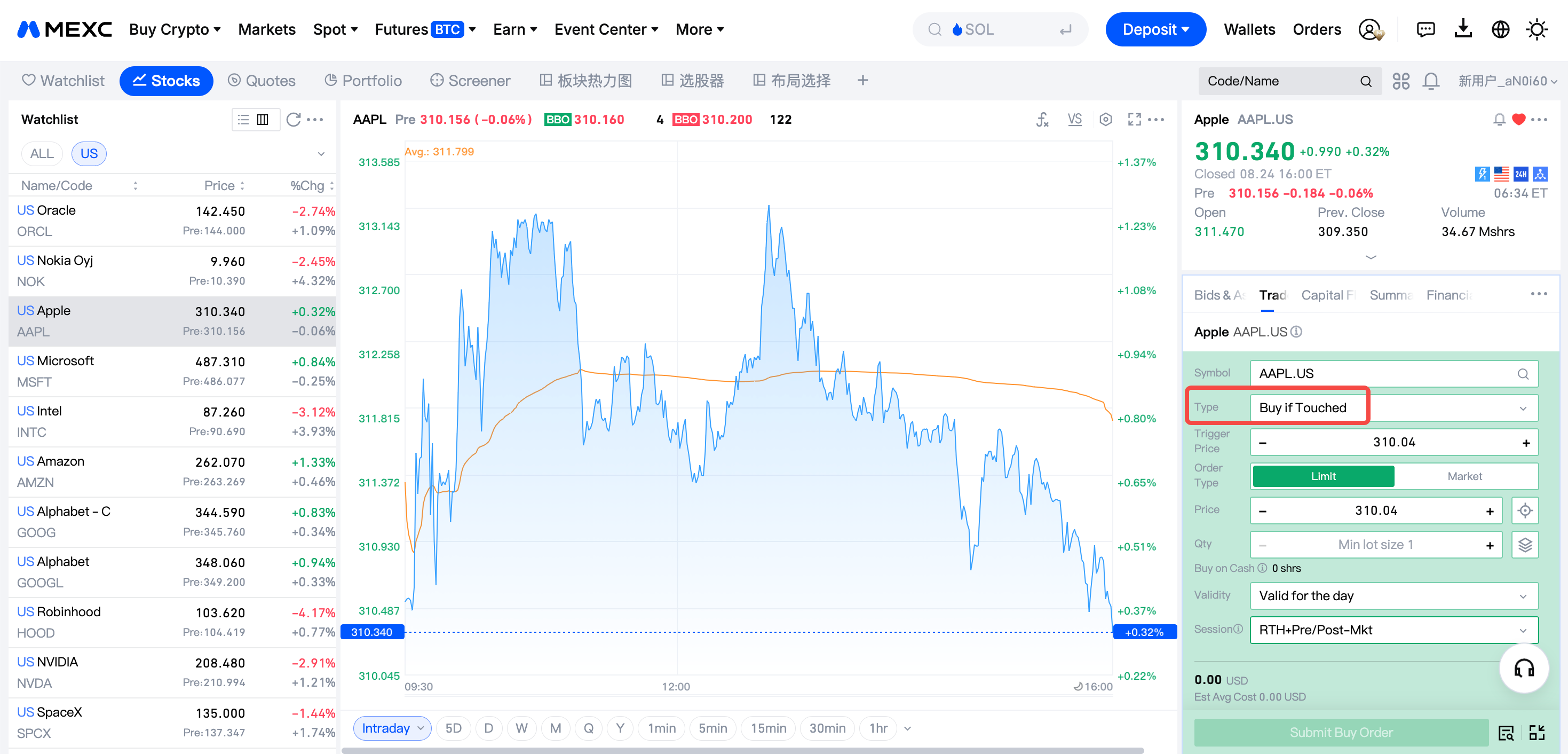
2)Tap Buy in the order panel and select Buy if Touched as the order type.
3)Set the Trigger Conditions, including the trigger price and number of triggers. Make sure the trigger price is below the current market price. Otherwise, the order may be triggered immediately or may not work as intended.
4)Configure the Orders settings, including the order type, price, quantity, time in force, and trading session.
5)Review the order details and tap Submit. Once submitted, the order will remain pending. You can view its status under open orders.
6)When the market price reaches the trigger price, the system automatically submits the buy order. You can view the actual execution price and quantity in your trade history.
4.2 What Should You Prepare Before Placing an Order?
Consider the following before placing an order:
1)Make sure your account has sufficient available funds. Otherwise, the order may fail after being triggered.
2)Use your own analysis to set a reasonable trigger price and avoid price ranges with extremely low liquidity.
3)Select an appropriate validity period. After submitting the order, check its status regularly and adjust your trading plan when necessary.
5. Risks and FAQs for Buy if Touched orders
5.1 Why Was My Order Not Filled After the Price Reached the Trigger Price?
Possible reasons include:
1)The trigger occurred outside the selected monitoring session, so the order was not activated.
2)The account had insufficient buying power when the order was triggered, causing the order submission to fail.
3)The order was triggered, but insufficient market liquidity or sharp price movements prevented it from being filled.
4)The order expired, and the system automatically canceled the unfilled portion.
5.2 Is a Buy if Touched Order Guaranteed to Be Filled at the Trigger Price?
No. The actual execution depends on the execution method selected in advance.
If you select a Market order, the system submits a Market order once the trigger condition is met. The order will be filled at the best available market price. During periods of sharp volatility or low liquidity, the execution price may differ significantly from the trigger price due to slippage. However, a Market order generally offers greater execution certainty.
If you select a Limit order, the system submits a Limit order at the preset price once the trigger condition is met. The execution price will not be worse than the specified limit price, providing greater price control. However, if the market does not meet the limit price, the order may be partially filled or remain entirely unfilled.
5.3 What Is the 7% Sell Rule?
The 7% sell rule is a common risk-management discipline. It involves selling a position when its price falls approximately 7% to 8% below the purchase price to stop the loss on a trade.
This rule is separate from Buy if Touched orders. However, investors may use stop-loss orders to automate the rule and apply disciplined risk management.