

How to Change the Email Address Linked to Your MEXC Account
Summary
- MEXC supports changing your linked email via both the App and the Web.
- Changing your email requires verification code confirmation to ensure account security.
- Important reminder: Crypto and fiat withdrawals will be unavailable for 24 hours after the email changes.
- It is recommended to update your email regularly to enhance account security.
While using the MEXC trading platform, you may need to change your linked email address due to switching to a new primary email or improving account security. This article provides a detailed guide on how to update the email address linked to your MEXC account on both the MEXC App and the Web, helping you complete the email relinking process with ease.
1. On the App
1) Open the MEXC App and tap the profile icon on the homepage to enter the personal account management page.
2) Locate and tap Security.
3) After entering the Security section, find and tap Email to access the modification page.
4) On the email change page, enter your new email address and tap Get Code. The system will send a verification code to the new email address. After entering the code, tap Confirm to complete the email change.
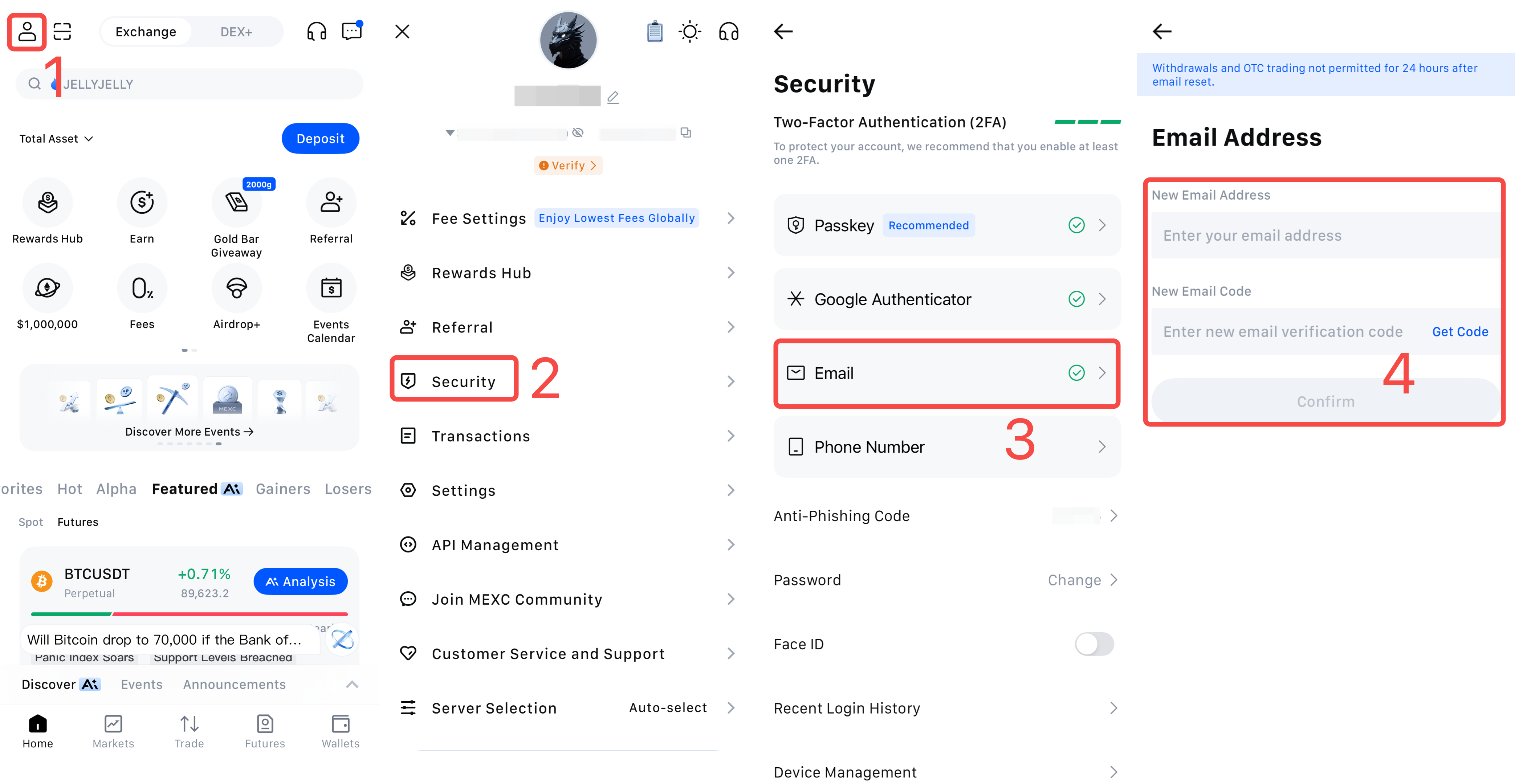
Reminder: To protect your funds, the system will temporarily disable crypto and fiat withdrawals after you reset your linked email address. Please plan the timing of this change carefully to avoid affecting your normal trading activities.
2. On the Web
Go to the MEXC official website and log in to your account. On the homepage, open the dropdown menu under your profile and select Security.
On the Security page, locate Email and click Change on the right.
Be sure to carefully read the on-screen notice, check the confirmation checkbox, and then click Change Anyway.
Enter your new email address and click Get Code. The system will send a verification code to the new email address. After entering the code you receive, click Confirm to complete the email change.
Reminder: To protect your funds, the system will temporarily disable crypto and fiat withdrawals for 24 hours after you change your linked email address. Please plan the timing of the change accordingly to avoid impacting your normal trading needs.
With the detailed guidance in this article, you should now have a clear understanding of how to change the email address linked to your MEXC account. If you encounter any issues during the process, feel free to contact MEXC Customer Service at any time for assistance.
To further enhance your account security, we recommend that you also read the following related articles: