

Sell if Touched Orders for RealStocks: Triggers, Order Comparisons, and a Step-by-Step Guide
Key Takeaways
- A Sell if Touched order automatically submits a sell order when the stock price rises to a preset trigger price. It is commonly used to take profit on a long position.
- MEXC supports both market and limit execution for Sell if Touched orders, offering different trade-offs between execution speed and price control.
- This article explains how to place a Sell if Touched order for RealStocks on the MEXC app, including how to set the trigger conditions, order details, validity period, and trading session.
- It also compares Sell if Touched orders with Stop, Limit, and Trailing orders to help users select an appropriate order type.
- A triggered Sell if Touched order does not guarantee execution. Users should understand the risks of slippage, non-execution, and one-time triggers before placing an order.
1. Sell if Touched Order Basics
1.1 What Is a Sell if Touched Order?
A Sell if Touched order is a conditional order type. The user sets a trigger price above the current market price. When the stock price rises to the trigger price, the system automatically submits a sell order to the market.
The sell trigger price must be higher than the current market price. Sell if Touched orders are commonly used to take profit on an existing long position when the stock reaches a target price.
1.2 How Does a Sell if Touched Order Work?
A Sell if Touched order involves three stages:
1)Setup: The user sets a trigger price above the current market price, selects an execution method, and enters the quantity to sell.
2)Waiting: The order remains pending until the trigger condition is met. Funds and shares are not frozen at this stage.
3)Execution: When the market price rises to the trigger price, the system automatically submits the sell order to the market.
1.3 Can You Provide an Example?
Suppose an investor holds a stock purchased at USD 10 per share, and its current market price is USD 20. The investor places a Sell if Touched order with a trigger price of USD 25.
When the stock price rises to USD 25 or higher, the system automatically submits the sell order. This allows the investor to take profit at the target price without continuously monitoring the market.
1.4 When Can Sell if Touched Orders Be Used?
Sell if Touched orders are mainly used in the following situations:
1)Automated profit-taking: An investor holding a long position wants to exit automatically when the price reaches a target level.
2)Position management: A Sell if Touched order may be used together with a Stop order to establish both an upside profit target and a downside risk limit.
2. How to Place a Sell if Touched Order on MEXC
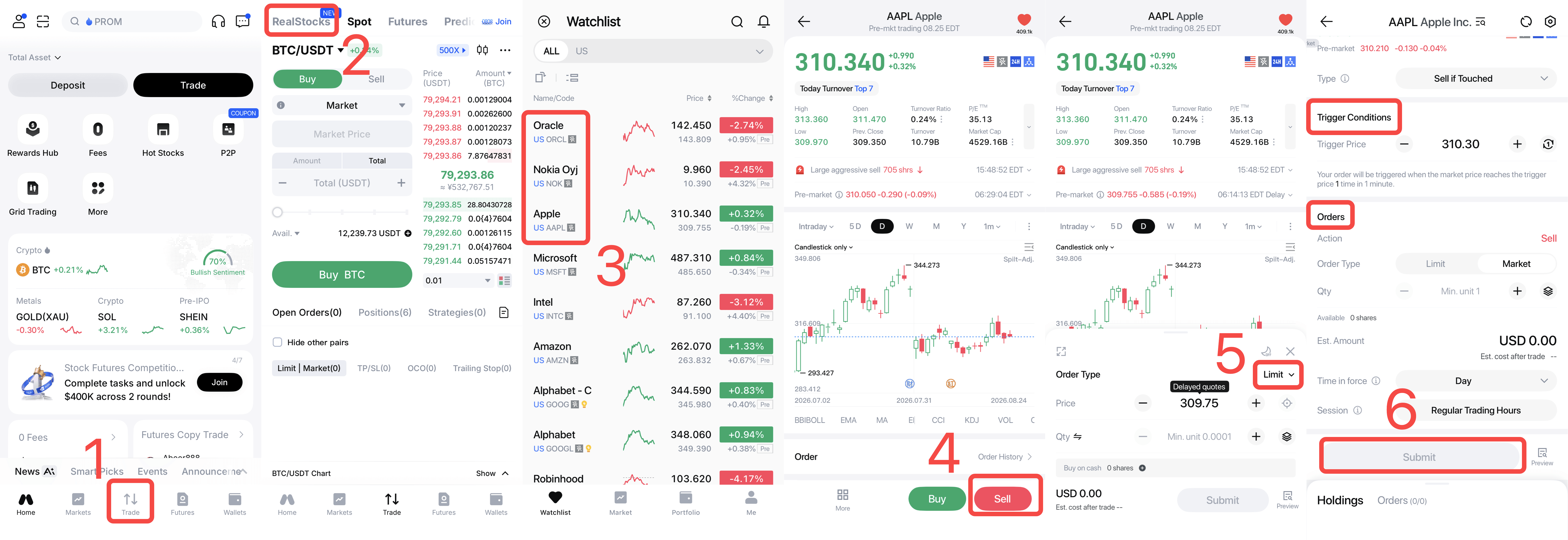
2.1 How to Place a Sell if Touched Order
1)Log in to the MEXC app and open the RealStocks trading page. Search for and select the asset to sell.
2)Tap Sell in the order panel and select Sell if Touched as the order type.
3)Set the Trigger Conditions, including the trigger price and number of triggers. Confirm that the trigger price is above the current market price. Otherwise, the order may trigger immediately or fail to work as intended.
4)Configure the order settings, including the order type, price, quantity, time in force, and trading session.
5)Review the order details and tap Submit. The order will remain pending until its trigger condition is met. Its status can be viewed under open orders.
6)When the market price reaches the trigger price, the system automatically submits the sell order. The actual execution price and quantity can be viewed in the order history.
2.2 Which Execution Methods Are Available on MEXC?
MEXC supports market and limit execution for Sell if Touched orders:
Market: Once the trigger price is reached, the system submits a market sell order for execution at the next available price. This generally offers faster execution and a higher likelihood of being filled, but the execution price is not guaranteed. Slippage may occur during periods of high volatility.
Limit: Once the trigger price is reached, the system submits a Limit sell order. The order will execute only at the specified Limit price or a better price. This provides greater price control, but the order may remain unfilled if the market price falls quickly after the trigger.
Market execution may be more suitable when execution certainty is the priority, while Limit execution may be preferable when maintaining an acceptable selling price is more important.
2.3 Which Time-in-Force Options Are Available?
MEXC provides the following time-in-force options: Valid for the day, Good Till Canceled and Set Validity.
If an order is not fully filled before it expires, the system will automatically cancel the unfilled portion.
2.4 Can a Sell if Touched Order Be Modified or Canceled?
Yes. A Sell if Touched order can be modified or canceled from the order management page before it is triggered.
Once triggered and submitted to the market, it will be processed as a regular Market or Limit order and can no longer be modified as a conditional order.
3. Sell if Touched Orders Compared With Other Order Types
3.1 What Is the Difference Between a Sell if Touched Order and a Sell Stop Order?
The main difference is the position of the trigger price relative to the current market price and the intended purpose of the order:
- Sell if Touched order: The trigger price is set above the current market price. It is generally used to take profit when the price rises to a target level.
- Sell Stop order: The trigger price is set below the current market price. It is generally used to limit losses when the price falls.
In simple terms, a Sell if Touched order sells when the price rises to a target, while a Sell Stop order sells when the price falls to a specified level.
3.2 What Is the Difference Between a Sell if Touched Order and a Limit Order?
A limit sell order is submitted directly to the market and executes only at the specified limit price or a better price. The execution price is controlled, but the order may remain unfilled.
A Sell if Touched order is not submitted to the market until its trigger condition is met. After it is triggered, the system submits either a Market or Limit order based on the selected execution method.
3.3 What Is a Trailing Order, and How Is It Different From a Sell if Touched Order?
A Trailing order, such as a Trail to Sell order, is triggered when the price falls by a specified amount or percentage from its highest recorded level. Its effective trigger price moves upward as the market price rises.
By comparison, the trigger price of a Sell if Touched order remains fixed.
Trailing orders may be suitable for dynamically protecting profits during an upward trend, while Sell if Touched orders may be more suitable when there is a specific target price at which the position should be sold.
4. Sell if Touched Order Rules and Risks
4.1 Why Was the Order Not Filled After the Trigger Price Was Reached?
Possible reasons include:
1)Triggering the order only causes it to be submitted to the market. Execution still depends on market liquidity and available orders.
2)For Limit execution, the market price may fall rapidly after the trigger, preventing the order from reaching the specified Limit price.
3)The account may not have enough available shares when the order is triggered, causing order submission to fail.
4)The order may have expired and been automatically canceled.
4.2 Does a Sell if Touched Order Freeze the Shares?
No. Placing a Sell if Touched order does not freeze funds or shares. Availability is checked only when the trigger condition is met.
The account must therefore have sufficient available shares when the order is triggered. Otherwise, the sell order may fail to be submitted.
4.3 Can the Trigger Condition Take Effect More Than Once?
No. Once the order is triggered, the trigger condition will not take effect again, regardless of whether the resulting order is filled.
If there is still a need to sell, a new Sell if Touched order must be placed.
4.4 During Which Sessions Can a Sell if Touched Order Be Triggered?
The system monitors the trigger condition only during the selected trading sessions. If the trigger price is reached outside those sessions, the order will not be triggered.
Users should review the selected session settings before submitting an order to avoid missing the intended trigger.
4.5 What Risks Should Be Considered?
Three main risks should be considered:
1)Slippage risk: With market execution, the actual execution price may differ significantly from the trigger price during periods of high volatility.
2)Non-execution risk: With Limit execution, the order may remain unfilled if the market price falls rapidly after the trigger.
3)One-time trigger: The trigger condition takes effect only once. It will not reactivate after being triggered, regardless of whether the resulting order is filled. The order status should therefore be monitored after triggering.