

Trail to Buy Orders for RealStocks: Triggers, Settings, and a Step-by-Step Guide
Key Takeaways
- A Trail to Buy order is a conditional order whose trigger price moves downward as the market falls. It automatically submits a buy order when the price rebounds by the preset amount or percentage.
- The process consists of four stages: setting the trailing value, tracking the price downward, establishing the lowest price, and triggering execution.
- To place an order, select Trail to Buy on the RealStocks trading page in the MEXC app, then configure the trigger conditions and order details.
- A trailing percentage of 1%–5% may suit short-term trading, 5%–10% may suit swing trading, and 8%–15% may suit longer-term strategies.
- Trail to Buy orders involve the risk of missed-entry, slippage, and triggers caused by short-term price fluctuations. Beginners may consider testing with a small amount and regularly reviewing untriggered orders.
1. Trail to Buy Order Basics
1.1 What Is a Trail to Buy Order?
A Trail to Buy order is a conditional order whose trigger price automatically moves downward as the market price falls. When the price rebounds from the lowest recorded price by the preset amount or percentage, the system automatically submits a buy order.
The main purpose of a Trail to Buy order is to help investors avoid entering too early during a decline. Instead, the order waits for a specified rebound from the lowest recorded price before submitting a buy order at a potentially more favorable price.
1.2 What Does Trailing Mean in Trading?
Trailing means that an order's trigger price automatically adjusts when the market moves in a favorable direction.
For a buy order, the trigger price moves downward as the market price falls. For a sell order, the trigger price moves upward as the market price rises. When the market moves in the opposite direction, the trigger price remains unchanged.
This dynamic mechanism allows the order to adjust to market movements without requiring constant monitoring.
1.3 How Is a Trail to Buy Order Different From a Limit Order?
A limit order has a fixed price that does not change once the order is placed.
By contrast, the trigger price of a Trail to Buy order is dynamic and moves downward whenever the market reaches a new low. If the market continues to decline, a Trail to Buy order may capture a lower entry point, whereas a fixed Limit order may be filled earlier in the decline.
2. How Trail to Buy Orders Work
2.1 How Does a Trail to Buy Order Work?
The process consists of four stages:
1)Set the trailing value: Enter a trailing amount, such as USD 2, or a trailing percentage, such as 5%.
2)Track the price downward: As the market price falls, the trigger price automatically moves downward and remains the preset distance above the latest low.
3)Establish the lowest price: When the market price begins to recover, the trigger price stops moving and remains at the level calculated from the lowest recorded price.
4)Trigger execution: When the price rebounds from the low and reaches the trigger price, the system submits a market buy order for execution at the best available price.
2.2 Can You Provide an Example of a Trail to Buy Order?
Suppose a stock is currently trading at USD 100, and a Trail to Buy order is placed with a trailing percentage of 5%:
- The initial trigger price is USD 105, which is 5% above the current price of USD 100.
- If the stock price falls to USD 80, the trigger price automatically moves down to USD 84, which is 5% above the new low of USD 80.
- When the stock rebounds from USD 80 to USD 84, the trigger condition is met, and the system immediately submits a market buy order.
In this example, the order enters at approximately USD 84 instead of the initial market price of USD 100, reducing the entry cost by approximately 16% and helping avoid an early entry during the decline.
3. How to Place a Trail to Buy Order on MEXC
3.1 How to Place a Trail to Buy Order
Follow these steps to place a Trail to Buy order on MEXC:
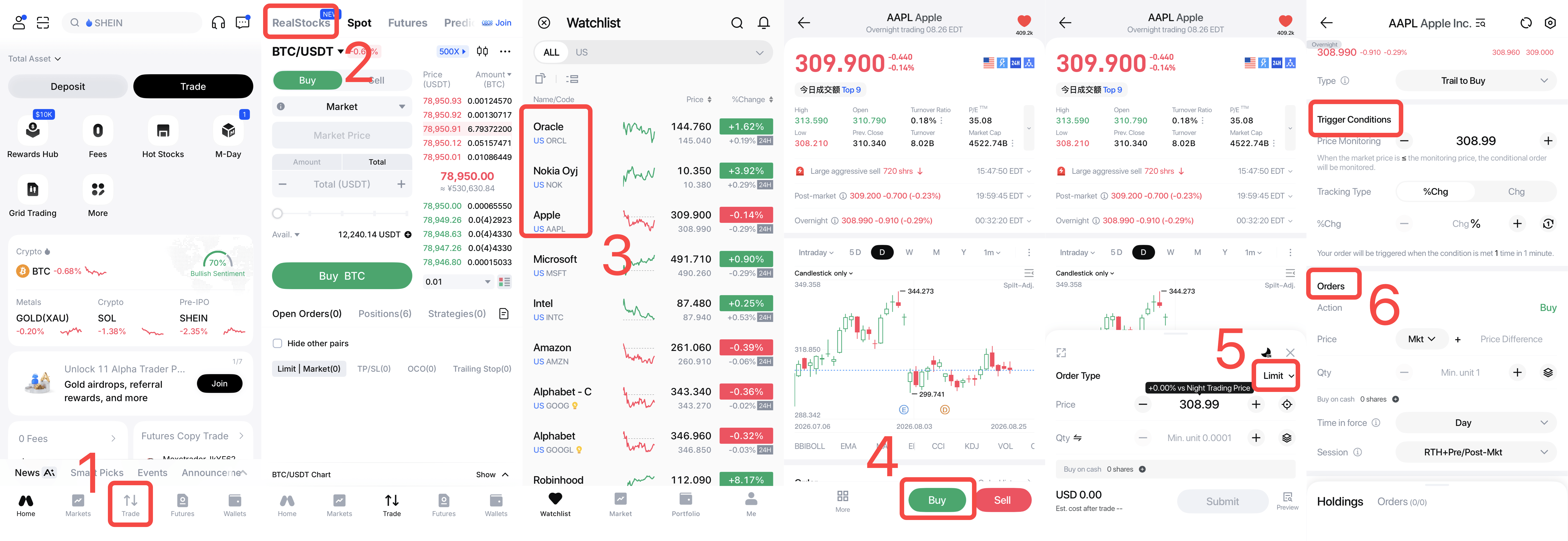
1)Log in to the MEXC app, open the RealStocks trading page, and search for the asset to buy.
2)Tap Buy in the order panel and select Trail to Buy as the order type.
3)Configure the Trigger Conditions by setting the monitoring price, selecting the tracking type (%Chg or Chg), entering the rebound percentage or amount, and setting the number of triggers.
4)Configure the ordersettings, including the price, quantity, time in force, and trading session.
5)Review the order details and tap Submit to place the Trail to Buy order.
3.2 How Should the Trailing Value Be Set?
The trailing value may be adjusted according to the trading horizon and the volatility of the asset:
- Short-term trading: A relatively narrow range of approximately 1%–5% may help capture short-term price movements. However, an excessively narrow setting may be triggered by temporary volatility.
- Swing trading: A moderate range of approximately 5%–10% may suit trends lasting from several days to several weeks.
- Longer-term strategies: A wider range of approximately 8%–15%, or up to 20% in certain cases, may accommodate larger normal pullbacks.
For more volatile assets, a wider trailing value may help reduce unnecessary early execution.
4. Trail to Buy Order Comparisons
4.1 What Is a Trail to Sell Order, and How Is It Related to a Trail to Buy Order?
A Trail to Sell order is the inverse of a Trail to Buy order.
Its trigger price moves upward as the market price rises. When the price falls by the preset amount or percentage, the system automatically submits a sell order. It is mainly used to lock in gains and limit drawdowns during an upward trend.
In simple terms, a Trail to Buy order is used to enter after a rebound from a low, while a Trail to Sell order is used to exit after a pullback from a high. Together, they can support a more automated entry and exit strategy.
5. Trail to Buy Order Risks and Tips
5.1 What Risks Are Associated With Trail to Buy Orders?
Trail to Buy orders involve three main risks:
1)Missed entry: If the price rises without first declining, the order may never be triggered, causing the investor to miss the move.
2)Slippage: The order is executed as a Market order after being triggered. During periods of high volatility, the actual execution price may differ from the trigger price.
3)False trigger: Short-term price fluctuations may satisfy the trigger condition and cause the order to execute at an unfavorable time.
5.2 What Should Beginners Consider When Using Trail to Buy Orders?
Beginners may consider the following:
1)Start with a small amount to understand how the trigger mechanism works before increasing the order size.
2)Set a suitable trailing value based on the asset's volatility and avoid settings that are excessively narrow or wide.
3)Review untriggered orders regularly and modify or cancel them when the original market rationale no longer applies.
Trail to Buy orders are trading tools and should not replace independent investment analysis.