

Stop Wasting Weeks on Dev Setup: Containers to the Rescue
Setting up development environments takes time. Doing this more than once is a time sink and prone to error. So how can we reduce setup complexity and quickly get to productively writing code ?
I’ve been looking at this problem and applying it to my own apps for AI with Google ADK and Python.
We need to talk about setup
Who has never heard ‘it works on my laptop’ when apps fail in production or on another developers laptop ?
Manually building development environments can be labour intensive and error prone. I’ve seen 2 week lead times set aside for this in some places. This being a part of what was seen as ‘induction’ or ‘familiarization’ exercises.
Surely we can do better. Containers I believe are a good starting point. Investing in workflows that employ them is in my opinion, time well spent.
inftools-cn
inftools-cn is a container that is built for rapid deployments of mvk, a minimal viable kubernetes environment/ It has a built in Python tooling for some AI workflows and development using pip and uv. It also has additional tooling needed for local and remote kubernetes administration such as kubectl, k3d docker cli.
Without a container, each of these tools would need to be added to our environment manually. Each in turn need maintained, updated and security scanned. This takes precious time away from development and which can be automated.
inftools-cn is built with a pipeline that uses trivy to scan for and halt deployments that have critical CVE alerts. Using tooling like this takes yet another headache away.
inftools-cn is still early in its development and will have more tooling added over time. This will make it a part of my daily workflow using kubernetes, python and agentic AI.
Getting Started
Prerequisites
The following are pre-requisites for this article’ approach to container development workflows:
- Docker
- VSCode
- VSCode Extensions
- container tools
- dev containers
- python language support
I chose to use VSCode as it has well supported container support through extensions from Microsoft.
ADK setup
To get started with an environment for ADK development, make a new directory for a project and add a docker compose file.
Open this folder in VSCode:
mkdir -p ~/projects/adk cd ~/projects/adk wget https://codeberg.org/headshed/inftools-cn/raw/branch/main/docker-compose.yml code .
start the container stack
Click on Run All Services, then in the container view in VSCode ( find this in the left window ), Attach visual studio code
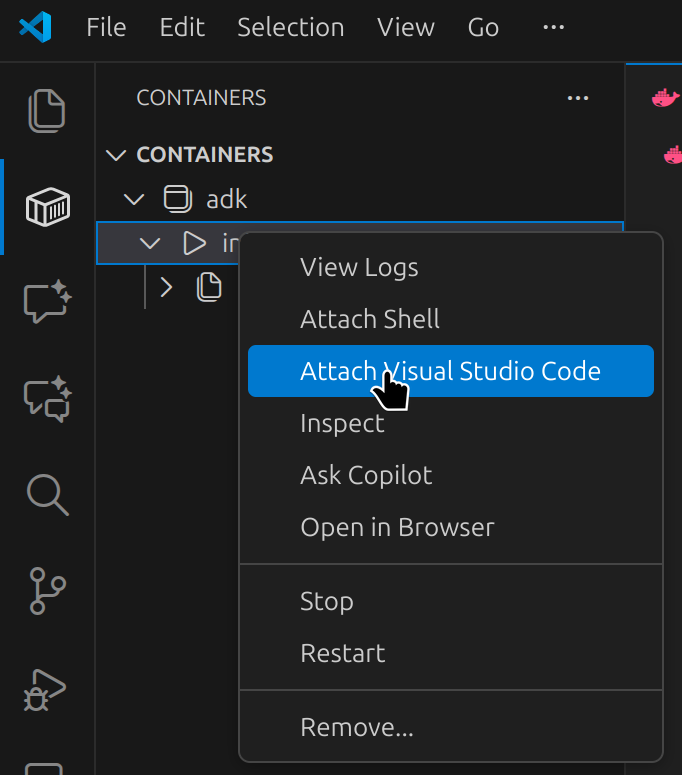
This will open another VSCode instance within the container we just started.
The 2nd VSCode instance is where we will work from and the first one can be closed.
Open a new terminal in VSCode
cntrl / command + shift + `
Which opens a console in the home directory of the container:
user@6bccffe008e0:~$ pwd /home/user
In this console, a new python virtual environment can be created:
user@6bccffe008e0:~$ uv venv Using CPython 3.13.11 interpreter at: /usr/bin/python3 Creating virtual environment at: .venv Activate with: source .venv/bin/activate
As suggested, running the source command in the current shell
source .venv/bin/activate
… activates a python virtual environment in this, current, shell however to apply globally in our project in VSCode
control / command + shift + p to enter command mode
Type and select: Python: Select interpreter
Add an interpreter path of:
/home/user/.venv/bin/python
When opening subsequent shells within VSCode, the .venv environment will be applied automatically
Following the ADK docs
The Python quickstart for ADK can be followed for the most part but for its initial installation we need to use uv:
uv pip install google-adk
This sets up google-adk within the uv environment
in the same article by google, create an agent project, a new agent can be created in our new container with
adk create my_agent
I accepted the first and default options for most questions asked by the adk cli and added a valid API token from google api keys
This creates a new agent stub.
We can update the agent to tell the time in cities around the world
Testing ADK commmand line
To test our agent in the command line:
adk run my_agent
Which yields a command line session in which we can converse with the agent:
Running agent root_agent, type exit to exit. [user]: what is the time in new york, USA [root_agent]: The current time in New York, USA is 10:30 AM.
Testing ADK Using its Web Console
We can interact with our models using a rich web console environment:
adk web --port 8000
This opens the web browser app of adk that vscode will proxy for us and shows a helper to open in a browser:
We can talk to our agent now in this browser and debug environment
Why bother with development containers ?
This simple workflow could have been achieved by manually installing all of the tools that come bundled with inftools-cn.
However, this would need at least to include a recent version of python where it is not already present. Windows users may find this to be necessary outside of Windows subsystem for Linux ( WSL ), Linux and Mac users perhaps not so much.
the uv command is a simple curl command to install and we needed to add vscode plugins to run vscode within our container and initially to start the container up
We could conclude inftools-ci is over engineered, however, even these few steps, once done have to be done again and again on every new environment and each can have subtle differences.
As more tools are added, this will increase the operational load of our environment setup.
Any creature comforts we add in to our environment to give enhanced shell experience can quickly add to an array of manual steps that need to be repeated for every single laptop, workstation or virtual desktop we need to use.
Without pinned container versions, python and uv can vary across our environments and saying ‘it works on my laptop’ to someone telling us our code doesn't work in theirs is cold comfort and a bad developer experience.
As our projects become more complex, more tooling will be required and using a container with all dependencies built in aids our workflow and reduces the risk of incompatibilities being introduced and resulting in broken code for other developers.
If we run several development environments, be it just a couple of laptops or develop on a laptop to deploy to the cloud, we can experience differences in build and production environments that become critical, harmful even to our user’s experience.
The inftools-cn container has its own build pipeline that we can check to see if it is recent and up to date.
It’s pipeline is configured to block releases if critical CVE vulnerabilities are present and even gives us a software bill of materials for compliance and security checks.
The benefits of using containers for development become more evident as we add build infrastructure and pipelines that support such a container workflow.
Now, If my laptop blows up, is stolen or lost in any other kind of disaster, how do I get up and running as quickly as possible ?
Containers like inftools-ci can play a part in having our own business continuity plan.
Of course, you don’t have to use this particular container. You can build your own and inftools-ci may be used as a template to do so.
Understanding the build process for your own containers, based on the above would be the subject of another article.
If you are interested in de-mystifying the dark arts of building containers for development, stay tuned as this is planned to be a follow up article soon, or find me on socials and lets talk about what your building.
\
Ayrıca Şunları da Beğenebilirsiniz

ZEC Surges Toward $480 Resistance, Is a $520 Breakout Next?

Wormhole Unleashes W 2.0 Tokenomics for a Connected Blockchain Future
