Kripto al
Bazarlar
Spot
FuturesBTC
Earn
Tədbir mərkəzi
Mükafat mərkəzi
Daha çox
How to Install the MEXC App via APK (Android)How to Install the MEXC App via APK (Android)
Kateqoriya siyahısı
Ləğv edin

How to Install the MEXC App via APK (Android)

This guide explains how Android users can install the MEXC app by downloading the APK file (the app installation file) from the official MEXC website.

In some regions, the MEXC app may not be available for direct download from Google Play. With this method, you can continue using the MEXC app as usual. Your existing MEXC account can be used without any changes.

1. Before You Install


For security reasons, only download the APK file from the official MEXC website. Do not use APK files obtained from third-party websites, as they may have been modified or contain security risks.

2. Installation Guide


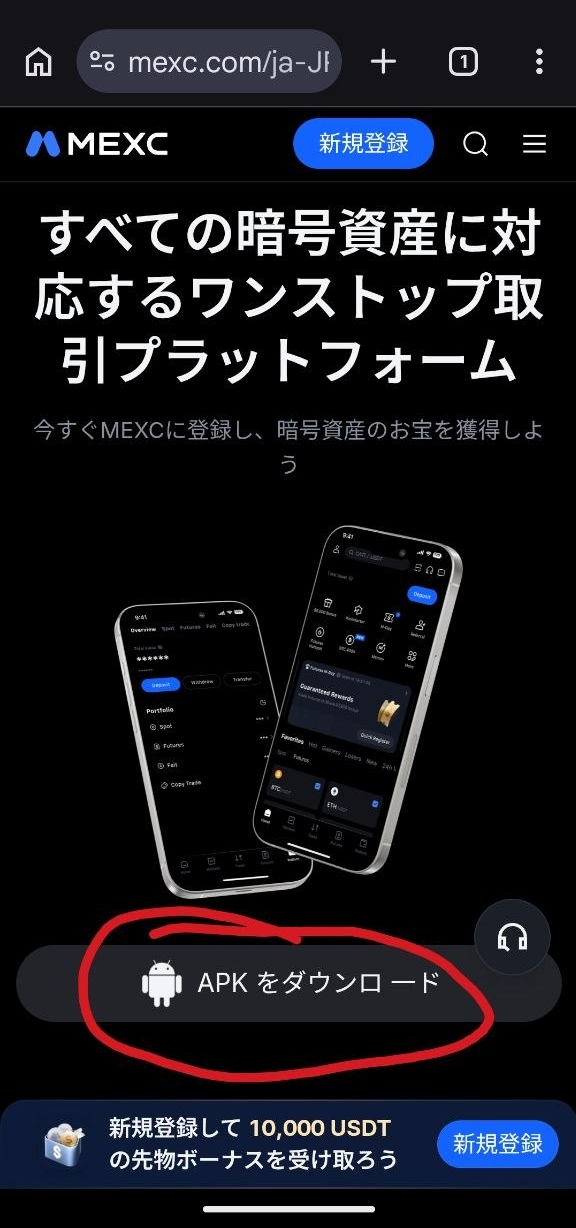
Step 1: Download the APK file from the official MEXC website


Open the official MEXC website in your browser and tap Download APK.

Step 2: Confirm the download


Depending on your browser, you may see a warning such as "This file may be harmful." This is a standard warning shown when downloading APK files outside Google Play.

If you started the download on the official MEXC website, it is safe to proceed. Tap Download anyway to continue.

The confirmation message may show a download domain other than mexc.com (such as download.mocortech.com). This is expected when downloading the APK through the official MEXC website. Depending on your device and browser, additional confirmation prompts may also appear.


Step 3: Install the APK file


Once the download is complete, open the APK file. When prompted with "Do you want to install this app?", tap Install.

You may need to allow installation from this source by enabling the Install unknown apps permission before installing the APK. Follow the on-screen instructions to enable it. The exact wording may vary depending on your Android version.


Step 4: Open the MEXC app and log in


Once installation is complete, the MEXC app willappear on your home screen. Open the app and log in with your existing MEXC account.


If you encounter any issues during installation, visit the MEXC Help Center or contact the official MEXC community for support.

3. FAQ


3.1 Is installing the app through APK safe?


Yes. As long as the APK file is downloaded from the official MEXC website, it is safe to install.

The APK distributed through the official website is provided and maintained by MEXC and offers the same features as the App Store and Google Play versions.

For security reasons, do not use APK files obtained from third-party websites, as they may have been modified.

3.2 I saw warnings such as "This file may be harmful" or "Install unknown apps". Is there a problem?


No. These are standard security prompts displayed by Android when installing apps from outside Google Play.

If you started the download from Download APK on the official MEXC website, follow the on-screen instructions to complete the installation.

3.3 How do I update the MEXC app?


If the app prompts you to update, follow the in-app instructions.

If the update cannot be completed, download the latest APK file from the official MEXC website and install it again. Your app data and login status will remain unchanged.

3.4 Do I need to create a new MEXC account?


No. Simply log in with your existing MEXC account.

3.5 I already use the Google Play version of the MEXC app. What should I do?


If the APK version cannot be installed over your existing MEXC app, uninstall the current app first, then install the APK file. Your account information is securely stored on MEXC servers, so you can simply log in again after installation. Your assets and trading data will not be affected.


How to Install the MEXC App via APK (Android)

This guide explains how Android users can install the MEXC app by downloading the APK file (the app installation file) from the official MEXC website.

In some regions, the MEXC app may not be available for direct download from Google Play. With this method, you can continue using the MEXC app as usual. Your existing MEXC account can be used without any changes.

1. Before You Install


For security reasons, only download the APK file from the official MEXC website. Do not use APK files obtained from third-party websites, as they may have been modified or contain security risks.

2. Installation Guide


Step 1: Download the APK file from the official MEXC website


Open the official MEXC website in your browser and tap Download APK.


Step 2: Confirm the download


Depending on your browser, you may see a warning such as "This file may be harmful." This is a standard warning shown when downloading APK files outside Google Play.

If you started the download on the official MEXC website, it is safe to proceed. Tap Download anyway to continue.

The confirmation message may show a download domain other than mexc.com (such as download.mocortech.com). This is expected when downloading the APK through the official MEXC website. Depending on your device and browser, additional confirmation prompts may also appear.


Step 3: Install the APK file


Once the download is complete, open the APK file. When prompted with "Do you want to install this app?", tap Install.

You may need to allow installation from this source by enabling the Install unknown apps permission before installing the APK. Follow the on-screen instructions to enable it. The exact wording may vary depending on your Android version.


Step 4: Open the MEXC app and log in


Once installation is complete, the MEXC app willappear on your home screen. Open the app and log in with your existing MEXC account.


If you encounter any issues during installation, visit the MEXC Help Center or contact the official MEXC community for support.

3. FAQ


3.1 Is installing the app through APK safe?


Yes. As long as the APK file is downloaded from the official MEXC website, it is safe to install.

The APK distributed through the official website is provided and maintained by MEXC and offers the same features as the App Store and Google Play versions.

For security reasons, do not use APK files obtained from third-party websites, as they may have been modified.

3.2 I saw warnings such as "This file may be harmful" or "Install unknown apps". Is there a problem?


No. These are standard security prompts displayed by Android when installing apps from outside Google Play.

If you started the download from Download APK on the official MEXC website, follow the on-screen instructions to complete the installation.

3.3 How do I update the MEXC app?


If the app prompts you to update, follow the in-app instructions.

If the update cannot be completed, download the latest APK file from the official MEXC website and install it again. Your app data and login status will remain unchanged.

3.4 Do I need to create a new MEXC account?


No. Simply log in with your existing MEXC account.

3.5 I already use the Google Play version of the MEXC app. What should I do?


If the APK version cannot be installed over your existing MEXC app, uninstall the current app first, then install the APK file. Your account information is securely stored on MEXC servers, so you can simply log in again after installation. Your assets and trading data will not be affected.